An AI assistant's real cost includes its subscription, extra usage, and the time you spend checking and fixing its work. For a founder or small team, the useful comparison is cost per accepted result: everything you spend on a workload, divided by the outputs you can actually use.
A monthly fee gets you access. It doesn't tell you how many client-ready reports, accurate account briefs, or usable follow-up drafts you'll receive.
This guide explains how to budget for that difference. The product examples use official sources checked on November 23, 2026. They illustrate billing structures, not a hands-on performance ranking. Workload assumptions are hypothetical; the labeled Okou demo screenshots show actual responses and recorded credit usage from an isolated test environment, not a month of observed business work.
How much does an AI assistant cost?
There isn't one category-wide price. A subscription might cover access subject to limits, include a monthly credit allowance, or combine a workspace fee with member packages. Your total depends on paid users, extra usage, external services, and human review. Divide that total by accepted outputs to compare your actual workload.
Here are four official examples of the rules worth checking:
| Product and scope | Published price or billing rule | What to budget beyond the headline |
|---|---|---|
| ChatGPT Plus, individual subscription | $20/month, billed monthly | Usage limits may apply. API usage is separate and billed independently. [1] |
| Lindy Team, default entry allowance shown in the rendered pricing page | From $29.99 per active user/month, with 3,000 credits per user pooled across the team | Top-ups are $10 per 1,000 credits. Count active users, not just the person who installed it. [2] |
| Okou Pro | $0 plan fee plus one member package per member; packages start at $20/month for 20,400 credits | Usage beyond the package draws on pay-as-you-go credits; paid-plan top-ups are $1 per 1,000 credits. [3][4] |
| Manus credit system | Credits cover model tokens, virtual machines, and third-party APIs | Consumption varies with task complexity and duration. A credit allowance isn't a fixed number of finished tasks. [5] |
Prices are in USD. These examples aren't equivalent plans, and the table doesn't compare their privacy, administration, or feature requirements. Confirm applicable taxes, regional terms, and the amount shown at checkout before purchasing.
The live rendered Lindy pricing page showed $29.99 for 3,000 monthly credits during the November 23, 2026 review. An earlier text extraction returned $49.99 for 5,000 credits. This records the rendered default, not a checkout quote; verify the allowance and price offered to your account before paying.
Read the subscription before counting credits
Start with who gets billed.
A pooled allowance can look like one team subscription while still charging for every active user. Lindy's pricing FAQ says someone can take a seat by signing up, joining the workspace, or mentioning Lindy in Slack. It also describes different trial treatment for Slack joiners and direct signups. [2] Check that rule before inviting the whole company.
Okou uses a different structure. Its Team plan has a $160 monthly plan fee plus a member package for each member. The advertised $180 starting total is the base fee plus one $20 package. [3][4]
For illustration, five members choosing the smallest package would cost:
$160 + (5 × $20) = $260/month, before extra usage or other charges.
That's arithmetic based on published pricing, not a custom quote. “Unlimited team members” describes a membership limit; it doesn't remove the member-package charge.
Also separate the billing term from the usage window. If you choose an annual offer, check when the payment is due and when the allowance refreshes. A price expressed “per month” doesn't by itself establish either.
AI assistant credits don't translate directly into tasks
A credit is a vendor-defined usage unit. It isn't a standard amount of business work.
Manus says its credits cover model tokens, virtual-machine work, and third-party APIs. Okou says credits cover AI model usage and paid tool calls, with consumption varying by model, tool, and task. [3][5]
So a product selling more credits per dollar hasn't necessarily made your report cheaper. It may use more units to produce the same accepted output.
Keep these two calculations separate:
- Cash budget: subscription payments and top-ups you actually buy during the period.
- Consumption allocation: the value assigned to the credits a particular job uses.
A hypothetical job might consume 1,000 credits valued at $1 under a top-up rate. That doesn't mean you can buy the entire product and complete the job for $1. A subscription may be required, a top-up purchase may leave a balance, and another attempt may consume more.
Don't add the value of included credits to the subscription fee again. You already paid for them.
What a real usage breakdown looks like
In an isolated Okou demo, we asked for a fresh, read-only check of the official credits page rather than accepting a citation alone as proof of retrieval. The response returned a page title, source URL, and the passage stating that model usage, billable tool calls, and supported generation consume credits. The visible usage panel showed 112 credits: 111 for Auto and 1 for Data Search. The task's settled usage record independently showed the same split.
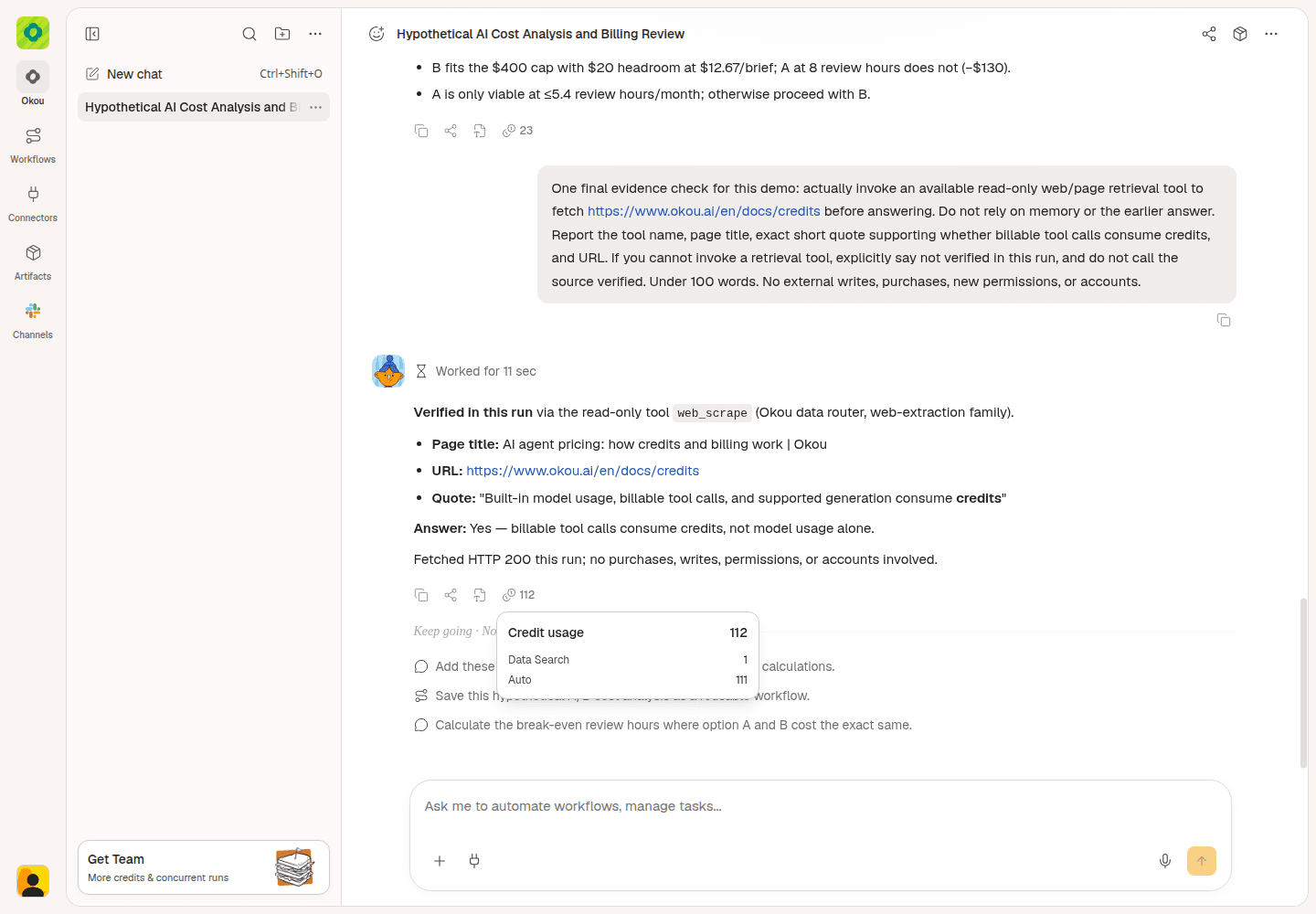
Figure 1. A completed source-check task, not a pricing mock-up. Full 1440 × 1000 viewport, recaptured November 23, 2026, in the Okou test workspace; the answer cites Okou's official credits guide. Auto was the available model. The usage split was checked against this run's settled record; it is one test observation, not a package yield or cross-product benchmark.
This small lookup is not a full research brief. Its credit count does not predict a complex report's consumption. No real payment or purchase was made. Do not translate the test usage into an invoice or claim that every source check costs the same.
Do unused AI credits roll over?
Check each credit bucket separately.
| Provider | Monthly allowance | Separately obtained credits |
|---|---|---|
| Lindy | Monthly credits refresh each billing cycle and don't roll over | Pricing FAQ says top-up credits remain until used. [2] |
| Okou | Monthly member-package credits expire at the billing-period end | Separately purchased credits don't expire. Its 1,000 free starter credits are a one-time grant valid for 30 days. [3][4] |
| Manus | Monthly subscription credits refresh on the subscription date each month | The credits guide says add-on credits expire 365 days after purchase; free credits don't expire. [5] |
Unused expiring credits can make an oversized package expensive even if its nominal unit rate looks attractive. Non-expiring top-ups avoid that expiration problem, but they still tie up cash.
Failed tasks and retries: what actually gets refunded?
An assistant can finish processing a task without producing something your business can use. A report with missing sources may need another run. A technically successful draft may miss the client's tone. Those are different from a platform crashing before delivery.
Refund rules can distinguish between them.
Manus's detailed credit-refund policy says it issues full credit refunds when an investigation confirms a bug or platform malfunction. It generally excludes unclear instructions, subjective dissatisfaction, external-service failures, and hitting task limits. [6]
A separate Manus help article uses broader language: users can report unsatisfactory outputs and receive credits after verification. [7] These pages don't establish an unconditional satisfaction guarantee. If a disappointing result is central to your buying decision, ask support which rule applies to that case.
Lindy's terms state that purchases are non-refundable and cancellation takes effect at the end of the current paid term. Its pricing page says there is no mid-cycle proration. [2][8] Those are purchase and cancellation terms; they don't, by themselves, establish a task-level credit-restoration policy.
The Okou pricing and billing pages reviewed here don't establish a failed-task credit-refund guarantee. Don't budget as if failed runs are automatically free.
For any provider, distinguish a cash refund from restored credits. Restored credits may fund another attempt, but they don't repay your review time or recover a missed deadline. Statutory rights and your applicable contract may also affect the position.
Does every retry create an extra charge?
No universal rule applies. A retry might consume more credits, count against an included limit, or qualify for a credit adjustment under the provider's policy.
Budget for both visible retries and the work needed to diagnose failure. Before repeating an unsuccessful external action, check whether it already happened. Retrying an uncertain email send or record update can create a duplicate, which adds cleanup work beyond the AI bill.
For a failed task, save the task link, visible error, credit usage, and any refund decision. Treat an adjustment as confirmed only when it appears in the account.
Calculate AI assistant cost per accepted result
Use two numbers:
Software cash cost per accepted result = cash paid for this workload ÷ accepted results
Fully loaded cost per accepted result = (software cash cost + attributable human time cost) ÷ accepted results
Include the costs of abandoned attempts in the numerator. Don't count their unusable outputs in the denominator.
For a dedicated subscription, include the full monthly fee. If the same subscription supports several workloads, use a documented allocation and reconcile it to the total bill. Otherwise each workload can appear artificially cheap by leaving the subscription cost somewhere else.
A hypothetical monthly budget
Suppose an agency requests 40 account briefs. Ten need an additional attempt, so there are 50 attempts in total. By month-end, 30 briefs meet the acceptance standard and 10 remain unusable.
These are invented assumptions, not observed results from any named product.
| Monthly input | Assumption |
|---|---|
| Dedicated subscription, including its allowance | $100 |
| Extra credits purchased | $20 |
| Separately billed data service | $10 |
| Review, correction, setup, and administration | 3 hours |
| Internal hourly cost | $50/hour |
| Accepted briefs | 30 |
Assume the extra credits purchased are consumed during the month and no credit adjustments are received.
- Software cash cost: $100 + $20 + $10 = $130.
- Human time cost: 3 × $50 = $150.
- Fully loaded cost: $280.
- Software cash cost per accepted brief: $130 ÷ 30 = $4.33.
- Fully loaded cost per accepted brief: $280 ÷ 30 = $9.33.
The extra attempts are already reflected in usage and human time. Don't add an invented “retry fee” on top.
If a paid data call is already included in the assistant's credits, don't count it again as the separate $10 service. If top-ups remain unused, show the remaining balance so the cash budget isn't mistaken for the cost of credits consumed.
Compare with the same work done manually
Suppose producing those same 30 accepted briefs manually would take 10 hours at the assumed $50 hourly cost: $500.
Against that hypothetical baseline, the AI-assisted process costs $280, a difference of $220. That is time valued at an internal rate, not necessarily $220 of cash saved. It matters whether your team can use the freed time for other work.
If review and correction instead take eight hours, the AI-assisted total becomes $130 + $400 = $530. The apparent saving disappears.
That's why a cheaper subscription can still be the more expensive process.
Demo: act on the budget context, then change one assumption
We ran a bounded demonstration in an Okou test workspace using Auto. The inputs were hypothetical: 30 accepted briefs per month, a $50 hourly review cost, and a $400 total budget cap. Workflow A used the $130 software cost and three review hours above. Workflow B used $80 in software and six review hours. Neither represents a measured vendor workload.
The actual response produced $280 total and $9.33 per accepted brief for A, versus $380 and $12.67 for B. On those assumptions, A left $120 of budget headroom and B left $20.
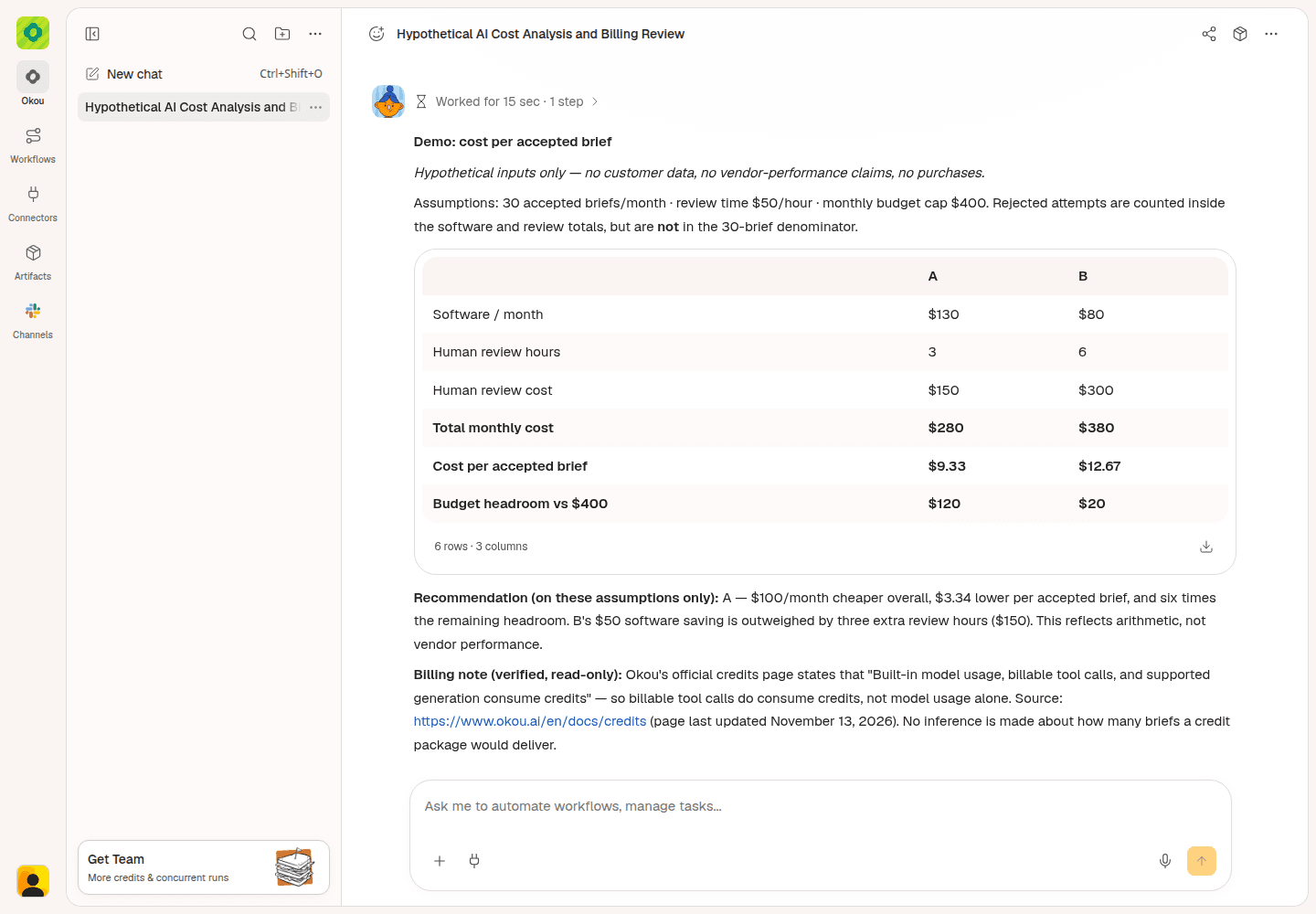
Figure 2. Completed cost-analysis response using supplied hypothetical inputs, shown in the full 1440 × 1000 interface. Recaptured November 23, 2026, in the Okou test workspace, showing the original completed Auto task; the existing result was reopened for this screenshot. This calculation does not claim that either workflow produces 30 usable briefs in practice. The response's $3.34 per-brief saving is a rounding error; the exact $100/30 difference rounds to $3.33, corrected in the follow-up below.
Next, in the same conversation, we changed only A's review time from three to eight hours. We did not resupply B's numbers, the hourly rate, brief count, or cap. The response retained those inputs, recalculated A at $530 and $17.67 per accepted brief, and changed the recommendation to B. It also calculated that A would need no more than 5.4 review hours per month to stay within the $400 cap.
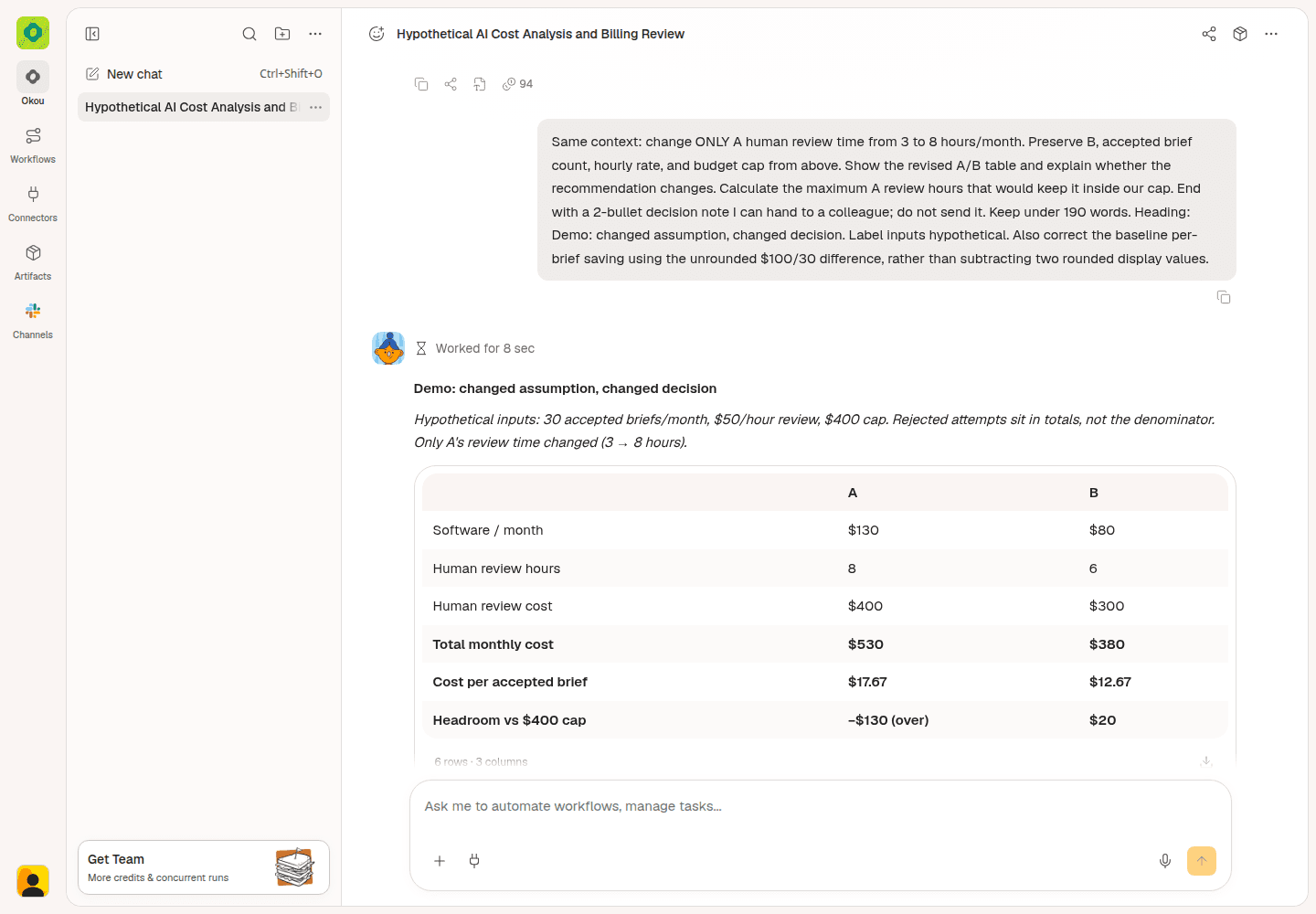
Figure 3. The actual follow-up request and revised table in the complete 1440 × 1000 Okou interface. Recaptured November 23, 2026, in the Okou test workspace, using the existing Auto conversation. This shows the same existing conversation, not a new result.
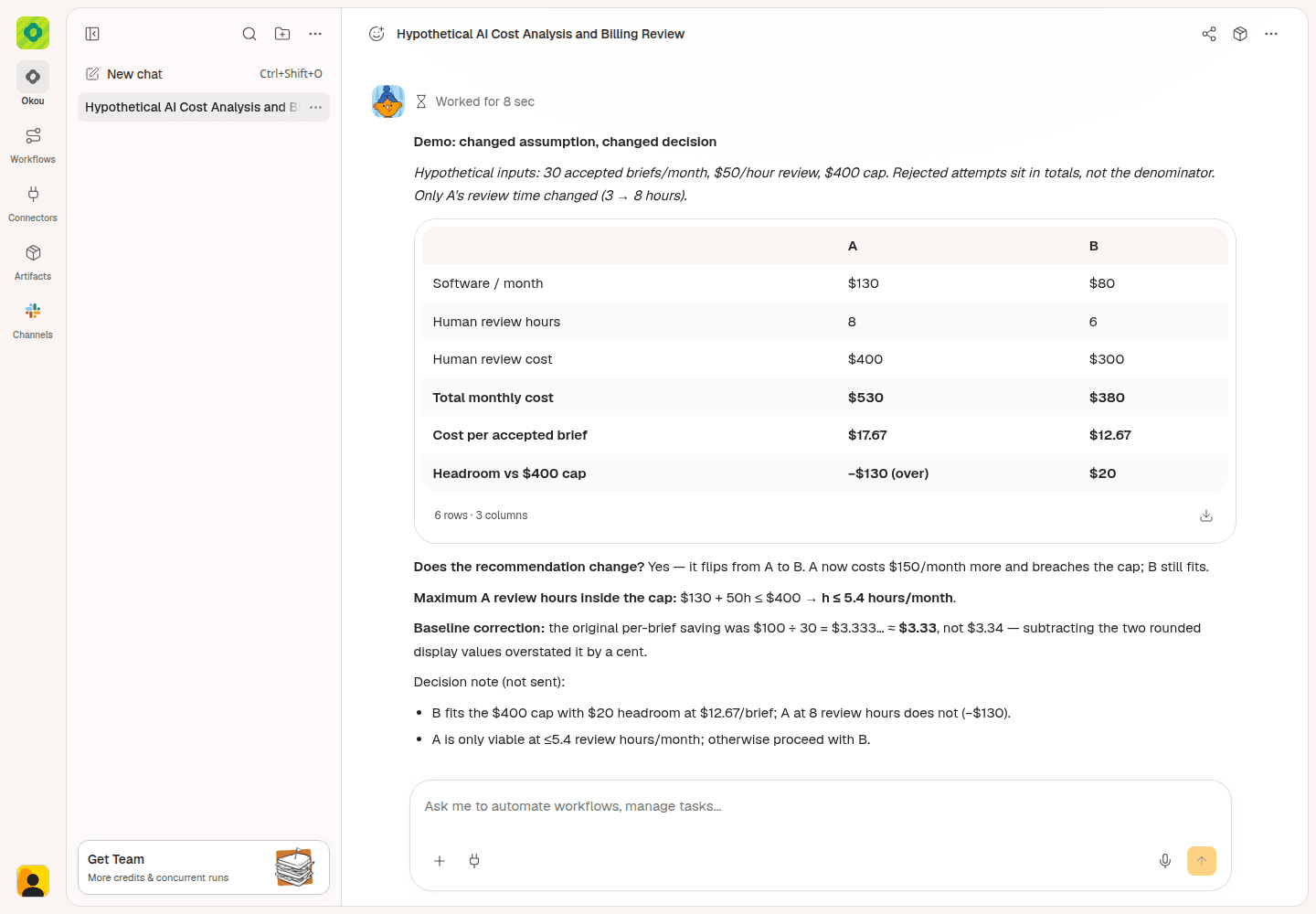
Figure 4. The completed follow-up at a second scroll position, including the corrected rounding and a decision note marked “not sent.” Full 1440 × 1000 viewport, recaptured November 23, 2026, in the Okou test workspace. No message was sent to a colleague and no multi-user product behavior was tested.
The action here was to update an analysis using existing context and prepare a reviewable handoff—not to make a purchase. We checked the arithmetic ourselves and requested the rounding correction instead of presenting the first answer as flawless. The analysis run recorded 94 credits and the changed-assumption follow-up 23; the separate source check above recorded 112. Those are three individual test observations, not an average, a price quote, or a success-rate study.
Run a small cost trial before committing
Choose a recurring business deliverable with a clear acceptance standard. For an account brief, that might mean current company facts, working source links, and no invented customer claims. For a meeting follow-up, it might mean accurate owners and dates with no promises that weren't discussed.
Then use this procedure:
- Write the acceptance standard first. Decide what makes an output usable before seeing it.
- Use representative inputs. Include ordinary jobs and messy ones, rather than only the easiest example.
- Record the full attempt history. Include follow-ups, retries, abandoned work, and human corrections.
- Reconcile usage to the bill. Separate included credits, top-up purchases, external invoices, and confirmed adjustments.
Use one row per requested deliverable, with linked attempt details:
| Deliverable | Attempts | Total credits | Human minutes | Accepted? | Confirmed adjustment |
|---|---|---|---|---|---|
| Brief A | Record all attempts | Record actual usage | Include corrections | Yes / No | Amount or none |
| Brief B | Record all attempts | Record actual usage | Include corrections | Yes / No | Amount or none |
Keep the original credit units for each vendor. Convert them into a reconciled cost within that vendor's billing model; don't compare the raw credit totals across products.
A handful of jobs can reveal billing mechanics. It can't establish a reliable annual success rate. Repeat the trial across the task variations that matter to your business before forecasting a full year.
Keep recurring usage inside a budget
Scheduled work can keep consuming an allowance after the initial setup is forgotten. An agency's reporting routine may run for every client even during a quiet month.
Before enabling recurring work, check:
- The stop condition: Does work pause at zero, or can it continue into paid usage?
- Automatic purchases: Is auto-recharge enabled, and what threshold and purchase amount apply?
- Ownership: Who reviews usage and removes jobs that no longer have a business purpose?
- External costs: Are data, generation, or connected-service charges included or separate?
Lindy's pricing FAQ says credit-using actions pause when the allowance runs out until reset or top-up; its terms also describe optional overages where available. Verify your selected plan and settings. [2][8]
Okou supports optional auto-recharge on paid plans. Its billing guide describes a balance threshold and top-up amount. [4] A threshold that triggers another purchase isn't the same as a monthly spending ceiling.
Where Okou fits in the evaluation
Evaluate Okou on whether it acts on the context you've already supplied. For this buying decision, that means carrying your budget assumptions into a cost analysis, gathering source-backed information, and responding to a changed assumption without quietly replacing the original brief. Its public pricing page lists built-in web research services; its billing guide explains that billable tool calls and model usage can consume credits. [3][4] Research supports your decision. It doesn't authorize a purchase or decide your budget for you.
Include the collaboration experience in that evaluation: can a colleague understand the inputs, sources, assumptions, and unresolved questions in the delivered analysis? Count the time needed to review that handoff, alongside the time needed to generate it. This article has not tested multiple users collaborating in the product and makes no claim of a faster handoff.
The bounded demo above shows one version of that evaluation: a completed cost table, a follow-up that carries earlier assumptions forward, a separate source check, and a draft decision note for a colleague. It does not establish coverage of every data source or prove a smoother multi-user experience. For your own trial, use a representative deliverable and inspect the sources, billing distinctions, and human review needed before acting.
Apply the same acceptance standard and cost ledger to every tool. This guide doesn't establish that Okou uses fewer attempts, saves more review time, or costs less per finished task. A lower unit price doesn't prove a better research or collaboration experience.
Review Okou's current pricing and credits and billing guide, then evaluate one context-rich cost analysis. Check the sources and the follow-up, and make the purchase decision yourself.
Frequently asked questions
Is an AI subscription enough, or will I pay for API usage too?
It depends on the route you use. OpenAI says API usage is billed separately from ChatGPT Plus. Its help page also describes eligible participating tools using an approved shared allowance, which is a different arrangement from API billing. [1] In Okou, provider routing can use Okou credits, an eligible connected personal subscription, an organization API key, or a configured gateway, subject to policy. [4] Check the actual route and any remaining tool charges.
What's the cheapest AI assistant for a small business?
That can't be established from starting prices alone. Compare the plan your business is eligible for, the people who need access, and the cost of your accepted outputs. A tool that requires less correction can justify a higher subscription; that needs evidence from your workload.
Should I include failed attempts in my AI budget?
Yes. Count their actual usage and human time, then subtract only confirmed adjustments. Keep abandoned deliverables out of the accepted-result count. Otherwise failure can make your cost report look better than the process really is.
Sources
Official pages accessed November 23, 2026. Some extraction responses were cached; access date is not a claim of checkout verification. Prices and policies may change.
- OpenAI, What is ChatGPT Plus? — monthly price, usage limits, separate API billing, and participating-tool allowance distinction.
- Lindy, Pricing — entry price, per-active-user billing, pooled credits, top-ups, expiration, trials, pauses, and cancellation FAQ. The November 23, 2026 browser review showed $29.99 / 3,000 as the default entry allowance; earlier cached text extraction returned $49.99 / 5,000. The discrepancy and checkout caveat remain unresolved.
- Okou, Pricing — plan fees, packages, credit allowances, top-ups, and expiration. Fresh extraction on access date.
- Okou, Credits & billing — package obligations, one-time starter grant, auto-recharge, expiration, and provider routing.
- Manus, What are credits? — consumption components and credit expiration. Extraction cached November 22, 2026.
- Manus, How does our AI agent's credit refund policy work? — displayed December 16, 2025; confirmed bugs, exclusions, and review process.
- Manus, How can I apply for a credits refund? — displayed February 13, 2026; broader reporting language and task-link requirement. Read alongside source 6; eligibility wording differs.
- Lindy, Terms of Service, sections 5–6 — displayed update November 3, 2026; workspace billing, optional overages, non-refundable purchases, and cancellation.