Choose an AI assistant when you need to delegate a changing piece of work. Choose AI automation when you need a defined job to run reliably after an event or on a schedule. Use both when a repeatable process includes work that needs interpretation.
That’s the useful starting point for AI assistant vs AI automation. The distinction gets blurry at the product level: an assistant can run recurring jobs, and an automation platform can help you build workflows through conversation.
Before you buy either, write down the work you want back. “A supplier recommendation with source links” is a buying requirement. “Something agentic” isn’t.
AI assistant vs AI automation at a glance
An AI assistant gives you a conversational way to delegate work; AI automation puts AI inside a repeatable process. The practical difference is how the job starts, how much of its path is predefined, and who handles exceptions. One product can support both, so evaluate the job rather than its label.
| Decision | Assistant-led work | Workflow-led AI automation |
|---|---|---|
| Starting point | You describe an outcome and supply context | An event, schedule, or manual run starts a defined process |
| Best fit | Research, analysis, and drafts whose requirements change | Recurring work with clear inputs and acceptance rules |
| Setup work | Define the brief, approved sources, and boundaries | Define triggers, field mappings, conditions, and failure handling |
| Handling variation | Ask a follow-up using the existing context; inspect how the recommendation changes | Variation needs a supported branch, bounded AI step, or escalation |
| Human collaboration | Turn evidence and open questions into a reviewable handoff | Assign an owner for exceptions, approvals, and process changes |
| Main risk | A plausible output that doesn't meet the brief | A mistake that repeats before anyone notices |
| Ongoing responsibility | Review the result and correct the instructions | Review results and maintain the process as systems change |
These are operating patterns, not hard limits on every tool. A scheduled assistant can still choose its own research steps. A workflow can contain an AI agent that makes bounded decisions.
What is an AI assistant for business?
An AI assistant is software you interact with in natural language to get help with work. Depending on the product and its permissions, that can mean answering questions, preparing documents, researching a decision, or taking actions in connected applications.
The word assistant doesn't tell you how much execution is included. SAP describes modern assistants as coordinating context and work across business systems. Other vendors use the term more narrowly.
Ask a concrete question: Will this product return a finished deliverable, or will I still need to perform the recommended steps?
What is AI automation?
AI automation uses AI within a process that can run repeatedly. For example, a new inquiry arrives, AI classifies its request, and the process routes it to the right person.
Some steps don't need AI. Matching an existing customer ID or checking whether a required field is empty should usually follow an explicit rule. Reading an unstructured message to identify the customer's concern may benefit from AI.
Zapier’s documentation describes Zaps as workflows with a trigger and one or more actions. It also describes templates and an AI-powered Copilot for building them. So “automation” doesn't automatically mean writing code or constructing every step from scratch.
When should you delegate to an AI assistant?
Start with delegation when you know what a useful result looks like but can't yet specify the same route for every job.
Imagine you run a small retail business and need a new packaging supplier. This week, you're comparing minimum order quantities. Next week, delivery reliability matters more because a launch date moved.
An assistant-led brief might be:
Compare the suppliers in this shortlist using their official product and shipping pages. Recommend which ones deserve a quote request for our launch. Include source links, minimum order requirements where published, and any missing information. Don't contact suppliers or place orders.
The deliverable is a recommendation you can inspect. You don't need to design an ongoing supplier-monitoring system before you know which questions matter.
A real demo: resolve the constraint conflict, then revise it
For a bounded Okou preview demo, we supplied fictional facts rather than asking for live supplier research:
DEMO: We need exactly 200 packaging units with no excess inventory, delivered within six weeks. Cedar requires a minimum order of 500 and takes four weeks. Bay can supply 200, has a minimum order of 100, and takes eight weeks. Prices and reliability are unknown. Compare quantity and timing, explain whether either meets both constraints, and give the buyer three questions. Use only these facts; do not browse, contact anyone, buy anything, or create recurring jobs.
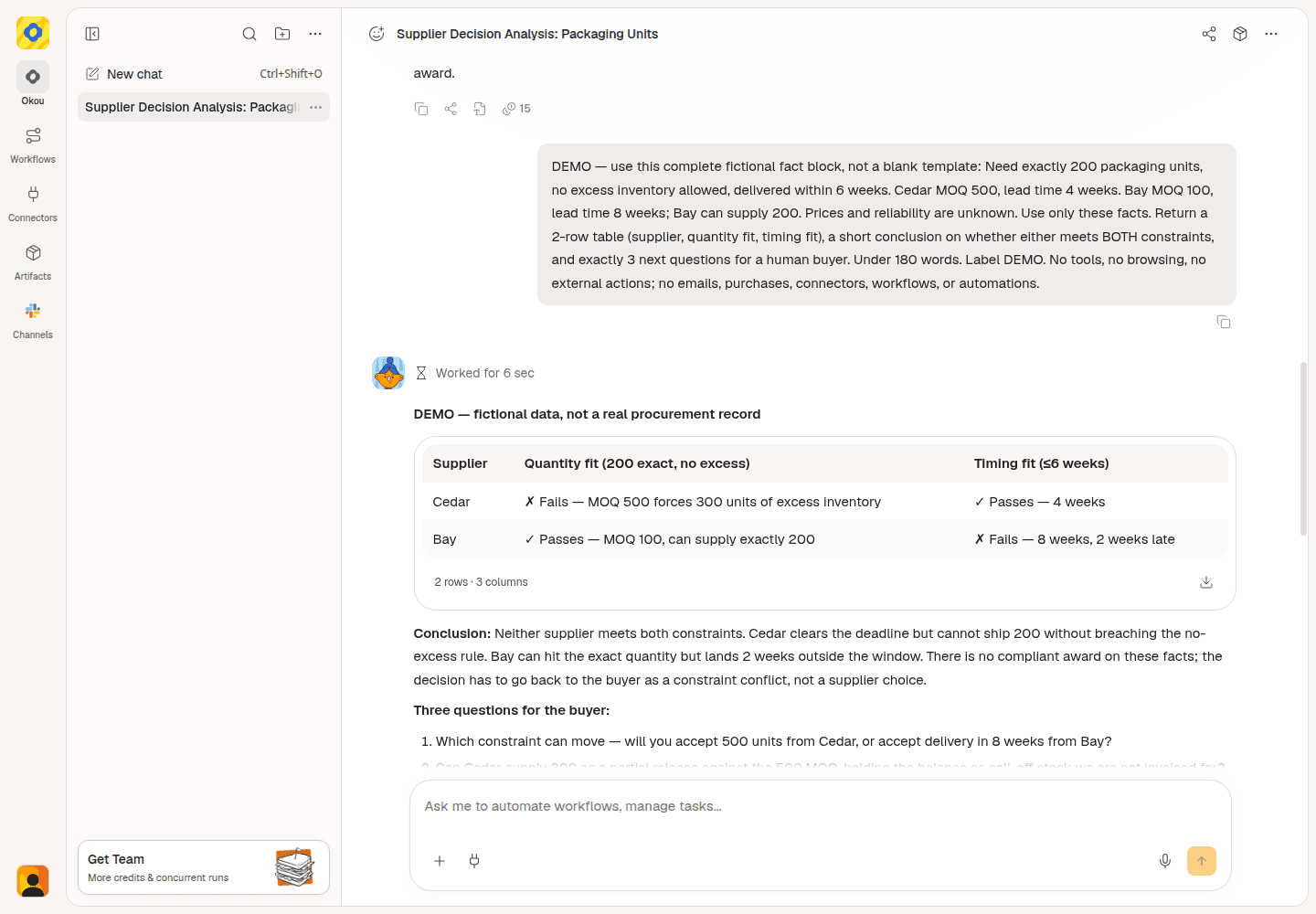
Figure 1. Complete Okou desktop interface, showing the submitted DEMO and actual result. The result exposes a constraint conflict rather than inventing a winner. Cedar would leave 300 excess units; Bay would arrive two weeks late. Fictional inputs, real agent output in a test account. Captured November 23, 2026 with agent-browser. Source: Okou test-environment capture, November 23, 2026.
Then we asked, in the same conversation: “The launch deadline has moved to nine weeks. Keep exactly 200 units and no excess inventory.” We did not repeat the supplier facts. The revised output identified Bay as meeting both constraints and kept price and reliability unverified.
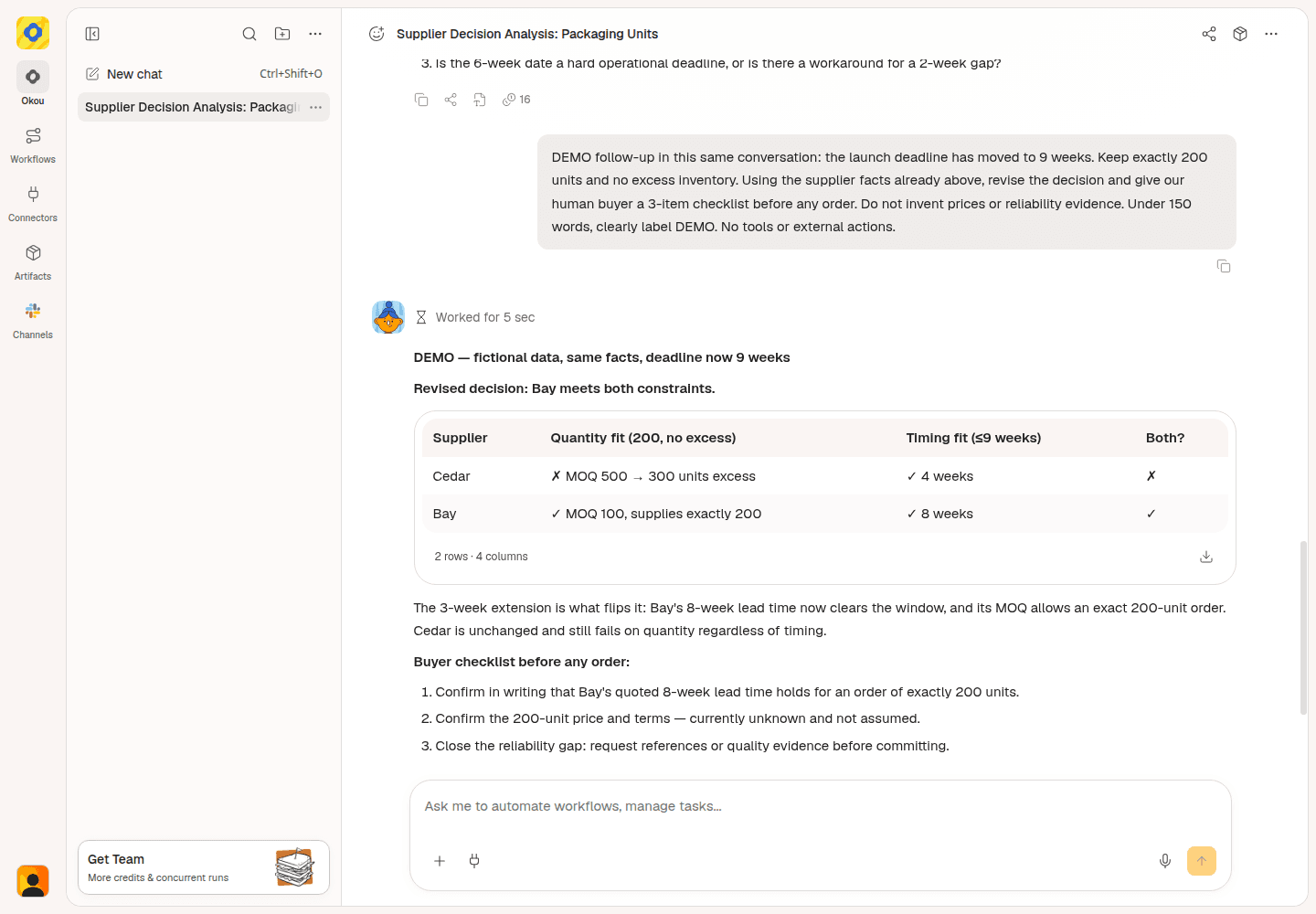
Figure 2. Complete Okou desktop interface with the actual follow-up and revised result. Act on context: one changed deadline updates the conclusion while the quantity rule and supplier facts stay in place. The output includes a human buyer’s checklist; no supplier was contacted or order placed. Captured November 23, 2026 with agent-browser. Source: Okou test-environment capture, November 23, 2026.
This is a small test of supplied-fact reasoning and a contextual follow-up, not a benchmark or proof of live research quality. The example illustrates a narrow decision-support task, not autonomous purchasing or reliability across repeated runs.
Delegation is also a reasonable starting point when:
- Each assignment has different sources or constraints.
- You expect to revise the brief after seeing a first result.
- The task happens too irregularly to justify a maintained process.
- You can review the result before it affects another person or system.
The trade-off is review. An assistant can return a confident recommendation based on an outdated policy or a missing assumption. Require sources for factual claims and a visible “unknown” when evidence is absent.
If every run needs the same long correction, stop treating that correction as a conversation. Put it into the reusable instructions or process.
When should you build AI automation?
Build a repeatable workflow when the job has a stable starting event, a defined output, and someone responsible for failures.
Consider inbound quote requests. Your team already knows the handoff rules: find the customer record, capture the requested service, and create an internal review item. An AI step might interpret the free-text message. Record matching and duplicate prevention need explicit checks.
Before building, you should be able to answer:
- What event starts the job, and which events must be ignored?
- What information is required, and what happens when it's missing?
- Which actions are allowed, and which need approval?
- Who receives an exception, and how can they see what already happened?
If those answers change every time someone discusses the process, run the work manually with assistance first.
Automation earns its setup effort through reuse. But repetition alone isn't enough. A frequently repeated process with unclear ownership can become a frequently repeated mistake.
The supplier demo does not establish recurring automation behavior. No schedule, trigger, or automated purchasing process was created or tested.
Does automation always follow fixed steps?
No. An automated process can call an agent that chooses tools or decides which source to inspect next.
Anthropic’s architectural guide distinguishes workflows with predefined paths from agents that dynamically direct their processes and tool use. It also recommends starting with the simplest adequate approach. The guide was originally published in December 2024 and now notes that its tooling discussion has evolved; the distinction is useful here as a design framework, not a current product comparison.
For a business buyer, separate two questions: What makes the job run again? What decisions can the AI make inside it? Scheduling answers the first. It doesn't answer the second.
Four business examples: which approach fits?
The following are illustrative process designs, not customer case studies or tested product results.
1. A founder choosing a new supplier: assistant first
The questions and constraints are still changing. Request a sourced comparison, review the gaps, and decide what to investigate next.
Acceptance check: Every recommendation links to evidence, and unpublished terms are marked unknown. A polished table with guessed delivery times fails.
2. An operator routing quote requests: workflow first
The intake happens repeatedly, and ownership rules are known. Use a workflow for the trigger and record lookup; add AI only where the message needs interpretation.
Acceptance check: An existing customer isn't duplicated, and an ambiguous request goes to review rather than an invented category.
3. A business owner requesting a weekly operating brief: combine both
The schedule and report structure can stay fixed. The explanation of what changed may need context from approved data sources.
Acceptance check: The brief states its reporting window, links to the underlying records, and flags missing data. It must not silently compare a partial week with a complete week.
4. A team handling a disputed invoice: human decision first
AI can assemble the invoice history and draft an internal summary. A repeatable process can route the dispute. Neither should silently decide whether to concede a contractual claim.
Acceptance check: The result distinguishes documented facts from interpretation and identifies the person who must decide. A draft is not approval to send or issue a refund.
How to choose without getting trapped by product labels
Use the same task brief for each product you evaluate. Comparing one tool's best demo with another tool's blank setup screen tells you little.
Check the exact action, not just the integration logo
“Connects to your CRM” is incomplete. Can it search the records you need? Can it update the exact fields? Does your account have the required access?
Separate reading from writing. A tool that can summarize records may not be configured or authorized to change them.
Ask how exceptions become visible
A useful demonstration includes missing data and a failed connection. Watch whether the system stops, explains the blocker, or proceeds with an assumption.
For external actions, ask what happens after an uncertain response. A timeout after sending a message does not prove the message wasn't sent. Blind retries can create duplicate contact or duplicate records.
Name the process owner
No-code setup still needs ownership. Someone must update the instructions when your qualification rules change and investigate why a scheduled report stopped arriving.
If nobody has time for maintenance, narrow the first job. A reviewed research brief is a safer first purchase than an unattended process with several write actions.
Compare cost per accepted result
Include subscription or usage charges, setup time, review time, and recovery work. Don't compare only the sticker prices of the two categories.
For your pilot, record:
Cost per accepted result = total pilot tool charges and staff-time cost ÷ results that pass the agreed checks.
Use your own staff-time assumptions and actual receipts. This formula is a measurement method, not a claim that either category is cheaper.
Where does Okou fit?
Okou is an AI teammate for work that depends on context: understanding the brief and prior conversation, gathering information, and acting on it to produce a reviewable result. Its research offering draws on built-in data access to support information collection and human decisions. Check the sources and coverage available for your specific task rather than assuming every database or market is covered.
For this buying decision, evaluate three things: can it work from the context you already supplied, collect evidence relevant to the decision, and help colleagues review the reasoning and next steps? Team collaboration matters because the person requesting research may not be the person reviewing the evidence or approving the next action.
The supplier demo illustrates the context test: change one business constraint in the same conversation and inspect the revised recommendation. It is not a public-web research test, a multi-user collaboration trial, or evidence that Okou should make purchasing decisions autonomously. A useful next pilot would request a sourced research brief and have a colleague review its facts, unknowns, and proposed next steps.
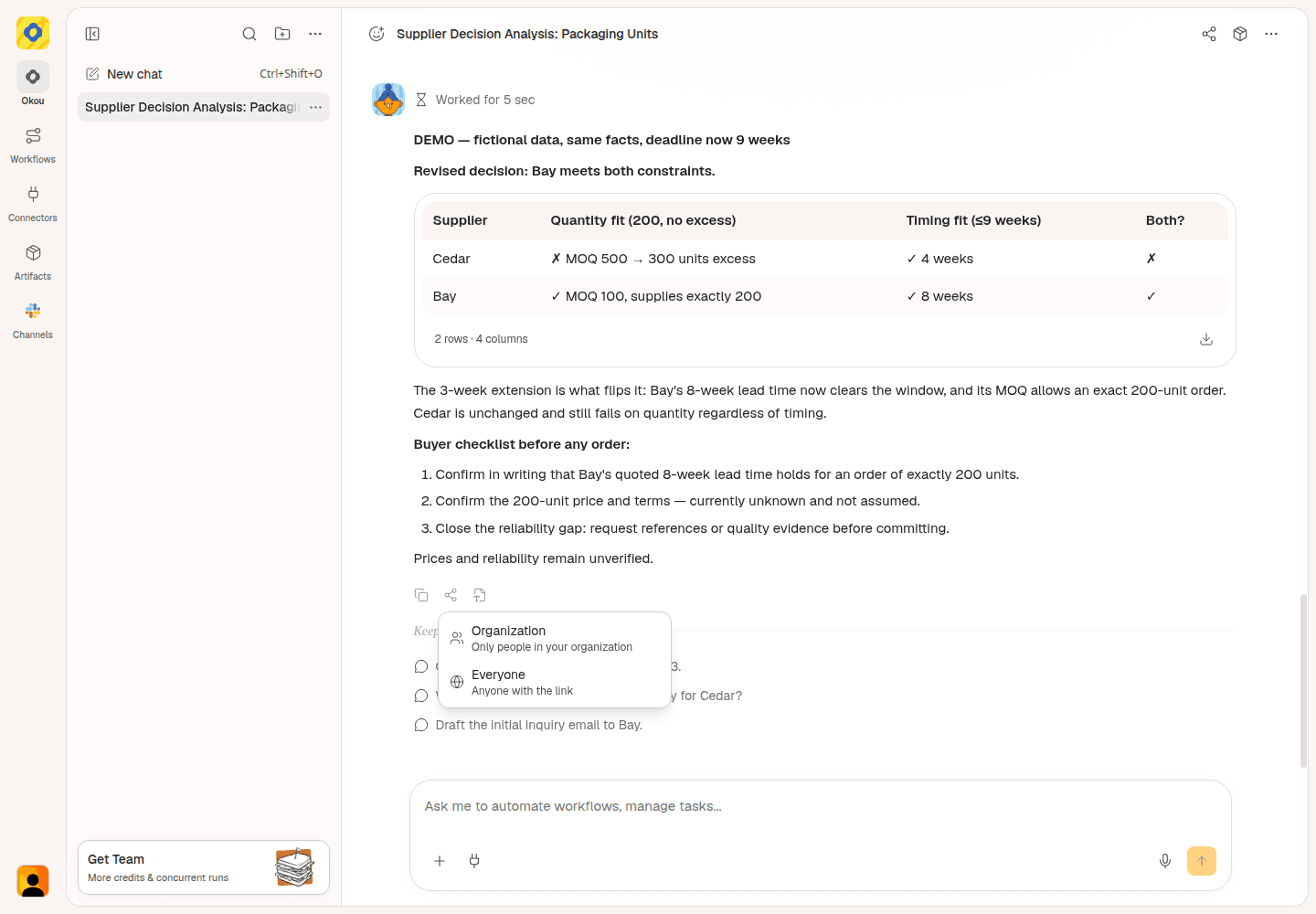
Figure 3. Complete Okou desktop interface with the result and its handoff options: the sharing menu offers “Organization” and “Everyone.” We opened the menu only; no audience was selected, link published, permission changed, or second user invited. This is UI evidence, not a multi-user collaboration test. Captured November 23, 2026 with agent-browser. Source: Okou test-environment capture, November 23, 2026.
This positioning doesn't establish that a particular source, CRM field, approval rule, or exception path will work for your business. Check the exact data access and action before relying on them.
Considering Okou? Start with one reviewable task. Use a brief like this, adapted to the tools and access available to you:
Use our existing supplier brief and launch constraints. Research the shortlist using approved sources, distinguish published facts from unknowns, and prepare a decision brief for our buyer. If I change the deadline, revise the recommendation using the same context. Keep the work read-only. Don't contact anyone, buy anything, or create recurring jobs.
Explore Okou’s approach to context-aware work, then check whether the evidence, follow-up, and handoff help your team make a better-informed decision.
A small pilot before you commit
Pick a job with a visible output and reversible consequences. Write the pass conditions before running it.
| Pilot case | What to inspect |
|---|---|
| Complete input | Did the result meet the brief and use the right records? |
| Missing information | Did the system flag the gap instead of inventing a value? |
| Conflicting information | Did it expose the conflict and request a decision where needed? |
| Connection failure or repeated event | Did it report the failure and avoid duplicate actions? |
Track setup effort, human corrections, and accepted results. Keep external sends and consequential updates behind review during the pilot.
One successful demonstration isn't proof that a recurring process is dependable. Test the cases most likely to cost your team time when something goes wrong.
Frequently asked questions
Can an AI assistant automate tasks?
Yes, some can run reusable jobs on schedules or event triggers. Others mainly respond to requests. Check the product's documented behavior and your available permissions; the word “assistant” doesn't settle it.
Do you need coding skills for AI automation?
Not always. Templates, visual builders, and conversational setup can reduce the technical work. You still need to define the right outcome, approve access, test exceptions, and maintain the process.
Is an AI agent the same as AI automation?
No. An agent describes how a system can choose steps and use tools. Automation describes a way to execute work repeatedly. An agent can operate inside an automated process or handle a one-off assignment.
Which should a small business choose first?
Start with the smallest job whose success you can verify. Delegate changing research or drafting work. Build a repeatable process when the handoff rules are stable and an owner can maintain it. If the job contains both, combine them with clear review boundaries.
Sources
Sources reviewed on November 23, 2026. This is a documentation-based comparison of working approaches, supplemented by a small fictional-input Okou preview demo—not a comparative hands-on benchmark. The article is prepared for Okou; its product section should be read in that context. Vendor descriptions establish published positioning, not independently measured reliability. Public extracts may be cached.
- SAP, What is an AI assistant? — assistant definitions and overlap with business workflows. Reviewed November 23, 2026.
- Zapier, Zap workflows quick start guide — trigger/action model, templates, Copilot, and operational history. Page reports an October 1, 2026 update; reviewed November 23, 2026.
- Anthropic, Building effective agents — predefined workflows versus dynamic agents; complexity and testing trade-offs. Originally published December 2024; includes an updated tooling caveat. Reviewed November 23, 2026.
- Okou: Official product overview — product background on delegated work and deliverables; current editorial emphasis is context-aware action, research, and human collaboration, not workflow reuse.