There are five classic types of AI agents: simple reflex, model-based reflex, goal-based, utility-based, and learning agents. In plain terms, they follow a rule, keep track of what is going on, work toward a goal, pick the best of several options, or get better from feedback. Many lists add two more, hierarchical agents and multi-agent systems, which are about how several agents work together.
This guide explains each type with an everyday example and a business example. It also makes one practical point: when an AI agent gets business work wrong, the cause is usually not weak planning. It is that the agent is working from the wrong facts. So when you choose an agent, first ask what it can see and what it is allowed to change. How clever it is comes second.
Before comparing decision styles, the agent introduction shows how goals, context, tools, and checks fit into one task. When choosing help for your own team, the chatbot, agent, and coworker comparison answers a different question: do you need an answer, a completed goal, or a recurring job with agreed rules?
What is an AI agent?
An AI agent is software that looks at a situation, decides what to do, and then does it. A chatbot answers your question. An agent can also take the next step, such as reading your inbox, updating a spreadsheet, or drafting a reply.
The five types come from Stuart Russell and Peter Norvig's textbook Artificial Intelligence: A Modern Approach, the book most university AI courses use. They sort agents by one question: how does the agent decide what to do next? IBM's guide to AI agent types uses the same list.
There is no single official definition, and that is fine. For a business reader, the useful test is simple: does it only answer, or can it also act?
The 5 classic types of AI agents
Read the five types from simplest to most involved. This is not a ranking. A simple design is often the right one, and learning can be added to any of the other four.
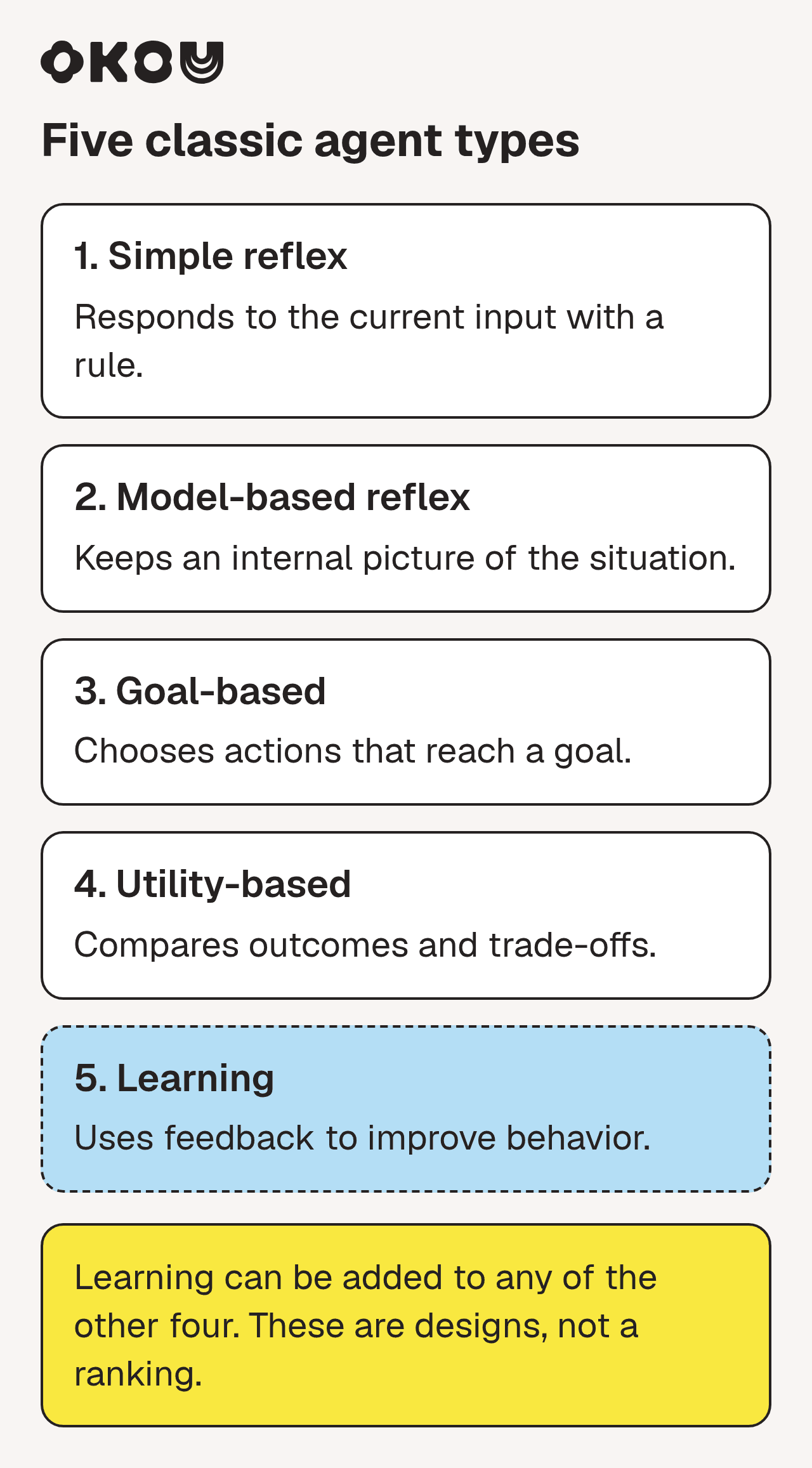
The five classic types describe how decisions are made. Learning can be added to the other four; it is not a final rung on a ladder. Check the quality of context for every design.
YouTube · IBM Technology
5 Types of AI Agents: Autonomous Functions & Real-World Applications · April 28, 2025
A 10-minute walkthrough of the textbook types, with a drawing for each one. The recap at 8:23 sums them up in five verbs: reacts, remembers, aims, evaluates, improves.
1. Simple reflex agents: follow a rule
What it does: "If this happens, do that." It looks only at what is in front of it right now.
Everyday example: a thermostat turns the heat on below 19°C.
Business example: an inbox rule sends every email with "invoice" in it to accounts payable.
Where it goes wrong: anything the rule did not expect. A newsletter that mentions "invoice" lands with your finance team too. The rule cannot tell the difference, and it will make the same mistake every time.
Use it when: the situation is predictable and a mistake is cheap.
2. Model-based reflex agents: keep track of what is going on
What it does: it still follows rules, but it remembers what it has seen. That gives it a picture of the situation, which textbooks call a "model".
Everyday example: a robot vacuum remembers which rooms it has already cleaned.
Business example: a support assistant sees that a customer already reported the same bug last week, so it adds the new message to the open ticket instead of opening a duplicate.
Where it goes wrong: when its picture is out of date. An old CRM record, a decision that only lives in a Slack thread, or last month's spreadsheet will lead it to act confidently on the wrong facts.
Use it when: the right action depends on history, not just on the latest message.
This is the type that matters most for business teams, and a post that spread widely on X in early November 2026 shows why. Gul Saeed Khattak, a lead data engineer at the University of Glasgow, described an agent asked for last quarter's revenue:
X · Gul Saeed Khattak (@Ldataengineer) · November 3, 2026
"It answers in 3 seconds. Clean number. Nice chart. But it used the wrong 'revenue' column. Nobody notices."
The agent in that story did not reason badly. It reasoned well from the wrong column. We agree with the diagnosis. Note that the post goes on to promote a specific data tool, which we have not tested. The business lesson is simpler than any tool: before you trust an agent's answer, check which source it used.
3. Goal-based agents: work toward a target
What it does: you give it a goal and it plans the steps. Instead of "which rule applies?", it asks "what gets me closer?"
Everyday example: a navigation app plans a route and re-plans when you miss a turn.
Business example: "Get the board deck ready for Thursday." The agent pulls the latest numbers, copies last quarter's slide layout, and lists the open questions.
Where it goes wrong: it only checks whether the goal is met. If two plans both work, it has no reason to prefer the cheaper or safer one.
Use it when: you know the result you want, but the steps change each time.
4. Utility-based agents: pick the best option
What it does: it compares several good options and scores them against what you care about.
Everyday example: a flight search that balances price, travel time, and number of stops.
Business example: an ads assistant suggests moving budget between campaigns by weighing cost per sale, remaining budget, and how much data each campaign has.
Where it goes wrong: the scores are only as good as your priorities. If nobody has decided whether speed matters more than cost, the agent cannot decide either.
Use it when: there are real trade-offs and more than one acceptable answer.
5. Learning agents: get better from feedback
What it does: it looks at how its past actions turned out and adjusts. This can sit on top of any of the four types above.
Everyday example: a music app's suggestions change as you skip or replay songs.
Business example: a lead-scoring assistant ranks leads better after the sales team marks which ones became real deals.
Where it goes wrong: it learns whatever the feedback teaches it. Patchy or inconsistent feedback makes it confidently wrong. Learning also takes the most data and the most time.
Use it when: the work repeats often and someone checks what the agent is learning.
Types 6 and 7: hierarchical agents and multi-agent systems
These two describe how several agents are organized, not how one agent decides.
- Hierarchical agents: a "manager" agent splits a big job into parts and hands each part to another agent.
- Multi-agent systems: several agents work on the same problem at once, sharing or dividing the work.
Business example: for a product launch, one agent researches competitors, one drafts the launch email, and one checks the landing page.
Do more agents mean better results? It depends on the job. In June 2025, Anthropic reported that a team of agents beat a single agent on its own research tests, but used about 15 times as many tokens (the units AI usage is billed in) as a normal chat. Anthropic also said tasks where every agent needs the same context were a poor fit (Anthropic). A research paper from October 2026, not yet peer reviewed, found that agents passing work to each other did not double-check each other's facts unless the process forced them to (arXiv).
So the takeaway is not "more agents is better". It is the same rule you use with people: every hand-off needs clear inputs, a clear output, and someone who checks the result.
Where today's AI agents fit
The five types were written before tools like ChatGPT and Claude existed. A modern AI agent mixes several of them. It follows your instructions (rules), reads your documents and past messages (keeping track), plans steps toward what you asked for (goal), weighs options when you ask it to choose (best option), and can improve when you save corrections (feedback).
So if a vendor says its product is "a goal-based agent", that tells you little. Ask three plain questions instead:
- What can it read?
- What can it change?
- When does it stop and ask a person?
Common mistakes when thinking about agent types
"The later types are always better." No. A simple rule is cheaper, faster, and easier to check. Use the simplest type that does the job.
"A learning agent learns from everything automatically." In most business tools, it improves only when someone saves the correction, for example as an updated instruction. If no one saves it, the next run starts from scratch.
"More agents means more capable." More agents means more hand-offs. Small errors also add up: if each step is right 95% of the time, a ten-step process is right only about 60% of the time.
"The type tells you what it can do in my business." The type tells you how it decides. What it can do depends on what it can access and what it is allowed to change.
A simpler way for business teams: sort agents by the job they do
The textbook types describe how an agent thinks. A sales lead or an operations manager usually cares more about the job it will do. So many teams find it easier to group agents by role. This is a practical way to think, not an official list.
| Role | What it does | What you get | What the person still decides |
|---|---|---|---|
| Monitor | Watches a source and flags what matters | A daily alert or summary | Which alerts need action |
| Researcher | Gathers and compares information | A brief or shortlist | Whether the sources are good and what to do |
| Producer | Turns inputs into a draft | An email, report, deck, or page | Edits, then sends or publishes |
| Operator | Makes changes inside your tools | Updated records, a scheduled post | Grants access and approves changes |
| Coordinator | Runs a multi-step job across tools | A finished package, handed back for review | Owns the outcome |
People are already handing whole jobs to agents. Greg Isenberg, CEO of the company-building studio Late Checkout, described his week on X:
X · Greg Isenberg (@gregisenberg) · November 3, 2026
"my team is 50+ people in 12 countries, but i talk to my agents more than my human teammates"
In the same post he lists a step where an agent questions his idea before anything gets built. That is a good habit for any role in the table: let the agent ask about the goal before it starts. Our take is less dramatic than his framing. Talking to agents a lot is fine, as long as people still decide what gets sent, changed, or approved.
Example: one sales follow-up, step by step
Here is how the types show up in one ordinary task. This is an example of how the steps fit together in Okou, not a customer story.
The ask. After a renewal call, an account manager writes: "Review this customer's history, prepare a brief for my team, and draft the follow-up email."
1. Check the facts first (keeping track). The agent reads the email thread, the call notes, the CRM record, and recent news about the customer. The CRM says "renewal, standard terms". But an email from last week says the customer's finance lead wants quarterly billing. The agent uses the newer email and flags the mismatch as an open question.
2. Plan the work (goal). It collects what the brief and the email both need: what was promised on the call, what is still open, and the next step the customer agreed to.
3. Follow the team's preference (best option). The account manager has already said "keep customer emails under 150 words and lead with the next step". That settles the trade-off between short and detailed.
4. Draft, don't send. The team has let Okou write Gmail drafts but not send them (What is Okou?). If the agent needs access it does not have, a person approves it and picks how long it lasts.
5. Use the right format for each reader. The internal team gets a brief as a document they can comment on. The customer gets a short email that makes the next step obvious.
6. A person reviews. The account manager fixes one sentence about billing, checks the recipient, and presses Send.

An email drafted in Okou (example data from a different task). Look for the Draft label and the Send button: nothing goes out until a person presses Send. Click the image to see it full size.
7. Save it so the team can reuse it (feedback). The fix only helps next time if it is saved. The account manager asks Okou to save the process as a workflow: which sources to check, what the brief looks like, and the rule that emails stay as drafts. A teammate can then run it for a different customer, using their own email and CRM accounts, not the creator's (Okou for teams). If the team wants it to run before every renewal call, they can add an automation with a schedule or trigger.
Most articles about agent types focus on step 2, the planning. In this example, what made the result useful was step 1 (the newer email), step 4 (draft, not send), step 5 (the right format), and step 7 (saving the fix).
A quick selection table for business work
The classic five types describe how agents make decisions. They are not a shopping list of five products your team needs. Start with the job instead.
| What the job needs | Smallest useful starting point | What to check before expanding |
|---|---|---|
| Copy the same fields every time | A fixed automation rule | Stable inputs and a clear exception route |
| Explain a document you already have | A chatbot or assistant | The answer matches the supplied document |
| Gather material across tools and produce a brief | A tool-using agent | Sources, missing facts and action permissions |
| Repeat a proven team method | A saved workflow | Current inputs and a named reviewer |
| Start the method at a particular time | An automation around that workflow | Owner, destination and unchanged permissions |
| Split genuinely independent research tasks | Possibly several agents | Coordination cost, duplicated work and one accountable reviewer |
Adding more agents is not a shortcut to reliability. First show that one bounded job produces work your team can check.
How to choose the right type of AI agent
Answer these questions about the job:
- Can you write the rule in one sentence? Then a simple rule may be enough.
- Does the right answer depend on history? Then the agent needs access to the right sources, and you should check what it does when two sources disagree.
- Do you know the result but not the steps? That is goal-based work: research briefs, reports, first drafts.
- Are there trade-offs? Decide your priorities first, then let the agent apply them.
- Will the job repeat? Plan how corrections get saved so the next run is better.
- What is the most it should change without asking? Start with read-only access and drafts. Give more access step by step, with time limits where you can.
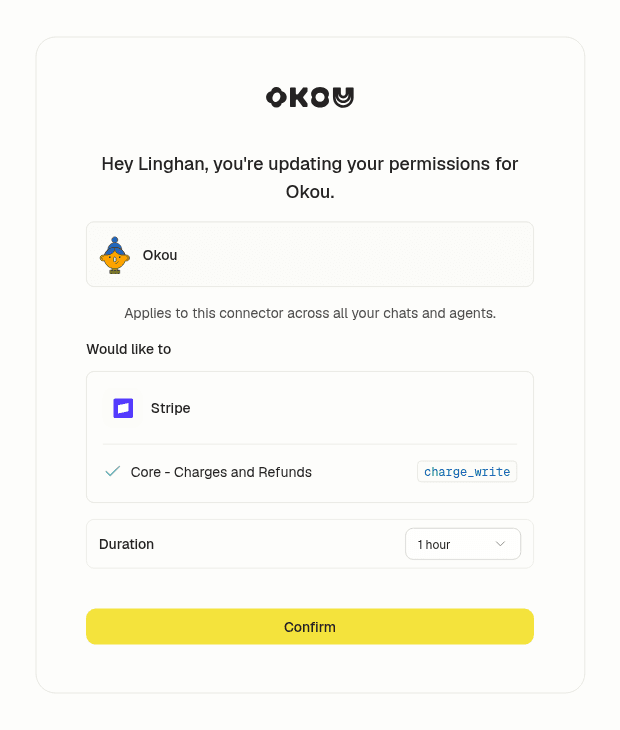
When Okou needs a permission it does not have, a person sees exactly what is being asked and chooses how long to allow it.
How Okou fits
Okou is an AI teammate for business teams. You do not pick an agent type. You describe the job, point to the relevant files and tools, and Okou gathers the context, does the work in the cloud, and hands back something you can check.
Three things from this guide shape how Okou works:
- Right facts first. Okou reads the emails, documents, and records the task needs and checks changing facts against their source. Corrections you make in a chat carry forward in that chat. To use another chat's background, you point Okou to it (Chat).
- The right format. A quick message for an update, a document for detail that needs review, a web page or slides when a group needs to walk through a recommendation.
- Reuse with limits. A saved workflow lets teammates reuse a method with their own accounts and permissions. Sharing a workflow does not share anyone's inbox or private chats.
For more examples, see 20 AI agent use cases with real prompts and outputs, AI agent context management for teams, and how Okou asks before it acts.
Frequently asked questions
What are the 5 types of AI agents?
Simple reflex agents follow fixed rules. Model-based reflex agents also keep track of the situation. Goal-based agents plan steps toward a target. Utility-based agents pick the best of several options. Learning agents improve from feedback. The list comes from Russell and Norvig's AI textbook and is the one most courses use.
What is a simple reflex agent in AI?
It acts only on what it sees right now, using "if this, then that" rules. It has no memory and makes no plans. A thermostat is one. In business, inbox filters and basic routing rules work this way: reliable when things are predictable, easily fooled when they are not.
What is the difference between a goal-based and a utility-based agent?
A goal-based agent is happy with any plan that reaches the goal. A utility-based agent compares the options and picks the best one. A goal-based agent books a flight to Chicago. A utility-based agent books the one that best balances price, time, and stops, based on what you said matters.
Are multi-agent systems a type of AI agent?
They are better described as a way to organize agents. Several agents divide or share a job, and each one can still be any of the five classic types. More agents also means more hand-offs, and hand-offs are where checks most often get skipped.
Is there an official list of AI agent types for business?
No. The five classic types are widely taught, but business groupings vary. Some sort agents by department, some by how independent they are, and some by role, like the monitor, researcher, producer, operator, and coordinator roles in this guide. Use any grouping as a planning tool, not a standard.
Which type of AI agent should a small business start with?
Start with a job that repeats, has a clear result, and is safe to check before anything goes out, such as a weekly report, a research brief, or draft follow-up emails. Give the agent read access to what it needs, keep sending and record changes with a person, and give it more access only after it has proven reliable.