An AI agent is software that takes a goal, works out the steps, uses your tools to do them, checks the results, and keeps going until the job is done or it needs you to decide something. A chatbot answers your question. An agent tries to finish the job.
That's the short answer. The trouble is that "agent" is now stuck on almost every AI product, so the label alone tells you very little. So what is an AI agent in practice? This guide follows one real piece of business work from start to finish, so you can see what an agent does at each step, where it needs you, and how to tell a real agent from a chatbot with a new name.
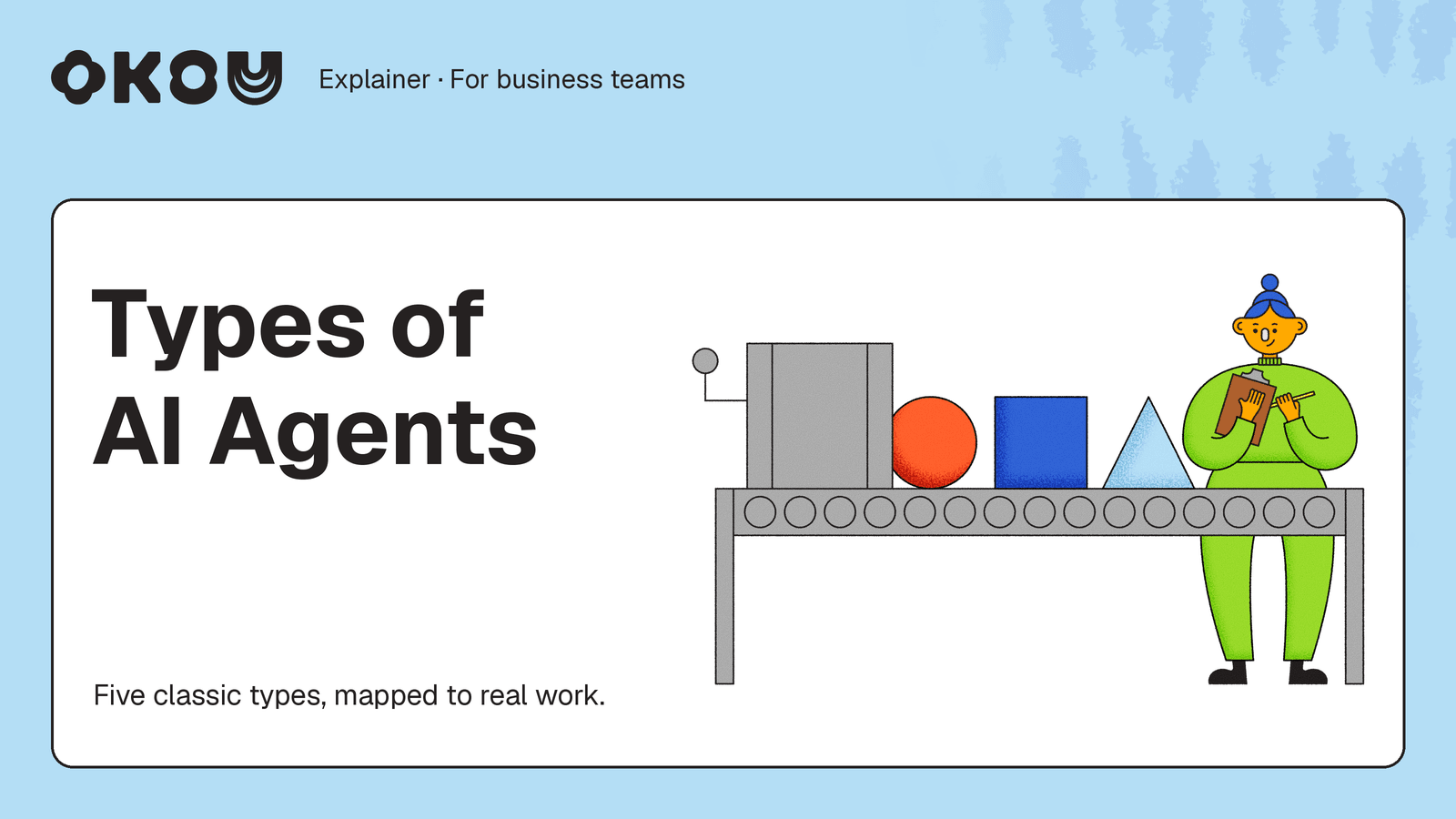
Once the basic idea clicks, follow the chatbot, agent, and coworker comparison to decide whether you're handing over a question, a goal, or a recurring job. The five classic agent types explain how agents choose their next action, rather than ranking products. For the bigger picture, the agentic AI guide walks through planning, acting, and checking; the terminology comparison explains why an agent and agentic AI aren't competing generations of technology.
When you're ready to delegate, the teammate guide shows how context, review, and saved methods support a team handoff. The AI employee guide draws the other important line: which recurring duties you can hand over, and which decisions and responsibilities stay with people.
What is an AI agent?
An AI agent is an AI system you give a goal instead of a single question. It decides what to do next, does it in your tools, looks at what happened, and adjusts.
The word "agent" is old. A classic AI textbook, Artificial Intelligence: A Modern Approach (first published in 1995), describes an agent as anything that senses its surroundings and acts on them. By that definition a thermostat is an agent.
What's new is the brain. Today's agents use a large language model (the kind of AI behind ChatGPT and Claude) to decide the next step. A 2022 research paper called ReAct showed a simple pattern that made this work better: think, act, look at the result, think again. Most agent products today follow some version of that loop.
You'll see different definitions from different companies. AWS puts it simply: "Humans set goals, but an AI agent independently chooses the best actions it needs to perform to achieve those goals." LangChain adds a useful point: autonomy is a scale, not a yes-or-no. Some agents follow a path a person laid out. Others plan, act, and change course on their own. Most useful business agents sit in the middle. They do the legwork and stop for a person when it matters.
If you'd rather watch than read, IBM's short explainer covers the basics well. It's from 2024, so treat it as a primer on the idea, not a picture of today's products.
YouTube · IBM Technology
What are AI Agents? · July 15, 2024
A 12-minute whiteboard explainer. Maya Murad shows why a model on its own gets a simple vacation-days question wrong, and how giving it a plan, tools, and memory fixes that. Near the end she describes "a sliding scale of AI autonomy."
A quick test for any product that calls itself an agent: Does it pick the next step itself? Can it act in your tools, not just write text? Does it check its own work before handing it back? More yeses means more agent.
How AI agents work: five parts, one task
Here's the task we'll follow. It's an example built in Okou's demo workspace with made-up data, not a customer story.
You run marketing at a small software company. You want to partner with a few creators who teach practical AI workflows to operations teams. You write:
Find five creators who reach operations leaders and fit our product. Add them to our partner tracker with links and the reasons they fit. Draft a first email to each, and leave the drafts for my review.
A chatbot would give you some names from memory and a template email. An agent treats this as a job. To do it well, it needs five things: a goal, context, tools, a way to act and check, and feedback. These five are our way of breaking it down, not an official standard, but if you can see all five in a task, you can see what the agent actually did.
1. A goal: what "done" looks like
The goal is the outcome in plain words: five creators, a filled-in tracker, one draft email each. A good goal also has limits. "Leave the drafts for my review" is a limit. So is "return fewer than five if you can't find good matches."
Most problems start here. Agents fill gaps with guesses, so a vague goal gets you guesses. Say what you want, where it should go, and who checks it.
2. Context: what the agent knows about your situation
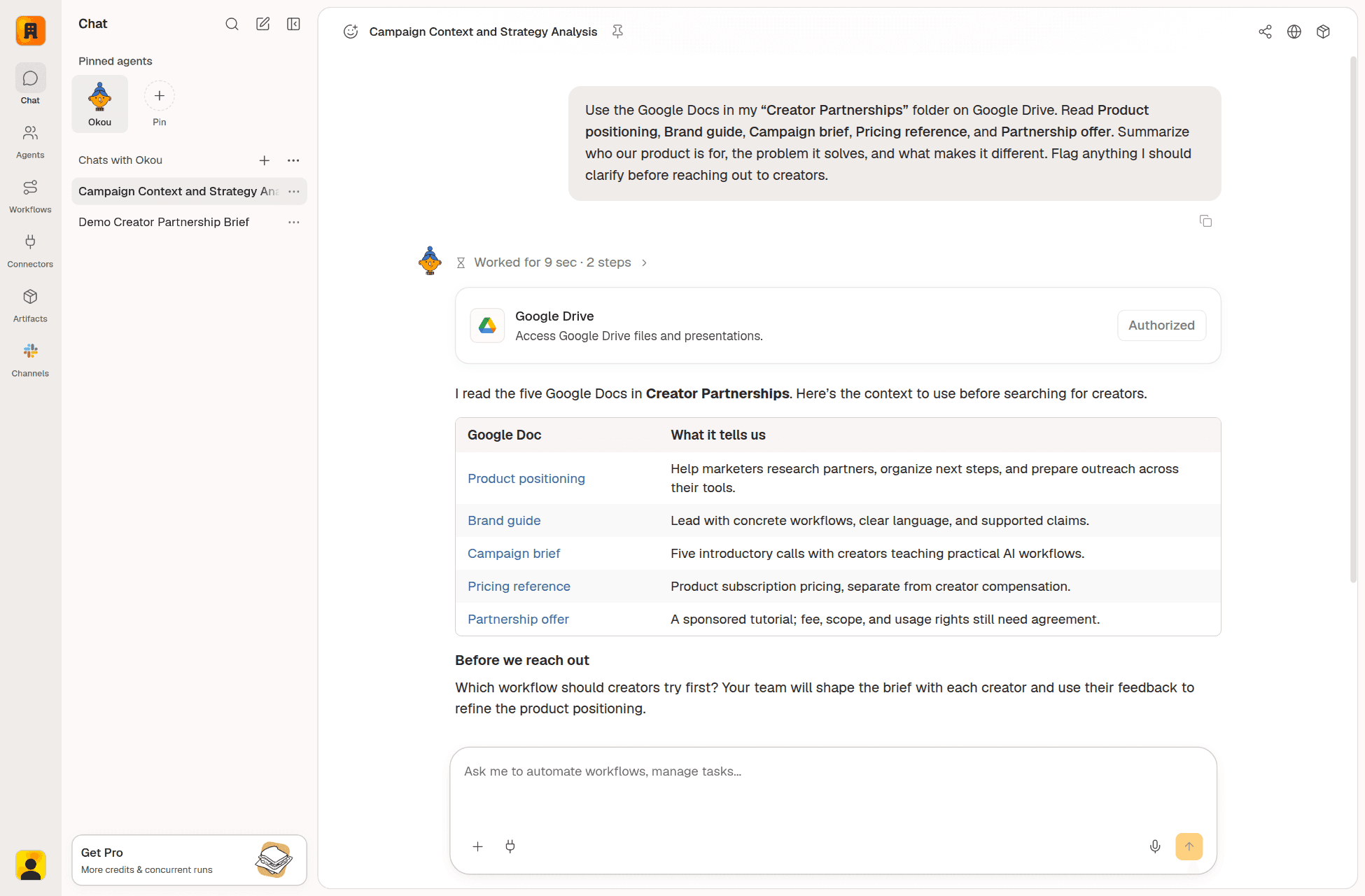
Context is the background a new colleague would need: your product brief, your brand guide, notes from earlier partnerships, and what you've already said in the conversation.
Context changes the decisions, not just the wording. In our example, the campaign brief asks for creators who teach practical AI workflows, so creators who only teach coding get dropped. The partnership notes say fees and terms aren't agreed yet, so the emails invite a conversation instead of quoting a price. The brand guide asks for concrete claims, so each email mentions the creator's actual work instead of praising their "amazing content."

Okou reads five documents from a Drive folder you've given it access to, sums up what each one says, and flags a question to settle before reaching out. Live Okou app, made-up documents. View full size
Context also has edges. In Okou, a chat remembers what was said in that chat. A new chat starts fresh. If last week's discussion matters, you point to that earlier chat or attach the brief. That way you always know what the agent was working from.
3. Tools: what the agent can use and change
Tools are how an agent gets things done. For this task: search the web for creators, open their pages to check recent work, add rows to a shared Google Sheet, and create drafts in Gmail.
This is the biggest difference from a chatbot. A chatbot can describe a good tracker. An agent with access to your sheet can fill it in. That's also where the risk is, so be deliberate about access.
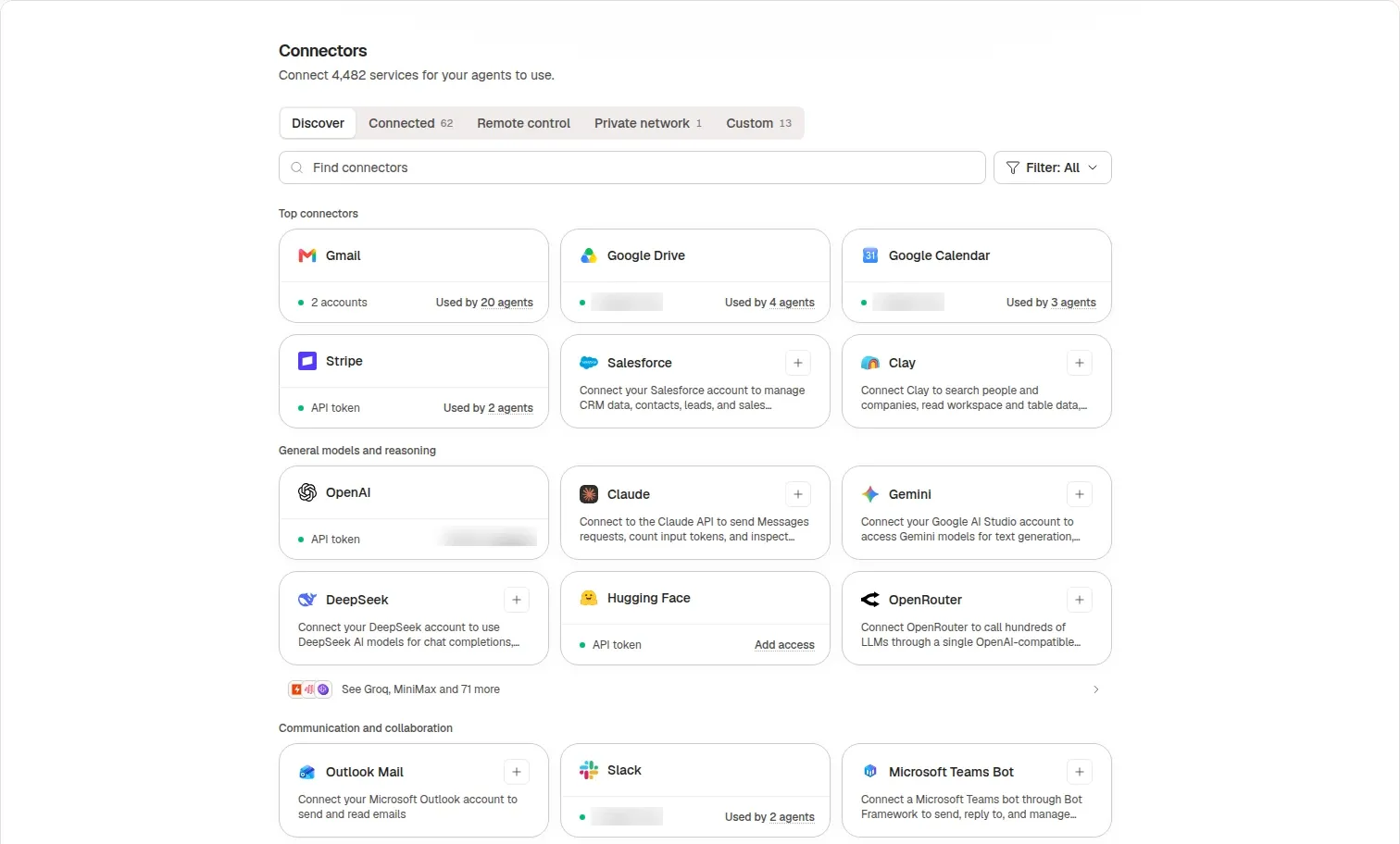
Okou's list of apps you can connect, captured October 5, 2026, with account details blurred. An app being on the list doesn't mean an agent can already use it. View full size
In Okou, you connect an account, let an agent use it, and then allow specific actions, such as "create a Gmail draft." You can allow an action for an hour, a day, a week, or permanently (how permissions work). For this task you'd allow reading the Drive folder, writing to the tracker, and creating drafts, and not allow sending. If the agent needs something you haven't allowed, Okou stops and asks.
4. Action: work, check, repeat
Now the agent works. It doesn't run a fixed script. It takes a step, looks at the result, and decides what to do next.
In our example: it searches for creators and opens each profile. One hasn't posted in a year, so it drops them and searches again. Another fits well but has no public business email, so it notes that as an open question instead of guessing an address. It adds each confirmed creator to the tracker with links, then drafts an email that mentions their real work.
The check step is what makes this an agent. A tool that runs once and hopes for the best is closer to a button. In our task, a simple check is "does every creator in the tracker have a source link?" If not, the agent goes back and finds one or drops that creator.
Because this loop takes time, Okou runs it in the cloud. The work keeps going after you close your laptop, and you come back to the result.
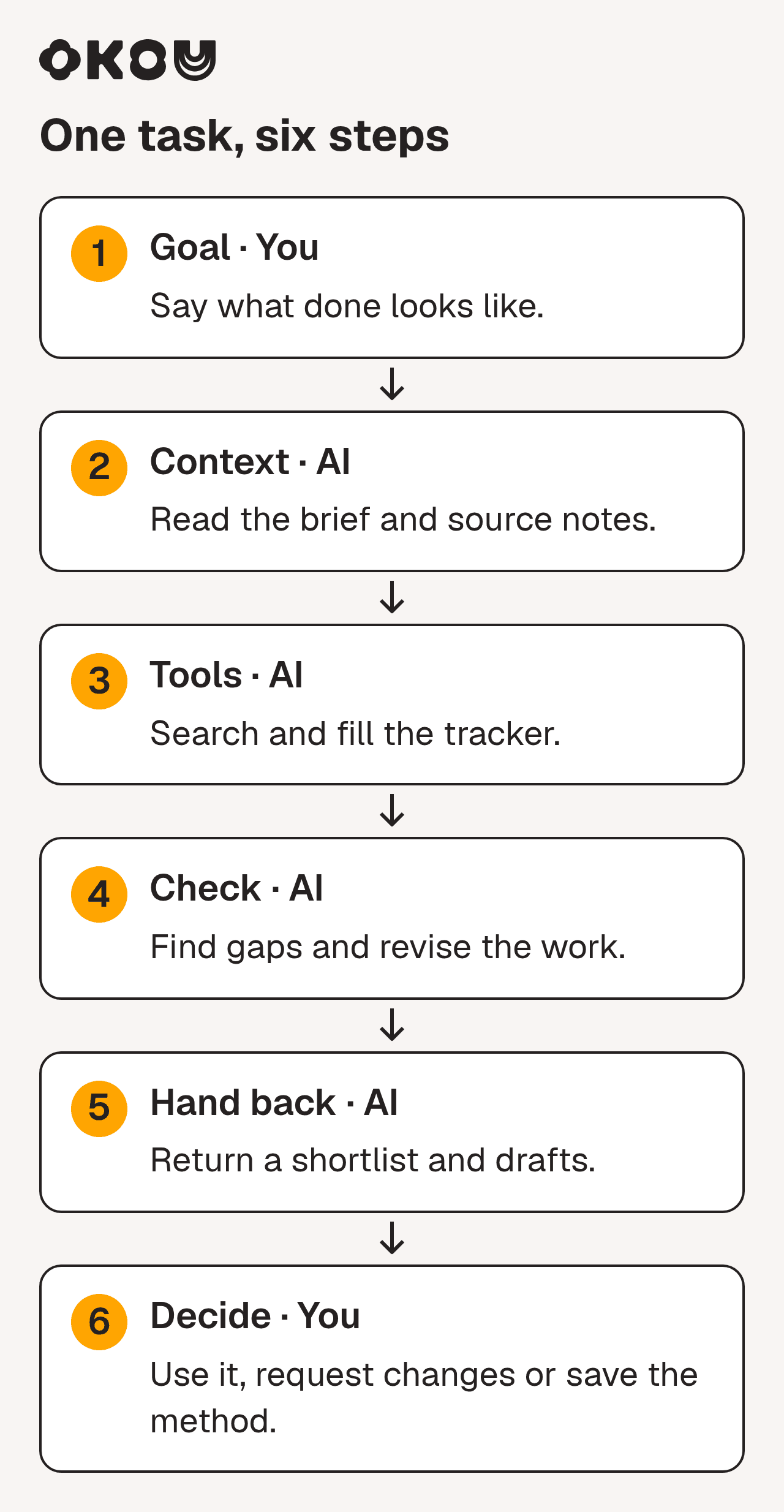
The same task in six steps. Yellow is your part, blue is the agent's working loop, green is what it hands back. View full size
5. Feedback: from the work and from you
Feedback comes from two places. The work pushes back: a search finds nothing, a page won't load, a creator's audience is different from their bio. A good agent adjusts on its own.
The second place is you. How an agent keeps you in the loop matters as much as how smart it is. A developer recently gave the same research task to three agent products and shared what happened:
X · Kun Chen (@kunchenguid) · October 5, 2026
"it kept giving me updates about its progress, which was useful"
In his test, as we read it, the fastest agent skipped a requirement he had stated at the start. The ones that asked questions first and shared progress let him correct course early. He calls it "a one-off experience" to take "with a grain of salt," and it is one person's opinion, not a benchmark. But it gives you three good things to watch for: Does the agent confirm the goal? Does it respect your limits? Does it show its work while there's still time to fix it?
How the agent hands back the work matters too. Different people need different things. In our task, your team gets the tracker, each creator gets a draft email, and you get a short list of open questions. Okou is built to pick the format that fits who's reading.
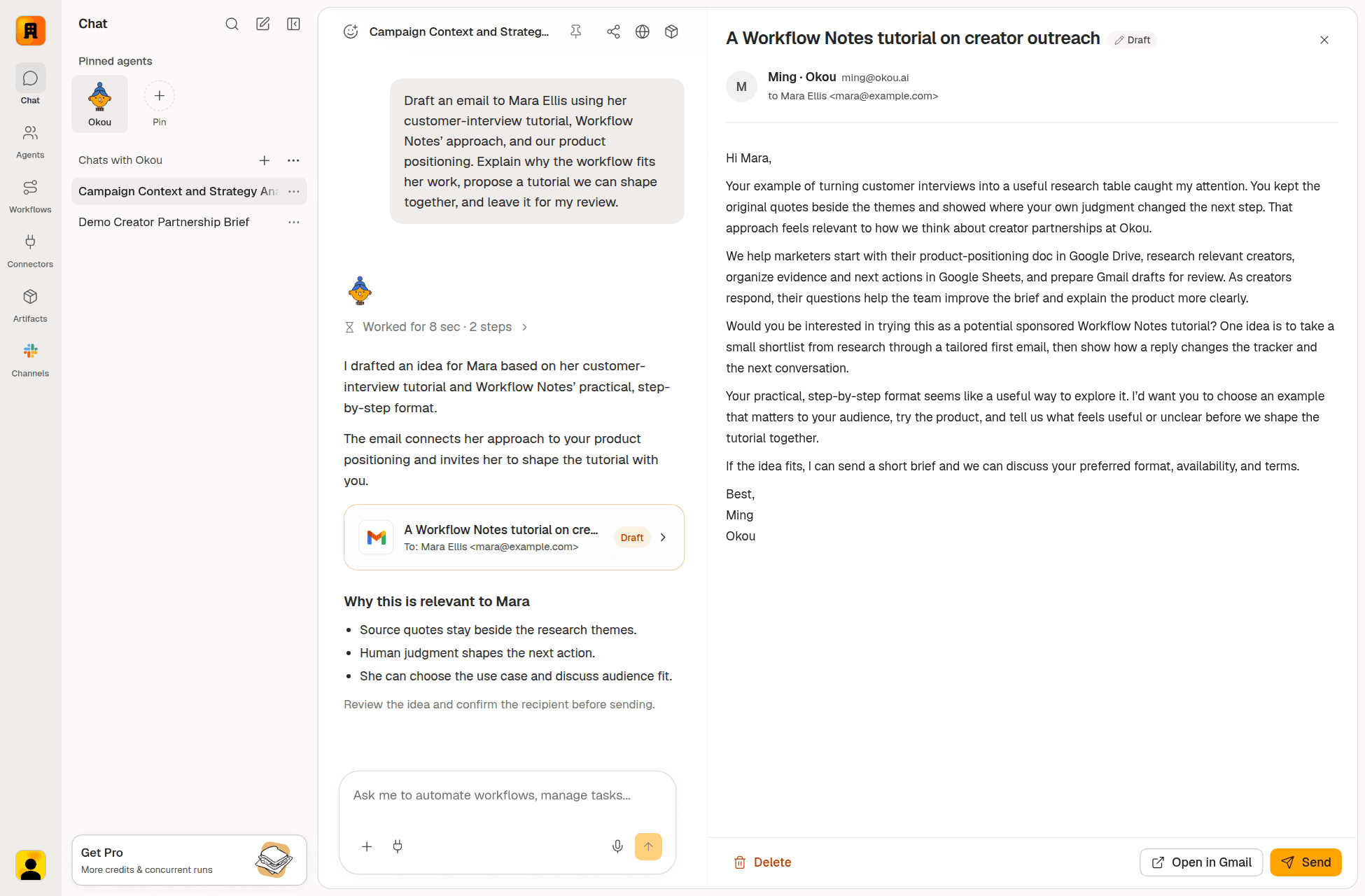
Then you review. You might say "lead Mara's email with her interview tutorial" or "drop the second creator, we already work with them." The agent revises in the same chat. And nothing leaves the company until you send it:

Okou leaves a Gmail draft and explains why the pitch fits. You decide whether to send. Live Okou app, made-up creator. View full size
After the task: make it reusable
Here's something most explanations skip. Your corrections improve this task, but they don't automatically become the team's way of doing it. If a colleague asks for creator outreach next month in a new chat, the agent won't know what you fixed.
So the last step is deciding what to keep. In Okou you save the method as a workflow: the steps, the reference documents, the output format, and the rule "drafts only, a person sends." A colleague can then run the same method with their own Gmail and their own permissions. Sharing a workflow shares the method, not your inbox or your chats. If you want it to run every Monday, add an automation. The workflow is the method. The automation is the schedule.
That's the difference between an agent that helped once and one that made the team better at something.
When is an AI agent the right tool?
Not every task needs an agent. If the steps are always the same, a simple automation is cheaper and more predictable. Agents earn their keep when the task needs judgment.
Barry Zhang from Anthropic gave a clear checklist in a 2025 talk. His first point: "don't build agents for everything" (0:52).
YouTube · AI Engineer
How We Build Effective Agents: Barry Zhang, Anthropic · April 4, 2025
A 15-minute talk from an Anthropic engineer. The first five minutes are a checklist for deciding whether a task needs an agent at all, and it translates well beyond engineering.
In business terms, ask four questions:
- Does the task need judgment? If you can write every step down in advance, use a fixed process.
- Is the result worth the effort? A weekly account brief is. Sorting support tickets into folders probably isn't.
- Can the agent do the hard part well? Test that first. If it can't find the right sources, make the task smaller.
- What does a mistake cost? If it's expensive or hard to spot, let the agent read and draft only, and keep a person on the final step.
Our creator task passes. Nobody knows the right creators in advance, a good partnership is valuable, research and drafting are things agents do well, and sending stays with a person.
How is an AI agent different from a chatbot or an automation?
| Chatbot | Rule-based automation | AI agent | |
|---|---|---|---|
| You give it | A question | A trigger and fixed steps | A goal, background, and access to tools |
| Who decides the steps | You, one message at a time | Whoever built the automation | The agent, within your limits |
| When something unexpected happens | It answers your next message | It fails or skips the step | It adjusts or asks you |
| You get back | Text to copy | The same output every time | Finished work, plus what it couldn't confirm |
Real products blur these lines. In July 2025, for example, OpenAI added an agent mode to ChatGPT. So judge a product by what it does with your goal, not by its name.
Common misconceptions about AI agents
"More independence is always better." No. How much to trust an agent depends on what a mistake would cost, and that can be different for each action in the same task.
"The agent remembers everything we've discussed." Agents work from what they're given: the current chat, the apps they can reach, and their instructions. In Okou, each chat has its own history, and you bring in another chat by pointing to it. If an agent seems to forget something, check what it was actually given.
"If I share an agent with my team, I share my accounts." Not in a well-built product. Colleagues get the same role and method, but each person uses their own accounts.
"If I correct it once, it learns for good." A correction fixes the current task. It becomes the team's standard only when someone saves it into the agent's instructions or a workflow.
What stays with people
An agent can do most of the legwork. It can't be responsible for the result. These stay with your team:
- Setting the goal and limits. Only you know a creator is off-limits or the budget isn't approved.
- Deciding what the agent can access. Give it what this task needs, not everything.
- Approving anything that leaves the company or can't be undone. Emails to customers, budget changes, payments, deletions.
- Owning the outcome. If an email goes out with a wrong claim, your company sent it.
The practical way to handle trust is one action at a time. The same agent can be trusted to read a brief and still have to wait before sending an email.
| Level | What the agent may do | In the creator task |
|---|---|---|
| 1. Read | Look, but change nothing | Open the brief in Drive and public creator profiles |
| 2. Draft and record | Prepare work nobody outside sees yet | Add rows to the tracker, save email drafts |
| 3. Act after you approve | Do it, but only once a person says yes | Send an email, change a CRM owner |
| 4. Act on its own | Routine, easy-to-undo steps you've checked | Update a status column |
Start with levels 1 and 2. Move an action up only after it has been right many times.
Okou's permissions guide suggests the same thing for work that needs a human check: allow drafting, don't allow sending, and write the review rule into the instructions. For how Okou keeps passwords and keys away from the AI itself, see Brokers hold your keys. Not your AI agent.
AI agent examples for business teams
The same five parts show up in most work teams hand to agents:
- Sales: before a customer call, pull together the CRM history, recent emails, and news about the company into a one-page brief, plus a follow-up draft for the salesperson to send.
- Customer success: sum up a customer's issue from past conversations and product docs, and draft a reply or escalation for the account owner.
- Marketing: turn campaign numbers and CRM results into a short performance brief with suggested next steps.
- Founders and chiefs of staff: prepare a weekly brief with what changed, what's blocked, and who owns each next step, with links to the sources.
For twenty more detailed examples, see AI agent use cases for real work. To compare agent products, see AI agents explained for non-developers.
How to start with your first AI agent task
- Pick something you do every week. You'll know right away if the result is good.
- Write what "done" means in one or two sentences. What you want, where it goes, who checks it.
- Give it what a new colleague would need. A brief, a past example, the right folder. Missing background is the most common reason for bland results.
- Start with read and draft access only. Keep sending and publishing with a person.
- Check the first few results closely, then save the method. Once it's reliably right, turn it into a workflow your team can reuse.
As more people use the same agent, keeping the shared background up to date matters. Our guide to AI agent context management for teams covers how.
Try the creator task with Okou
Okou is an AI teammate for business teams. They gather the background a job needs from the apps you connect, do the work in the cloud, and hand back something you can review, like a tracker, a brief, or a set of drafts. When the method works, your team keeps it as a workflow.
Open the creator research and partnership workflow, or ask Okou directly:
Use our product brief in Drive to find up to five creators who reach operations leaders. For each, include profile links, two recent relevant examples, why they may fit, and what is still unconfirmed. Return fewer if the evidence is thin. Add them to the partner tracker and draft a first email to each for my review. Do not send anything.
For the full walkthrough, including how the tracker updates when creators reply, see how to find influencers for your brand and track outreach.
Frequently asked questions
Is ChatGPT an AI agent?
A normal ChatGPT conversation is a chatbot: you ask, it answers, and you decide what to do. In July 2025 OpenAI added an agent mode that can take steps on its own, such as browsing websites to finish a task. So it depends on how you use it: is it choosing and taking actions toward your goal, or just answering?
What does an AI agent actually do?
It turns a goal into finished steps. It reads the background you point it to, uses your connected apps to search, read, write, or draft, checks each result, and hands back finished work, like a filled-in spreadsheet, a research brief, or email drafts. When something needs your decision, a well-set-up agent stops and asks.
What are the 5 types of AI agents?
The classic textbook list, which IBM also uses, is simple reflex, model-based reflex, goal-based, utility-based, and learning agents. It describes how an agent makes decisions. For business teams, it's usually more useful to group agents by the job they do and how much they're allowed to do on their own.
Is agentic AI the same as an AI agent?
They overlap and people often use them interchangeably. "AI agent" usually means one specific system that works toward a goal using tools. "Agentic AI" is broader: AI that acts with some independence, which can include several agents or agent-like steps inside a bigger process.
Do I need technical skills to use an AI agent?
Not with products built for business teams. You describe what you want in plain language, connect the apps the work needs, and review the result. The skills that matter are the ones you'd use with a new colleague: explaining what good looks like, sharing the right background, and giving clear feedback.
How do I stop an AI agent from doing something I didn't approve?
Allow specific actions, not whole apps. Start with reading and drafting, keep sending, paying, and deleting behind your approval, and write the review rule into the agent's instructions or workflow. Then check the task's activity log to see what it read and what it changed.