A chatbot answers your question. An AI agent takes a goal and does the steps to reach it, using your tools. An AI coworker is an agent your team has set up to own a recurring job, with clear sources, clear limits, and a person who checks the result.
The easiest way to tell them apart is to ask what you are handing over:
- To a chatbot, you hand a question.
- To an agent, you hand a goal.
- To a coworker, you hand a job: the background, the rules, what "done" looks like, and who signs off.
One note on the words. "Chatbot" means roughly the same thing everywhere. "AI agent" does not; companies define it in different ways. "AI coworker" (like "AI teammate" or "AI employee") is mostly a product term. It describes how you work with the software, not a special kind of AI.
For a closer look at the agent column, the agent walkthrough connects the goal, context, tools, and checks behind finished work. To take the coworker column into everyday practice, the teammate guide shows how to brief a job, review the result, and save a method the team can reuse.
AI agent vs chatbot vs AI coworker at a glance
| Chatbot | AI agent | AI coworker | |
|---|---|---|---|
| You hand over | A question | A goal | A repeating job |
| Who finds the info | You | The agent | The agent, from agreed sources |
| You get back | An answer | Finished work | Work ready to check |
| Who decides next | You | Partly the agent | Agreed in advance |
| Good for | Quick questions | Research and briefs | Weekly reports, triage |
Many tools can act like more than one column. The useful question is: what needs to happen after the answer?
What is a chatbot?
A chatbot is software you talk to. You type or speak, and it replies. IBM describes two kinds: older chatbots that follow a fixed script, and AI chatbots that understand normal language and write their own replies.
The idea is old. ELIZA, built by Joseph Weizenbaum and published in 1966, could hold a typed conversation. It could not do anything outside that conversation. Today's chatbots write far better, but many have the same limit: the work stops when the reply ends.
Here is what that looks like in practice. Ask a chat assistant "When is my next coffee chat?" and it can't tell you, because it can't see your calendar. Jeff Su uses exactly this example in a popular explainer:
YouTube · Jeff Su
AI Agents, Clearly Explained · April 8, 2025
A plain-English primer. The coffee-chat example shows why a chat assistant can't answer questions about your own calendar.
That doesn't make chatbots bad. Often an answer is all you need:
- A website visitor asks about your return policy.
- A new hire asks where the expense policy lives.
- You need five subject lines for a webinar invite.
In each case, a person reads the answer and does the next step.
What is an AI agent?
An AI agent is software that works toward a goal on its own. It decides the steps, uses tools such as your CRM or inbox, checks how it is doing, and keeps going until the job is done or it needs you.
Google Cloud defines agents as systems that pursue goals and complete tasks for users. Anthropic adds a useful line: if the steps are fixed in advance by a person, it's a workflow; if the AI decides the steps itself, it's an agent.
A simple example from IBM researcher Maya Murad makes this concrete. Ask an AI model how many vacation days you have left, and it guesses wrong, because it doesn't know who you are. Connect it to the HR system and it can look up the answer. Ask it something harder, like how much sunscreen to pack for a trip, and it has to plan: check your remaining days, check the weather, check health guidance, then do the math. That planning and looking-up is what makes it an agent.
YouTube · IBM Technology
What are AI Agents? with Maya Murad · July 15, 2024
Explains AI autonomy as a sliding scale: fixed steps for simple, predictable tasks, agents for messy, varied ones. It explains how agents work, not which products lead today.
A quick test you can use: if you copy information into the chat and copy the answer back out, you're using a chatbot. If the software goes and gets what it needs and takes the next step in another app, you're using an agent.
Is an agent just a smarter model?
Mostly no. The same AI model can sit behind a chatbot and an agent. The difference is what you let it do: which tools it can use, what it can change, and whether it can work through several steps and check itself.
Andrew Ng put it well in a 2024 talk: asking an AI for an answer in one go is like asking someone to write an essay "without ever using backspace." Let it outline, research, draft, and revise, and the result gets much better.
Products change fast here. OpenAI launched an agent mode in ChatGPT in July 2025, and by November 2026 had replaced it with ChatGPT Work, which it describes as "an agent for longer, more involved tasks." Product names come and go. The difference between answering and doing stays.
What is an AI coworker?
An AI coworker is an agent your team treats like a colleague with a defined job. Three things make the difference:
- It owns a repeating job. For example, "prepare a brief before every renewal call," not a one-off request.
- It works from the team's sources. The account history, past decisions, and the format everyone already uses.
- It has clear limits. Someone has decided what it can read, what it can change, and what a person must check before anything goes out.
The limits matter as much as the skills. A good coworker setup is defined by what the AI may not do alone.
Where Okou stands. We build Okou as an AI teammate for business teams. In practice that means Okou tries to do three things well (what is Okou):
- Use the right context. Before acting, pull together what the job needs: the customer's emails, the CRM record, the notes from last quarter, and recent public information.
- Deliver in the right format. A short message when someone needs a decision, a document when the details need review, an email draft when the customer needs a reply.
- Make good work repeatable. Save a method that worked as a workflow so a teammate can run it with their own accounts.
You don't need Okou to use the ideas in this article. But that is how we think about it, and the example below follows the same pattern.
Four common mix-ups
"If it runs a lot of steps, it's an agent." Not always. If a person set every step in advance, it's an automated workflow, however long it is. That's often a good thing: fixed steps are predictable.
"Agents mean no people involved." No. Even the people building agents recommend starting simple and keeping a person in the loop for decisions that matter.
"An AI coworker can see everyone's accounts." It shouldn't. Sharing a method is different from sharing access. In Okou, sharing a workflow shares the instructions and reference files, not the creator's inbox, logins, or private chats. Each teammate runs it with their own connections.
"Chatbots are dead." For answering common questions, a well-built chatbot is cheaper and easier to control than an agent. Use the simplest thing that does the job.
One task, three ways: choosing a research supplier
Suppose an operations lead needs a shortlist of research suppliers. The brief sets a budget ceiling, a required delivery date and a rule that no supplier may be contacted without review. This is an illustrative comparison, not a claim about a particular customer.
With a chatbot: hand over the material and a question
The lead pastes three proposals and asks for a comparison. A chatbot can explain the differences and draft useful questions. If the missing delivery date is not in the material, it should say so. For a one-off comparison with all the inputs already in front of you, that may be enough.
With an AI agent: hand over the research goal
The lead asks the agent to read the approved folder, check each proposal against the brief and return a sourced shortlist. With suitable tools and access, it can gather the material itself and decide which gaps need checking. It must not turn "research suppliers" into permission to contact one, accept a quote or spend money.
With an AI coworker: make the handoff reusable
The team also wants the next colleague to follow the same method. It saves a workflow that lists the required evidence, comparison format and contact rule. When a colleague runs it, their own accounts and permissions apply. The shared method does not share the first lead's inbox.
The deliverable is one table: supplier, quoted price, delivery date, source and unresolved questions. A proposal with no confirmed date stays marked unknown, not "probably on time". The reviewer can challenge a ranking without redoing the research, because each reason points back to the input.
Some chat products also have agentic modes, so these are work arrangements, not rigid product boxes. Choose the smallest arrangement that gives you enough context, useful output and control.
Why handoffs are where things go wrong
Anyone who has inherited a project knows this: you only know what was passed along. The same is true for AI. Two posts from November 2026 make the point from different sides. These are opinions, not research, but they match what we see in practice.
X · Aaron Levie (@levie), CEO of Box · November 6, 2026
"Every AI agent deployment comes down to how successfully they can get access to the critical context…"
X · Alexander Yue (@Alezander9), founder of Mainplane · November 6, 2026
"…all summaries are lossy. This is how your assistant makes emails you never wanted…"
In Okou, earlier messages and files stay available within the same chat. A new chat starts fresh unless you point it to the earlier one. So the safest habit is to put the sources and rules into the workflow itself.
Where the human stays responsible
Handing work to an AI doesn't hand over responsibility. Before you switch on any recurring job, answer one question: at what point does a person look before this goes out?
A sensible default for most teams:
- Let the AI read what the job needs, and nothing more.
- Let it prepare briefs, emails, and suggested changes as drafts.
- Keep sending, publishing, paying, and deleting with a person, unless you've decided a specific action is safe to automate.
Ethan Mollick, a Wharton professor who writes about AI at work, draws a similar line with his own agent:
X · Ethan Mollick (@emollick), Wharton professor · October 15, 2026
"I don't want it using my email or drafting messages on my behalf…"
His fix was to give the agent its own email address, so people know when they're talking to an AI. Your line might be different. Many teams are happy for an agent to draft in their name as long as a person sends. The point is to choose the line on purpose.
Good tools let you set that line. In Okou, when a task needs a new permission, a person sees exactly what is being asked and chooses how long to allow it. Our permissions guide suggests allowing only read or draft access where you can.
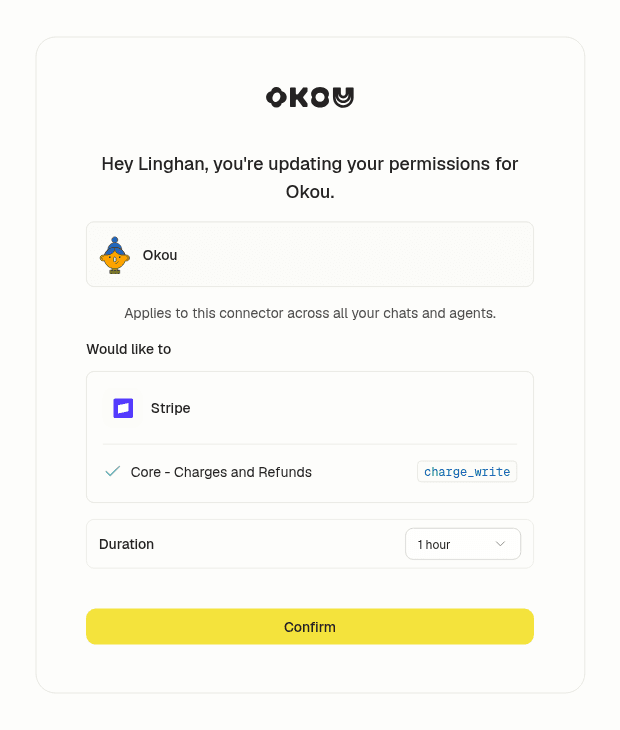 Okou asks before using a new permission. A person sees what's being requested and picks a time limit, such as one hour. View full-size screenshot
How to choose: chatbot, agent, or coworker?
Start with the task, not the tool. Four questions cover most cases.
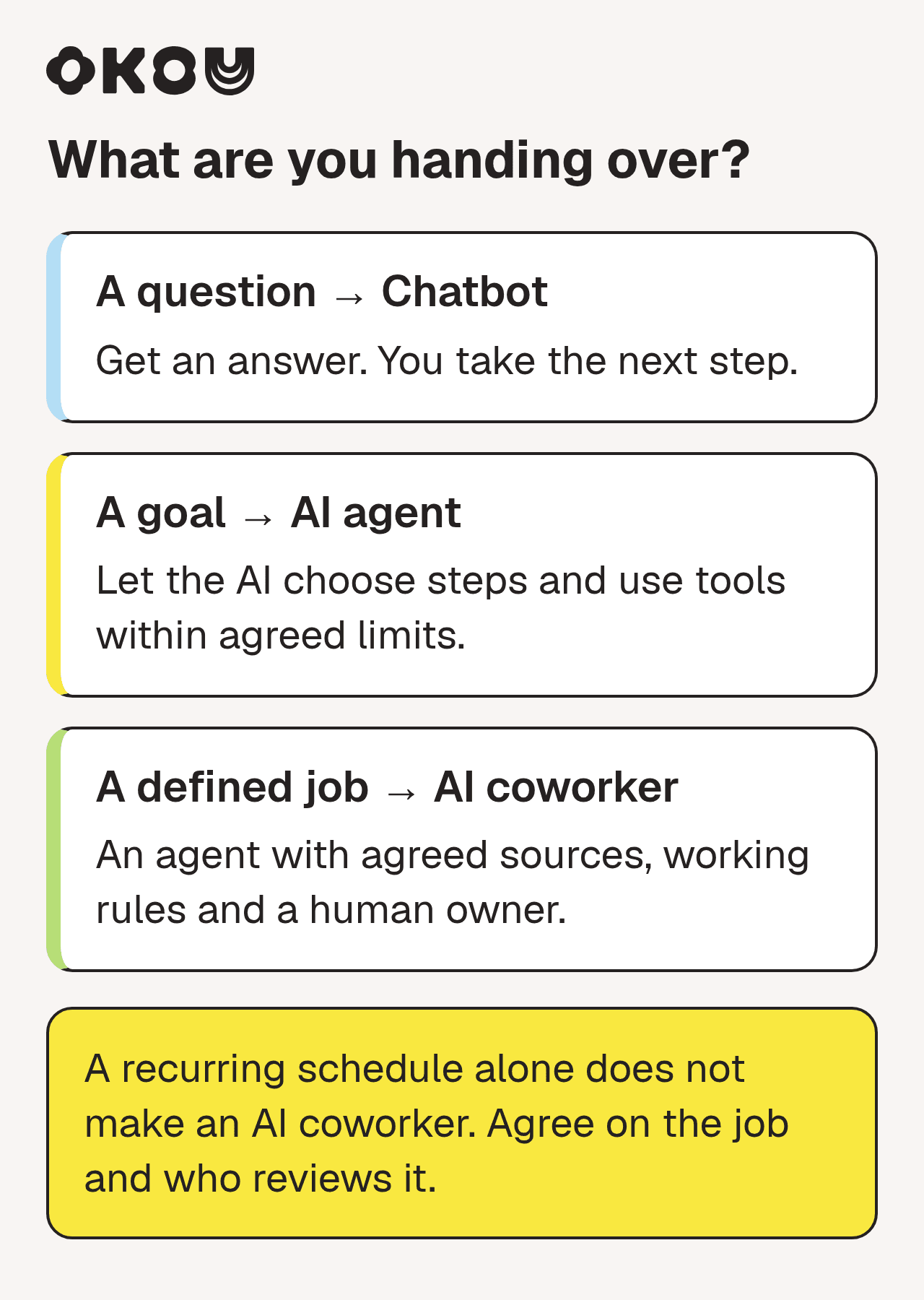 Match the task to the right kind of help. Most teams use all three.
- Will you act on the answer yourself? Use a chatbot. Explaining a contract clause, rewriting a paragraph, brainstorming names.
- Does the AI need to choose the next step based on what it finds? Use an agent, for example to investigate an account across CRM, support, and email. If the path is fixed in advance, an AI workflow may be enough.
- Is this a recurring job with agreed sources, rules, and an owner? That is a coworker setup, for example a Monday pipeline review or the follow-up after each demo. A schedule starts the work; it does not define the job or its permissions.
- Who signs off? Answer this for every agent and coworker task. If nobody can say, it isn't ready to hand off.
One more tip: give it time. In the same talk, Andrew Ng compares checking on an agent too soon to a new manager who hands off a task and asks for an update five minutes later. Judge the finished work, not the first minute.
What this looks like in Okou
Okou's team guide describes the path from one good result to a team habit: do the task once yourself, save the method as a workflow, share it with the team, and let each person connect their own accounts.
- Workflows hold the method: the steps, sources, format, and review rules.
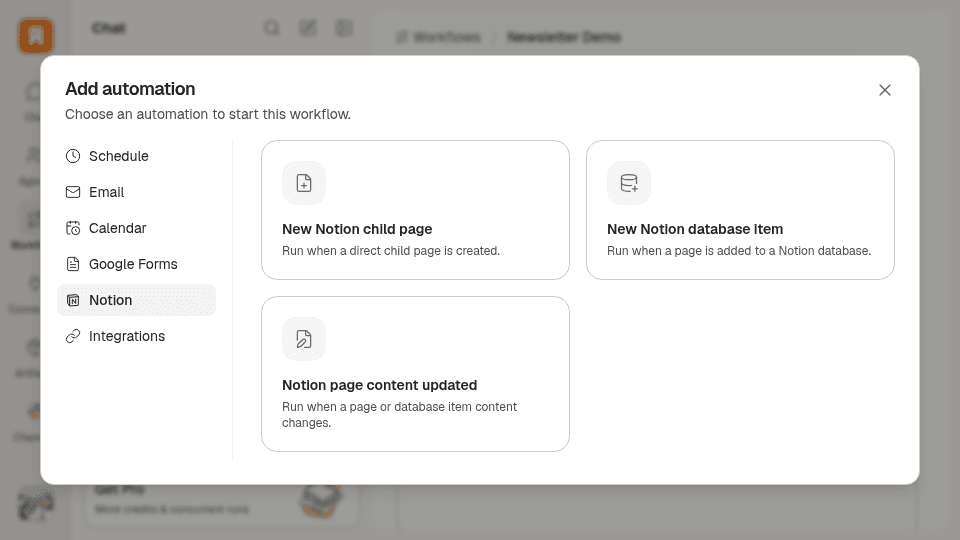
- Automations add the timing: a schedule, a new email, or a calendar change starts the job.
- Work happens where your team talks: you can @mention Okou in Slack or message them directly.
- Work keeps running in the cloud: a long task continues after you close your laptop.
- Emails stay drafts until you send them: Okou can write a follow-up as a Gmail draft, and a person reviews it and presses Send.
 Adding a schedule or trigger to a saved workflow. Some trigger types are only available in some workspaces. View full-size screenshot
To try the renewal-brief example, start in chat with one real account. When the brief looks right, save it as a workflow, then add a schedule. For more ideas, see 20 AI agent examples for real work. For more on approvals, read why your business needs the final say. For keeping shared context accurate, see AI agent context management for teams. For the longer story of AI moving from assistant to colleague, see From copilot to colleague.
FAQ
What is the main difference between an AI agent and a chatbot?
A chatbot answers, and you do the next step. An AI agent takes a goal, uses your tools to gather information or take actions, and returns finished work. The AI model underneath can be the same. What changes is what it is allowed to do.
Is ChatGPT a chatbot or an AI agent?
Both, depending on how you use it. A normal ChatGPT conversation is a chatbot: you ask, it answers. OpenAI also offers an agent-style mode for longer tasks; as of November 2026 that is ChatGPT Work. The label follows what the tool is doing, not its name.
Is an AI coworker the same as an AI agent?
An AI coworker is an AI agent set up for a specific, repeating job, with your team's sources, clear limits, and a person who checks the result. "Coworker," "teammate," and "employee" are product terms, not technical standards, so check what a given product actually does.
What is the difference between an AI agent and an AI assistant?
An AI assistant usually helps one person on request: drafting, summarizing, answering questions. An AI agent goes further and carries out steps toward a goal using tools. The terms overlap, and many assistants now include agent features.
Can a chatbot become an AI agent?
Yes, if you give it access to your tools and data and let it work through several steps. The harder part is deciding what it may read, what it may change, and who approves the result.
Will AI agents replace chatbots?
Unlikely for most teams. Quick questions and simple customer FAQs are well served by a chatbot, which is also easier to control. Agents and coworker setups make sense when the work means gathering information from several places, following through, or repeating on a schedule.