An AI teammate is an AI you hand a whole job to, the way you'd brief a colleague. You don't feed it one question at a time. It reads your team's documents and tools, does the work step by step, and hands back something a person can check, approve, and use again.
That's the short answer. The longer one is about the word "teammate." Lots of products use it now. Some of them mean a chatbot with a friendly name. This guide shows what the word should mean, walks through one real-world style job from start to finish, and is honest about where the comparison to a human colleague breaks.
To understand what lets a teammate take a job beyond the chat box, read the agent basics, which connect the goal, context, and tools behind the work. The AI employee guide explores the limits of the colleague analogy: what you can delegate, and why judgment and accountability still belong to people.
What is an AI teammate?
An AI teammate is AI that takes on a piece of work and carries it to a usable result. You say what you need. It gathers what it needs from the tools you've connected, works through the steps, and gives you something concrete: a brief, a spreadsheet, a deck, a set of email drafts, an updated record.
Three things set it apart from the AI most people already use:
- It takes a job, not a question. A chatbot answers and waits. An AI teammate takes "prepare this month's partner outreach" and does the research, the shortlist, and the drafts.
- It works from your team's information. It reads the brief in Google Drive, the tracker in Sheets, and the decision in Slack. You don't have to paste everything into a chat box.
- It reports back. It shows what it did, asks when something important is missing, and leaves the final call to you.
There's no official definition. Companies draw the lines in different places. Asana sells AI Teammates that work inside its project tool. In November 2026 it added AI Meetings, where a meeting's action items can be assigned to a person or an AI Teammate. Atlassian's People Insights team wrote in July 2026 that the hard part of making AI a real coworker wasn't the AI itself. It was giving it steady access to the team's data, definitions, and ways of working.
Most AI teammates are built on AI agents. An AI agent is software that can plan steps and use tools to reach a goal. "Teammate" describes the working relationship around it: who gives it work, what it can touch, how it reports, and who signs off.
AI teammate vs. AI assistant vs. chatbot
These words overlap. Here's the practical difference for a business team.
| Chatbot | AI assistant | AI teammate | |
|---|---|---|---|
| What you give it | A question | A task inside one app | A job with an outcome |
| What it knows about your work | What you type | What's in that one app | The documents and accounts the job needs |
| What you get back | An answer | A suggestion inside that app | Finished work: files, drafts, pages, updates |
| Who can reuse what worked | Nobody, unless you save the prompt | Usually just you | The whole team |
| Who decides | You | You | You, at the points you choose |
None of these is better in general. For a quick answer, use a chatbot. An AI teammate is worth it when a job touches several tools, would take you an afternoon, and will come up again.
What makes something a "teammate"?
Think about what makes a new colleague useful. You agree on what they're doing. They know the background. You can see what they did. You can stop them or change course. And once they figure out a good way to do something, the rest of the team can use it too.
Researchers spelled out most of this long before today's AI. In 2004, a group led by Gary Klein and David Woods studied what it takes for any automated system to be a good "team player." They said every joint effort needs four things. Here they are in plain terms, with what to look for in an AI teammate:
| What teamwork needs | In plain words | What to look for |
|---|---|---|
| A shared goal | You both know what "done" looks like | Can you hand over a whole job, not just a question? |
| Common ground | You both work from the same facts | Does it read your real documents and tell you what it understood? |
| Predictability | You can see what it's doing | Can you check each step afterwards? |
| Directability | You can steer it | Can you correct or stop it, and limit what it's allowed to do? |
Teams need one more thing the 2004 paper didn't focus on: what one person works out should help the next person. That's the part most AI products skip, and it's where "teammate" earns the name.
The comparison also helps you delegate better. Wharton professor Ethan Mollick makes this point in a 2026 interview: if you know your field, you can instruct an AI and spot its mistakes the same way you would with a junior colleague. He's also clear that the AI isn't a person.
YouTube · Simon Sinek
The AI Skills Nobody is Teaching (And Everyone Needs) | AI Expert Ethan Mollick · June 16, 2026
Mollick says AI "works enough like people" that experienced staff can direct it and catch its errors, while juniors often can't judge the output yet.
Hold on to both halves. Treating AI like a colleague helps you brief it well. It doesn't make the AI responsible for the result.
One job, from handoff to result
Here's what that looks like on a real piece of work. The story is an example. The screenshots come from an Okou demo workspace with sample documents.
Maya runs marketing at a 15-person software company. She needs five creators for a sponsored tutorial campaign. Everything she'd give a new hire is in a Google Drive folder: product positioning, the brand guide, the campaign brief, pricing notes, and a draft partnership offer. Doing it herself would take a day.
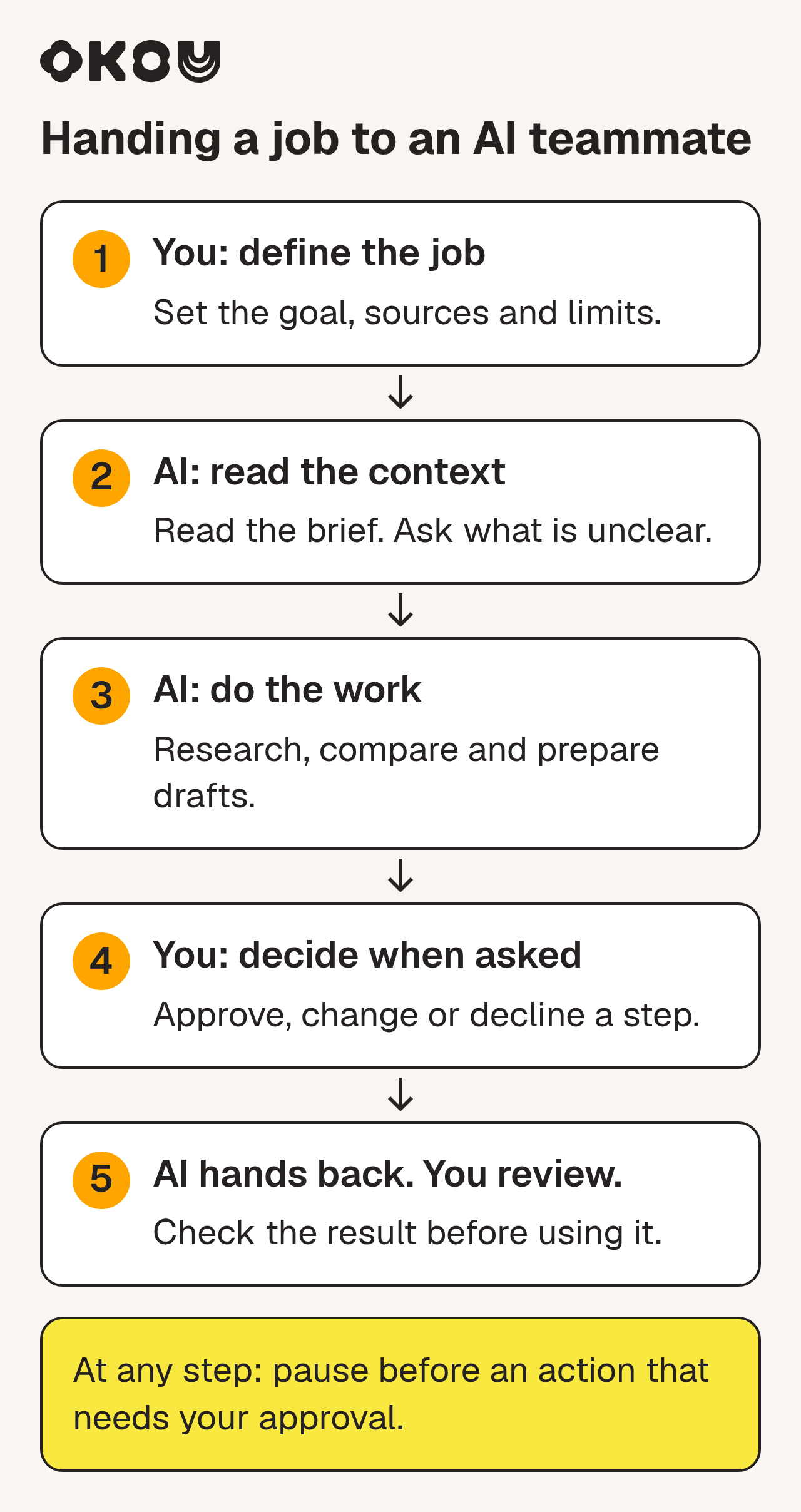
You set the goal and review the result. Whenever a step needs approval, the AI pauses before taking it.
1. Hand over the job
Maya writes a short brief, the way she'd brief a person. Who the campaign is for. What a good creator looks like. She needs five. Nothing gets sent without her review.
This is where most handoffs go wrong, to people or to AI. "Find some influencers" gets you a vague result from anyone. Say what done looks like, who it's for, when you need it, and what not to do.
2. Get up to speed
A good AI teammate reads before it acts. Maya points Okou at the Drive folder. Okou reads the five documents and sums up what each one says, so Maya can fix any wrong assumption before real work starts.

Okou sums up the five campaign documents in a table, then asks one question before starting outreach. Click the image to see it full size. Demo workspace with sample documents.
The last row of that table is the one that matters. It says the partnership offer is "a sponsored tutorial; fee, scope, and usage rights still need agreement." That one line changes what the emails should say. An email that names a fee would be wrong, however well written. This is what "using your team's context" means in practice: the facts in your documents decide what happens next. It's also why Okou ends with a question instead of guessing.
One limit worth knowing: in Okou, a chat keeps its own history. A new chat starts fresh unless you point it to an earlier chat. Nothing gets pulled in from your other conversations behind your back. (More on keeping shared context up to date in AI agent context management for team collaboration.)
3. Do the work where you can see it
Now the real work: find candidates, score them against the brief, build a tracker, write a personal email for each. Each step shows up in the chat as Okou goes. The work runs in the cloud, so it keeps going if Maya closes her laptop.
Maya doesn't need to watch. She probably shouldn't.
YouTube · Sequoia Capital
What's next for AI agentic workflows ft. Andrew Ng of AI Fund · March 26, 2024
Ng compares hovering over agent work to a new manager who delegates a task and checks in five minutes later.
The tools have changed a lot since that 2024 talk. The advice hasn't. If something does look off, Maya can stop the run or send a correction while it's still working ("skip anyone who already works with a competitor"). Okou picks it up without starting over.
4. Stop and ask
Some things shouldn't happen just because the AI decided to: emailing a stranger, spending money, changing customer records, publishing. A trustworthy AI teammate can't do those unless someone allowed it.
Maya allowed Okou to save Gmail drafts, but not to send them. If a job needs something that hasn't been allowed, the run pauses. A person sees exactly what's being asked for and decides yes or no, and for how long. (Okou's permissions guide has the details.)
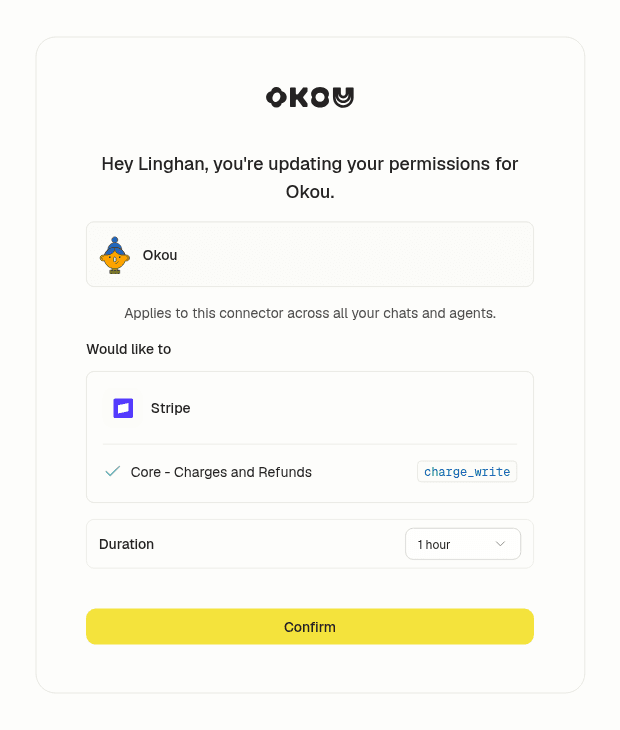
A permission request names the tool, the exact action, and how long access lasts. Nothing happens until a person confirms.
A practical tip: if a step must always stay with a person, don't allow that action at all. Allow the draft, keep the send. We wrote more about this in The AI Pause Debate Is Back. Your Business Needs the Final Say.
5. Hand it back
The job ends with something Maya can use, not a wall of chat text. A tracker with five creators and why each one fits. A personal email for each, saved as a Gmail draft.

The emails come back as drafts. Nothing is sent until a person sends it. Example data.
Maya rewrites one opening line, drops a creator whose audience skews too young, and sends four. That's her part of the job, and it should be.
6. Make it reusable
This is where "teammate" earns the word. Next month, Maya's colleague Dev needs the same thing for a different launch. Without a way to reuse Maya's work, he starts from scratch and learns everything again.
Instead, Maya asks Okou to save the job as a workflow. A workflow is a saved recipe: what to read, what steps to follow, what the result should look like, and the rules ("drafts only, never name a fee before terms are agreed"). Her note about audience age doesn't get saved by itself. She adds it, because a correction only becomes a team rule when someone writes it down.
When Dev runs the workflow, it uses his Gmail and his permissions, not Maya's. Sharing a workflow shares the method, not anyone's inbox or login. And a workflow doesn't run on its own. If the team wants it every month without asking, they add an automation: a schedule, a named owner, and a place for the result to go.
A handoff the next person can audit
Maya's story is illustrative. To test the same handoff yourself, use a small sample brief with three hard rules: the audience must be non-technical business users; each candidate needs recent evidence of relevant work; no fee or outreach may be committed before review.
Ask for a tracker with these columns: candidate, audience evidence, recent example and date, fit, unknowns, draft link, review owner. A candidate without audience evidence stays an unverified lead, outside the qualifying count. An unsent draft is not a contacted partner.
| Review check | What passes | What needs correction |
|---|---|---|
| Evidence | A source and date support the audience claim | A large follower count stands in for audience fit |
| Missing facts | The fee is marked unknown | The draft invents a price |
| Handoff | Each open question has a named review owner | The next colleague must guess what is unresolved |
| Reuse | The workflow contains the corrected rule | The correction exists only in Maya's chat |
Before sharing the method, deliberately include one candidate with no audience evidence. Check that the result flags the gap instead of filling it in. Then let a colleague run the saved workflow with their own accounts. Review the new output and access boundary separately: shared instructions are not shared permissions. This is a repeatable acceptance check, not a reported customer test or a promise of a particular result.
Where the comparison breaks down
Calling AI a teammate sets expectations. Some of them are wrong. Five to keep in mind:
- It isn't responsible for the result. You are. "The AI did it" won't satisfy a customer, a client, or your boss.
- It doesn't remember everything you've ever said. It knows what's in the chat, the files, and the saved instructions you give it.
- Sharing a teammate doesn't mean sharing accounts. Colleagues can use the same AI teammate and workflows while keeping their own logins, chats, and permissions.
- It doesn't learn from a correction unless you save it. Fixing today's job doesn't fix next month's. Updating the workflow does.
- It can be great at one task and wrong at a similar one. A 2023 study of 758 BCG consultants using GPT-4 found AI made them faster and better on most tasks, but worse on one that looked just as easy. Today's models are far stronger than 2023's, so don't read those numbers as current. The lesson still holds: you can't tell from the outside where AI is weak. Someone who knows the work has to check.
The new risk: agreeing with the AI without noticing
There's a quieter problem. Alex Tamkin, a researcher at Anthropic, posted about it in October.
X · Alex Tamkin (@AlexTamkin) · October 27, 2026
"When experts delegate work to an agent, do they still make the key decisions?"
The study behind that post gave 50 professional data analysts a realistic analysis to do with an AI agent. On each key decision, a coin flip set which of two reasonable options the agent would argue for. The analysts didn't know. They went with the agent's side 86% of the time, where chance would be 50%. Afterward, more than half said the final recommendation felt more like their own than the agent's.
This is one study, with one kind of task and one group of experts. But it matches what you'd expect from people, too: a confident colleague who has done all the legwork is hard to disagree with. For Maya, the takeaway is simple. Decide the important calls before you read the AI's argument. She had already decided "no fee until terms are agreed" before the drafts came back, so she was checking the drafts against her rule, not the other way round.
Microsoft's 2026 Work Trend Index shows people sense this. In a survey of 20,000 people who use AI at work in 10 countries (February to April 2026), 86% said they treat AI output as a starting point and "stay responsible for the thinking." Checking AI's work (50%) and critical thinking (46%) topped the list of abilities that matter more now. That's what people say, not what they always do. The study above is a reminder of the gap.
The "AI teammates instead of hires" pitch
You'll also see AI teammates sold as a way to skip hiring.
X · Vasco Calais Pedro (@justvasco) · October 7, 2026
"We built Spinnable with 21 AI teammates and ONLY 5 humans"
Pedro is Spinnable's founder and this is a launch post, so read it as marketing. It's still a fair picture of how the idea is being sold: AI teammates counted like headcount.
Here's the problem with counting that way. Someone still has to set the goal, keep the information current, check the work, and decide when the method changes. Five people working with 21 AI teammates is really five people managing a lot of delegated work. That can be a great trade. It isn't 26 colleagues.
Microsoft's 2026 report asks the questions every team will need to answer: who reviews the agents' work, who's allowed to change the workflows they run, and how one good result gets shared with everyone else. In Okou, the answers have a place to live. The person who starts a job checks what comes back. Team methods change when someone edits the shared workflow. Recurring work runs as an automation with a named owner.
What can an AI teammate take on?
A simple test: if you'd hand the job to a capable new hire with a clear brief and access to the right tools, an AI teammate can probably do the first pass.
- Founders and operators: a weekly brief pulled from your business tools, customer feedback, and numbers, with links, blockers, and who owns what.
- Marketing: a campaign results summary with suggested next steps, or partner research with outreach drafts.
- Sales: a meeting brief from past emails, call notes, and the CRM, plus a follow-up draft and a CRM update you approve.
- Customer success: a summary of a customer's issue and history, with a draft reply for the account owner to check.
- Chief of staff: one leadership update collected from several channels.
- Consultants and agencies: a client research pack, delivered in the client's template.
They have three things in common. They touch several tools. They end in something concrete. And a person can check the result quickly. For more ideas, see 20 AI agent examples for real work.
How much should you hand over?
Choose what the AI may do before deciding when it runs. Start with drafts and widen access only when the job warrants it.
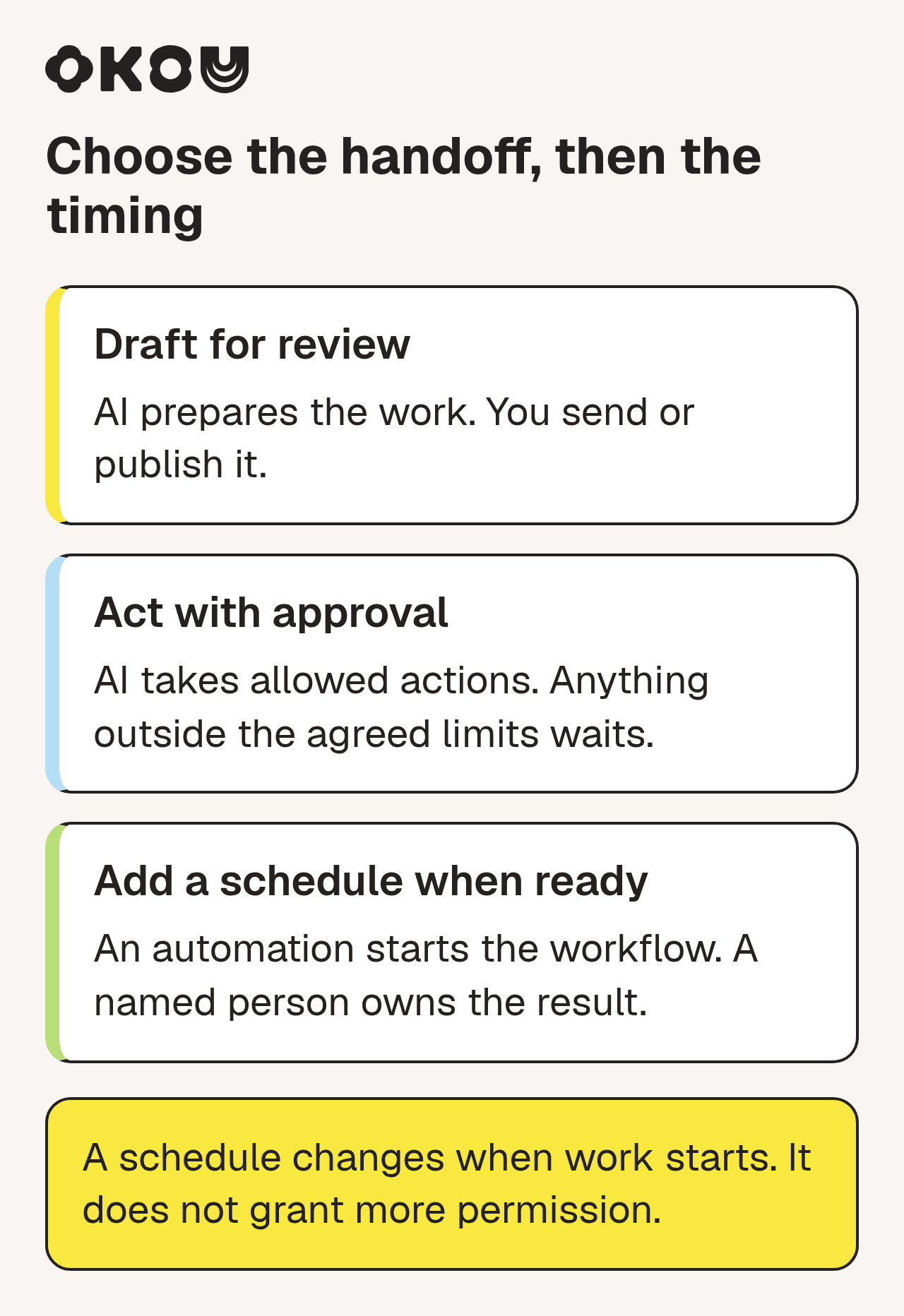
Choose the action boundary first. A schedule can start either arrangement; it does not add permission.
- Draft for review. The AI prepares. A person sends, posts, or publishes. Start here for anything customers will see.
- Act with approval. The AI does the job, and anything it isn't allowed to do waits for a person. Good for budget changes and CRM updates.
- Add a schedule. An automation starts the saved workflow, with a named owner. It keeps the same action and approval limits. A Monday-morning team update is a good first one.
If a draft still needs lots of edits, fix the brief before allowing more actions. Scheduling is a separate decision.
How to tell if a product is really an AI teammate
Anyone can use the label. In a demo or trial, ask:
- Shared goal: Can I hand it a whole job and get finished work back?
- Common ground: Does it read my team's real documents, and tell me what it understood and what's missing?
- Predictability: Can I see each step and check it later?
- Directability: Can I correct or stop it mid-job? Can I allow one action (save a draft) and block another (send it)?
- Reuse: Can a colleague run what worked, with their own accounts, without borrowing my login?
If most answers are no, you have a capable assistant. That may be all you need. It just isn't a teammate.
Where Okou fits
Okou is an AI teammate built for this kind of handoff. Okou's docs put it in three steps: you describe what you need, Okou gathers the context and does the work, and you review and build on the result.
In practice, that comes down to a few habits you saw in Maya's story. Okou reads the emails, documents, and records the job needs, and checks facts against where they came from. Okou picks a format that fits the next person: a short message for a quick update, a document for details that need review, a deck to walk a group through a decision. And when something works, the team saves it as a workflow that everyone can run with their own access. You can reach Okou in the web app or by mentioning @Okou in Slack.
The fairest test is one real job you'd normally spend an afternoon on. Keep it at "draft for review" and look closely at what comes back. For how this plays out across a whole team, read AI team collaboration breaks at the handoff.
Frequently asked questions
What does an AI teammate do?
It takes a job you'd otherwise do by hand, like researching prospects, building a weekly report, or drafting outreach, and carries it through using your connected tools. It shows its steps, only does what you've allowed, and hands back finished work for you to check.
Is an AI teammate the same as an AI agent?
Mostly. "AI agent" is the technology: software that plans steps and uses tools to reach a goal. "AI teammate" is how a team works with it: who gives it work, what it can access, how it reports, who approves the result, and whether others can reuse what worked. Most AI teammates are agents. Not every agent works like a teammate.
Is an AI coworker the same thing as an AI teammate?
In practice, yes. AI coworker, virtual coworker, digital colleague, and AI teammate are all marketing names for AI that works alongside people. None has an official definition. Judge products by what they do: finish real work, use your team's information, let you see and steer the work, and keep you in charge of decisions.
Will an AI teammate replace my employees?
It takes on tasks, not responsibility. It can handle research, drafting, and pulling information together. Someone still has to set the goal, give access, check the work, and own the result. Most small teams use one to get more done with the people they already have.
How do I give an AI teammate access to my tools safely?
Give it only what the job needs. Connect just the tools involved. Allow specific actions instead of everything, for example saving email drafts but not sending them. Use time limits for anything that changes data or spends money. Start every new job in draft-only mode.
What is a good first job for an AI teammate?
Pick something that repeats, has several steps, and is easy to check. A weekly team update, scoring new leads, or research and email drafts for a short outreach list all work well. Keep it at draft-for-review, compare the result with what you'd have done, then save it as a workflow before putting it on a schedule.