Pick one task you'd like help with. The best AI teammate for booking an appointment may be different from the one you'd choose to prepare a client report.
For everyday admin, look at Muse, Poke, or Martin. For ongoing business work, compare Claude Duet, Okou, and Lindy. Tasks in Gemini and OpenAI dots also belong on your list if you already use Google or ChatGPT.
Prepared for Okou. We reviewed product interfaces and public demos, and used a test account to explore Okou. This is a guide to product fit, not a performance ranking. Review methods and dates.
Best AI teammates at a glance
| Agent | Where to start |
|---|---|
| Muse | Everyday admin and longer-term goals, with an activity history to check what's happened. |
| Claude Duet | Ongoing professional work, with separate places for tasks, finished work, and decisions that need you. |
| OpenAI dots | An AI teammate connected to your ChatGPT context, with a view of its background work. |
| Tasks in Gemini | Help using your Google accounts, with a Chat / Task switch. |
| Grok Bot | Several agents coordinated through a primary Bot. |
| Cue by Manus | Agents with their own phone, email, wallet, and computer, brought together in group chats. |
| Okou | Research and deliverables built from business context and external data, with workflows colleagues can reuse. |
| Poke | A personal assistant you can text. |
| Martin | Scheduling and inbox help through email, messaging, and phone. |
| Lindy | Recurring client work and daily briefings. |
| Lucie | Personal context across iPhone and Mac, with suggestions you can approve. |
| J.Doe | Follow-up work drawn from conversations and business context. |
| Ken | A personal assistant with a cloud computer and a clear split between “Done” and “Needs you.” |
Some of these products have waitlists or regional restrictions. Their sections below explain the access limits we found.
What is an AI teammate?
An AI teammate is an assistant that remembers useful context and can use connected tools to work on your behalf. You might ask it to prepare a meeting brief, arrange an appointment, or follow up on an earlier task. It can return with a result or ask you to make a decision.
This guide focuses on AI teammates you can work with directly, from business assistants to tools for everyday admin.
When trying one, look beyond the first reply. Can you see what's still running? Can you correct what it remembers? Is it clear when a message is only a draft? Those details matter once you're trusting it with real work.
Muse: keep track of everyday tasks and goals
The Activity screen in Muse's public tour is a good place to begin. It lists actions such as emailing a carrier, organizing moving documents, and booking movie tickets. You can see what happened without reconstructing it from a long conversation.
Goals has its own area. That's a sensible distinction for something like a move: booking one appointment is a task; getting everything ready takes more than one request.
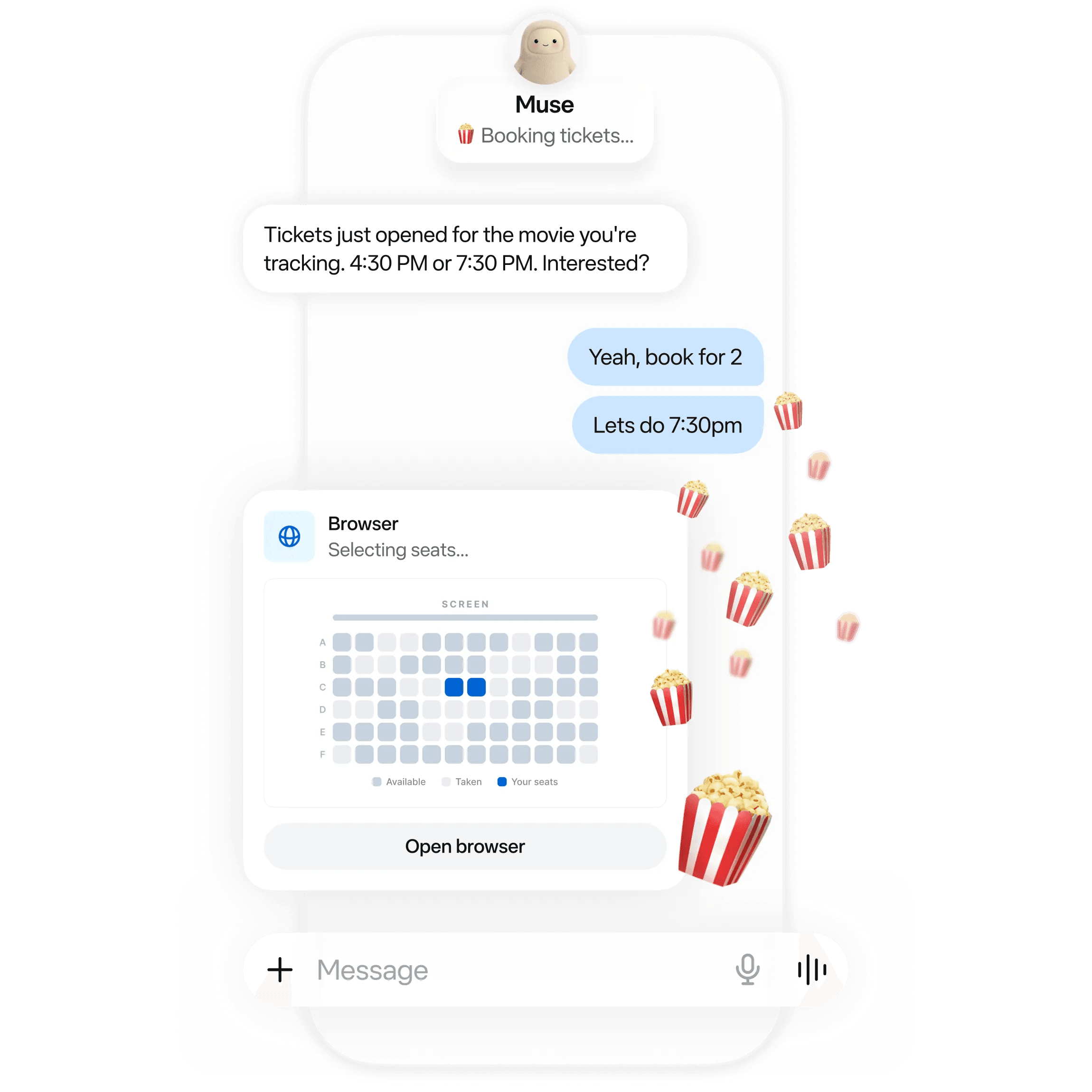
Muse's official booking example: the conversation and browser action stay visible together. Product demonstration.
Meta's help documentation describes a main chat and side chats that share context, along with reminders and a library for created files. That makes Muse a useful candidate if your requests move between personal admin and research.
Access is the catch. Muse was still in limited testing when we reviewed it. Meta lists a free allowance, Power at $20 per month, and Maximum at $100 per month, but availability depends on your account and location.
Watch Muse in use. No Code MBA's October 9 review shows a training plan built from a goal, then saved as a PDF. Start at 7:20 to follow that flow.

Claude Duet: review the decision before it goes out
The clearest detail in Claude Duet's public demo is an email waiting for approval. Duet has prepared a message with a deck and data-room link. The recipient, subject, and body are visible above two buttons: Not now and Send.
You can read what will leave your account before deciding. For a founder or consultant handing off preparation work, that's an important review point.
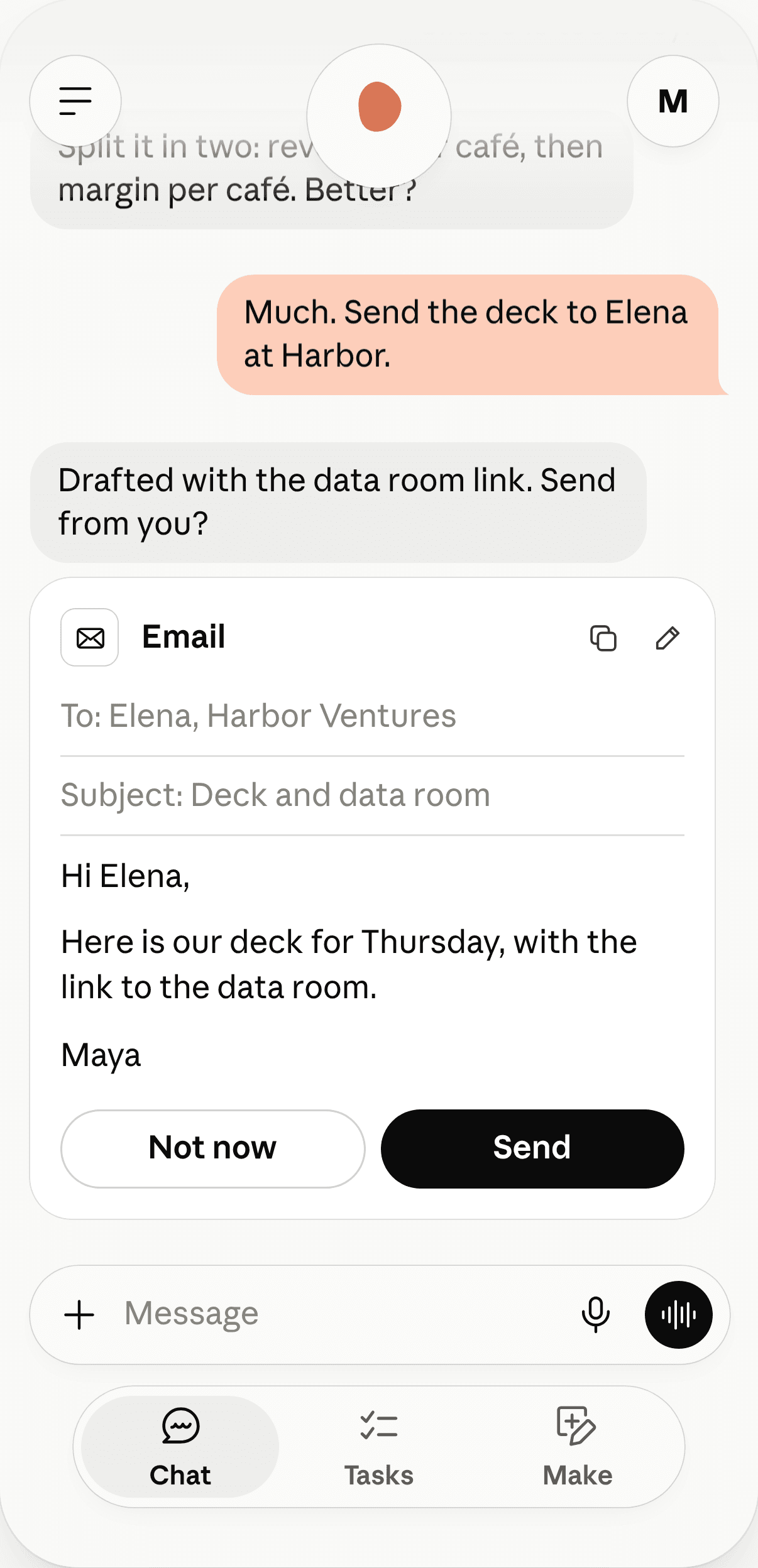
Anthropic's interactive demo: the email stays at a decision point, with its contents visible above Not now and Send.
Duet also separates Chat, Tasks, and Make. The conversation has a place, and so do the work in progress and the things it produces.
The access rules are less straightforward. Duet has a US waitlist for eligible Pro, Max, and Ultra subscribers; Team and Enterprise plans aren't included. Background work counts toward your plan usage. Its cloud computer also differs from a browser session you can watch and take over, so check that distinction if direct supervision matters to you.
Watch Duet's task review. No Code MBA's November 11 video follows requests through to finished reports. Start at 7:45 to see the task progress, documents, and review controls.

OpenAI dots: build on your ChatGPT context
If you've already spent time giving ChatGPT context about your work, OpenAI dots is a natural product to look at next. OpenAI gives each dot memory and its own cloud computer.
The Activity View is the part we'd inspect first. Once an assistant is working in the background, you need somewhere to see what it's doing. The published interface shows a named assistant handling an ongoing request alongside that activity.
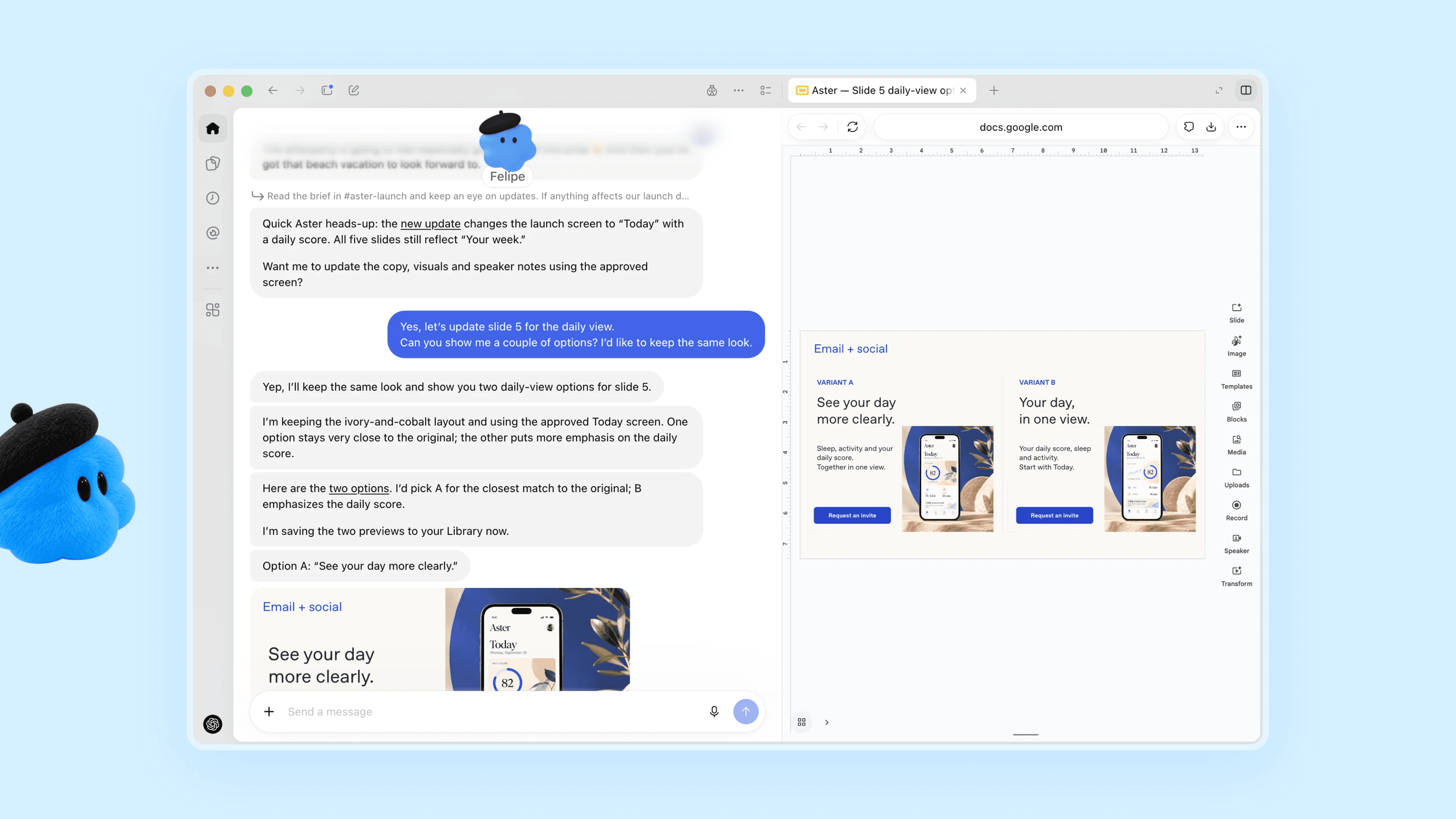
OpenAI's official dots interface, showing a delegated task and its activity. Source image retrieved November 18.
The getting-started guide explains permissions and limits on proactive work. Access depends on plan and region. At the time of review, the rollout excluded personal accounts in the EEA, UK, and Switzerland. An ordinary ChatGPT subscription doesn't necessarily give you access to dots.
Tasks in Gemini: help using your Google accounts
Google announced Tasks in Gemini on November 17, with a Chat / Task switch on the home screen. This is the current consumer entry point to look at; older guides may still call it Gemini Spark.
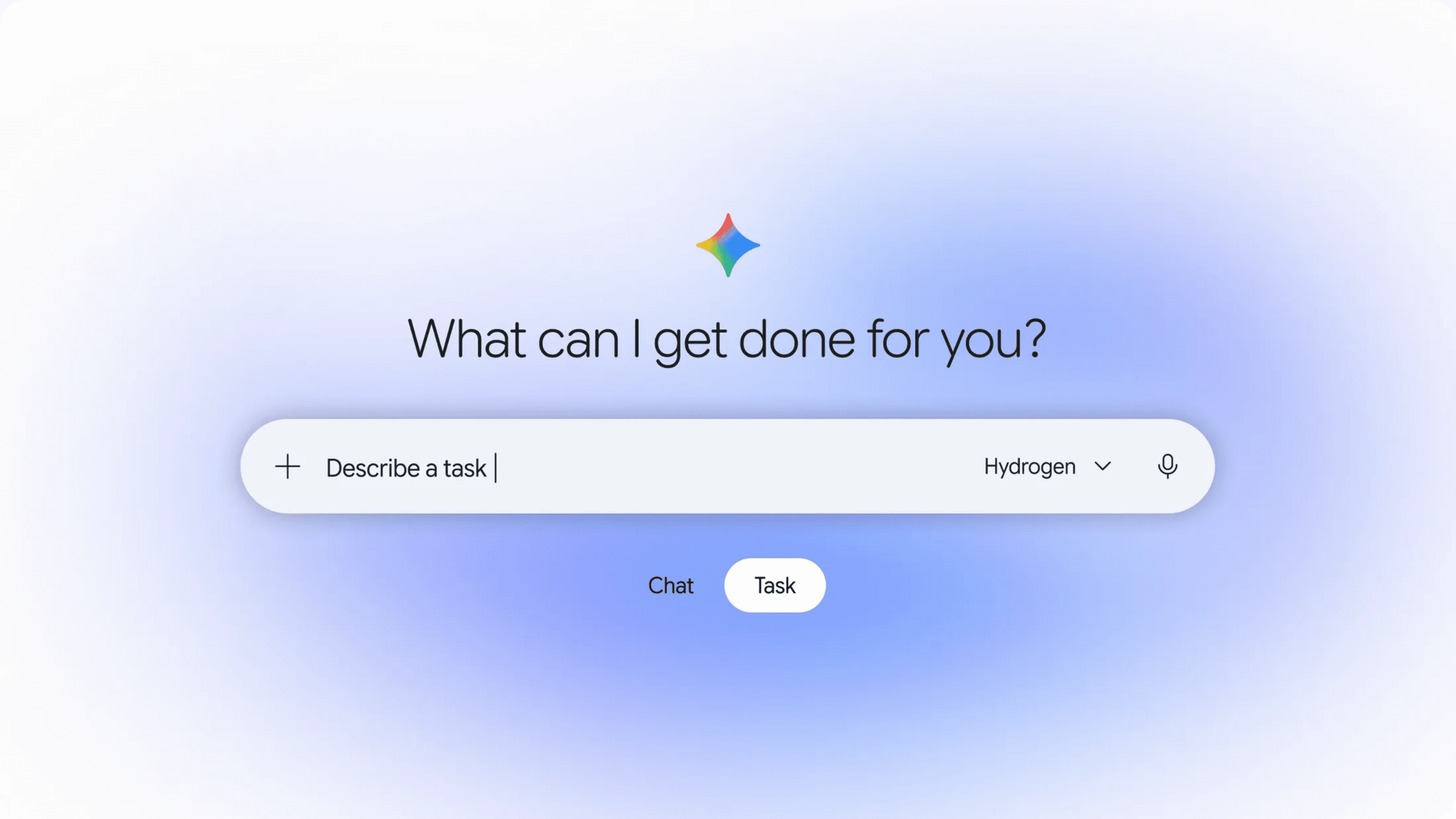
Google's November 17 announcement shows the Chat / Task switch, making the choice visible before you start typing.
The announcement describes calls, shopping, calendar work, and help using connected Google accounts. Purchase settings include approval rules and spending caps. Supported regions also get text messaging and email forwarding as ways to send a request.
If your calendar, files, and email already live with Google, this may be an easier place to start than setting up another service.
Google says the update is rolling out free across six countries, with advanced features starting in the US. Some calling features have state restrictions. Texting requires an eligible US number and carrier, so the announcement alone doesn't tell you what your account can do yet.
Grok Bot and Cue: working with more than one agent
Grok Bot's public demo has a Chief of Staff alongside other Bots. One response brings together calendar changes, a prepared brief, and replies waiting for approval. The appeal is having one place to find out what needs your attention.
Cue makes the separate agents more visible. Its tour shows an agent list and group-chat controls. Each agent can have its own phone number, email address, wallet, and computer. Manus's launch announcement describes Cue as a standalone app, separate from the main Manus workspace.
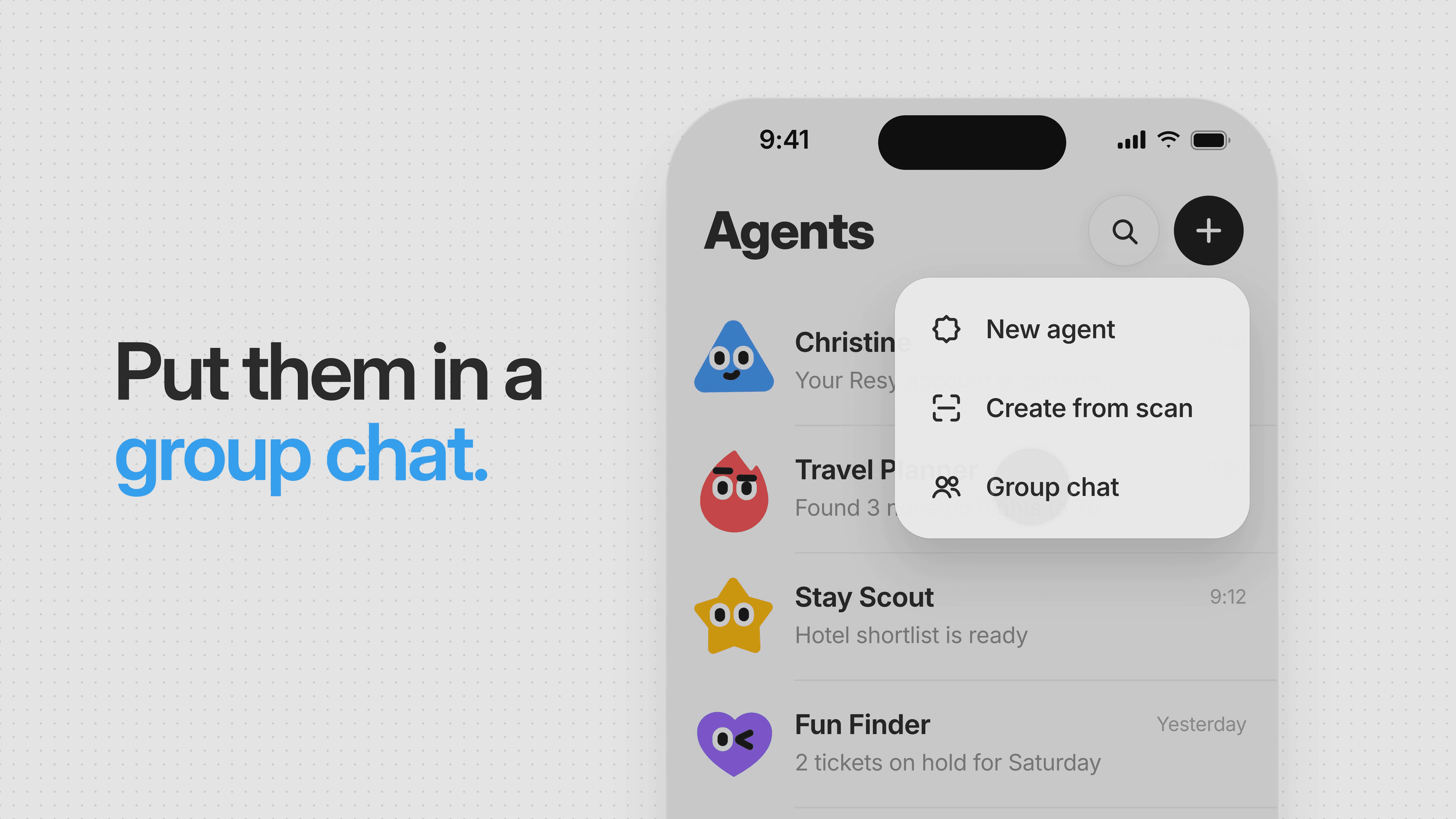
Cue's official tour: an agent list and a group-chat control make it clear who can join the conversation.
This setup raises a practical question: if several agents are involved, which one has permission to send a message or make a purchase? We'd want that to be as easy to understand as the conversation itself.
Cue launched with limited free invite-code access. Its site has desktop and mobile entry points, but we couldn't confirm that every new account can enter. Grok Bot's current eligibility and price also need a direct account check.
Okou: turn business context into work your team can use
When a job starts in your inbox and ends with a client proposal, Okou is built to follow it across your tools. Its What is Okou? guide explains how it gathers context, produces work you can review, and helps colleagues build on it.
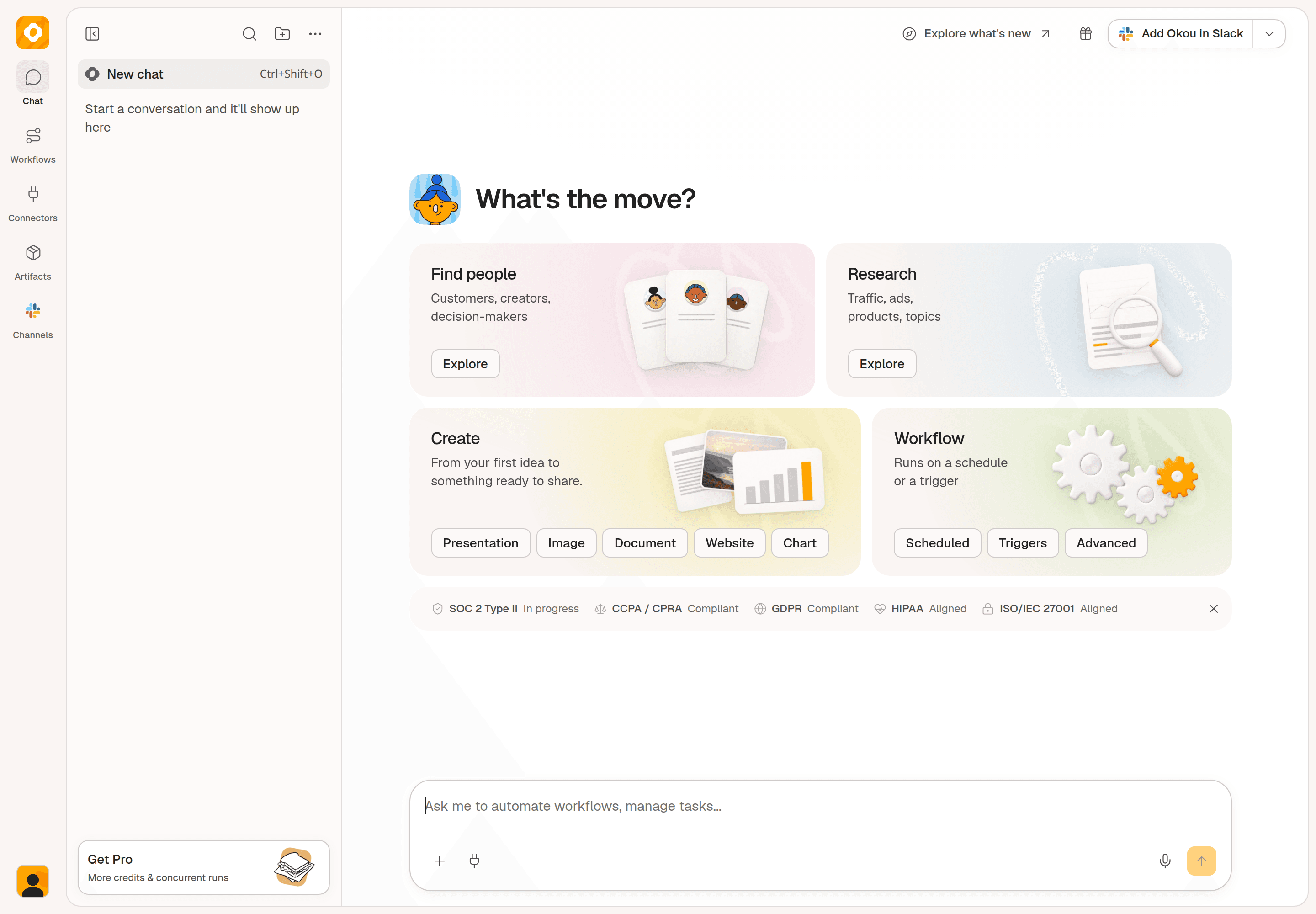
Okou's main workspace, captured in a staging test account on November 19. Task shortcuts sit above the message box; Chat, Workflows, Connectors, and Artifacts stay in the sidebar.
Context. Customer conversations, documents, and earlier decisions give Okou the background for a task. It can gather that information from connected Slack, Gmail, Notion, Drive, and CRM accounts. Corrections and earlier results remain available in the same chat, so you can keep refining the work.
Data. Internal records tell part of the story. Okou can bring in company research, market information, and other public sources to check what's changed. For a meeting brief, that means combining account history with current information and flagging questions that still need an answer.
Generation. Choose the format the next person needs: a proposal document to review, a presentation for a decision, or a webpage report to explore. Okou can turn research and data into these outputs, then revise them with your feedback in the same conversation.
Collaboration. Once a method works, save it as a shared workflow. Colleagues can reuse the procedure and output standard with their own connected accounts and permissions. A good customer-briefing process can become something the whole team uses for the next account.
You'll need to connect the relevant apps and choose what Okou can access. Our test workspace had no real business accounts connected, so this walkthrough checks the interface rather than the quality of those connected workflows. Pro starts at $20 per month, with credits and package choices affecting usage.
Watch Daniel's onboarding test. In his October 18 review, Daniel | Tech & Data walks through an onboarding plan in Google Docs, calendar invites, a Slack announcement, and a welcome-email draft.

Poke, Martin, and Lindy: help close to your inbox
Poke
Poke is for people who would rather text an assistant than open another dashboard. Its public phone UI shows an ongoing conversation with personal context, and the web sign-up starts with a phone number.
That feels familiar for reminders and follow-ups. The thing to look for in a trial is how you find an unfinished task once the conversation gets busy.
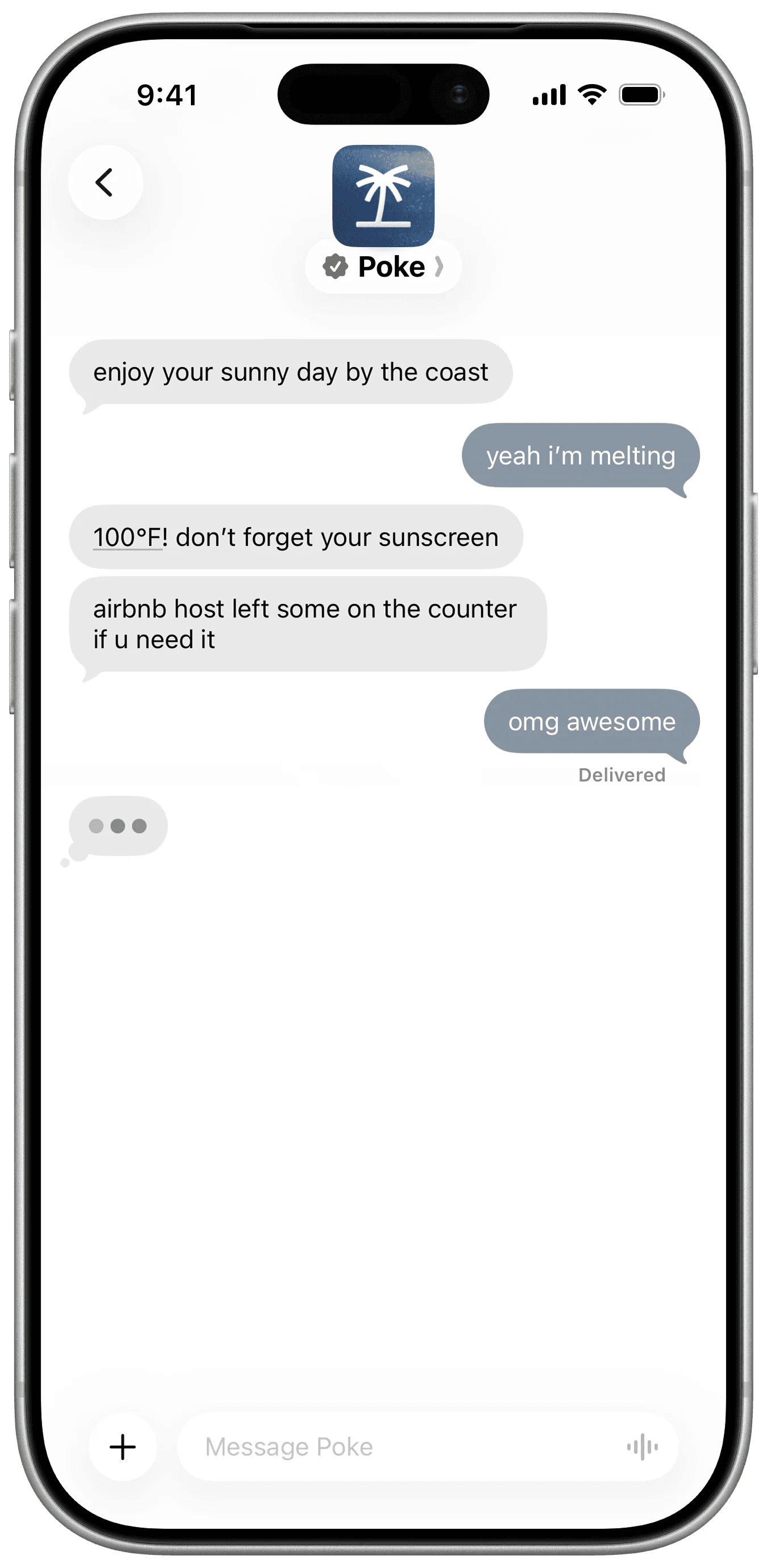
Poke's official messaging example. The conversation is the main interface.
At review, Poke's site announced it was joining Cognition and listed Free, Pro at $19 per month, and Ultra at $199 per month. Check the current plans before subscribing while that transition develops.
Martin
Martin's public screens show a familiar way to delegate scheduling: copy the assistant into an email. Other examples include a phone briefing and an inbox with draft status.
For arranging a meeting, email has an obvious advantage. The other person can stay in the conversation they already use.
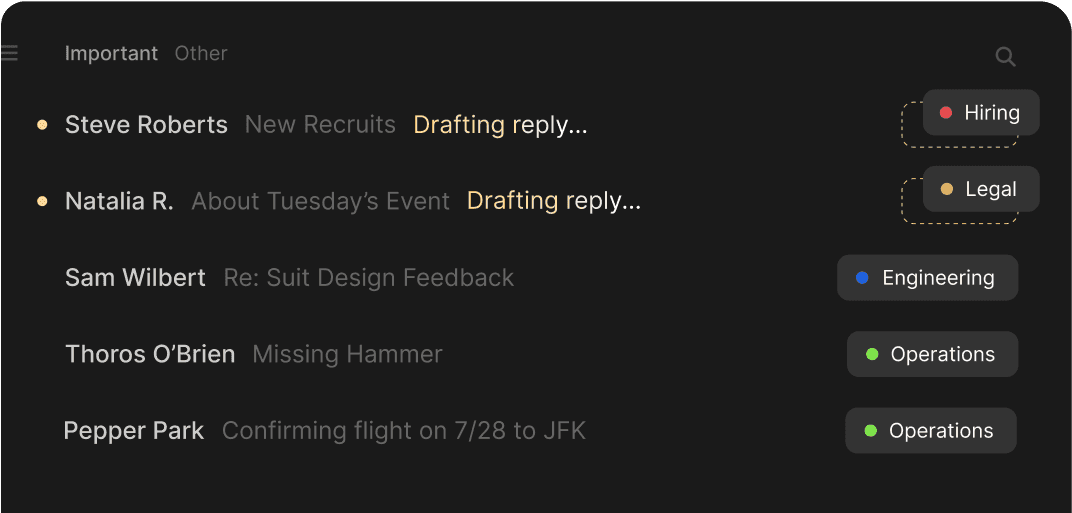
Martin's official inbox UI. The drafting status helps distinguish a reply in preparation from a finished action.
Take a moment with the pricing page. Basic is $35 with monthly billing; the $21 figure is a monthly equivalent paid yearly. Pro is $49 monthly, or a $30 monthly equivalent on annual billing. Compare the commitment as well as the headline number.
Lindy
Lindy focuses on recurring work such as leads, proposals, invoices, and client reports. Its public demo includes a daily brief with completed work and items that need attention.
That's the screen to look at if you're trying to reduce the time spent checking several tools each morning. Can the brief tell you what you need to decide, without making you open every conversation?
A Lindy workspace reference on Mobbin also shows agent status and integrations. Its capture date isn't supplied, so treat it as a reference rather than the latest app UI.
Plans start at $29.99 per user per month. Credits and active-user billing affect the total.
More AI teammates appearing on X
The smaller launches are worth a look too. Some have a clear idea about a particular job; others still have little to show beyond a waitlist. These are the details that stood out in the sources we could inspect.
Lucie: turn personal context into a suggestion
Lucie's App Store example starts with a simple preference: “I want to be more present with my family in the evenings.” The UI saves that intention, shows the week, and offers Not now or Move them.
That's more informative than a broad promise to “know you.” You can see the connection between the preference and the proposed calendar change, then make the decision yourself.
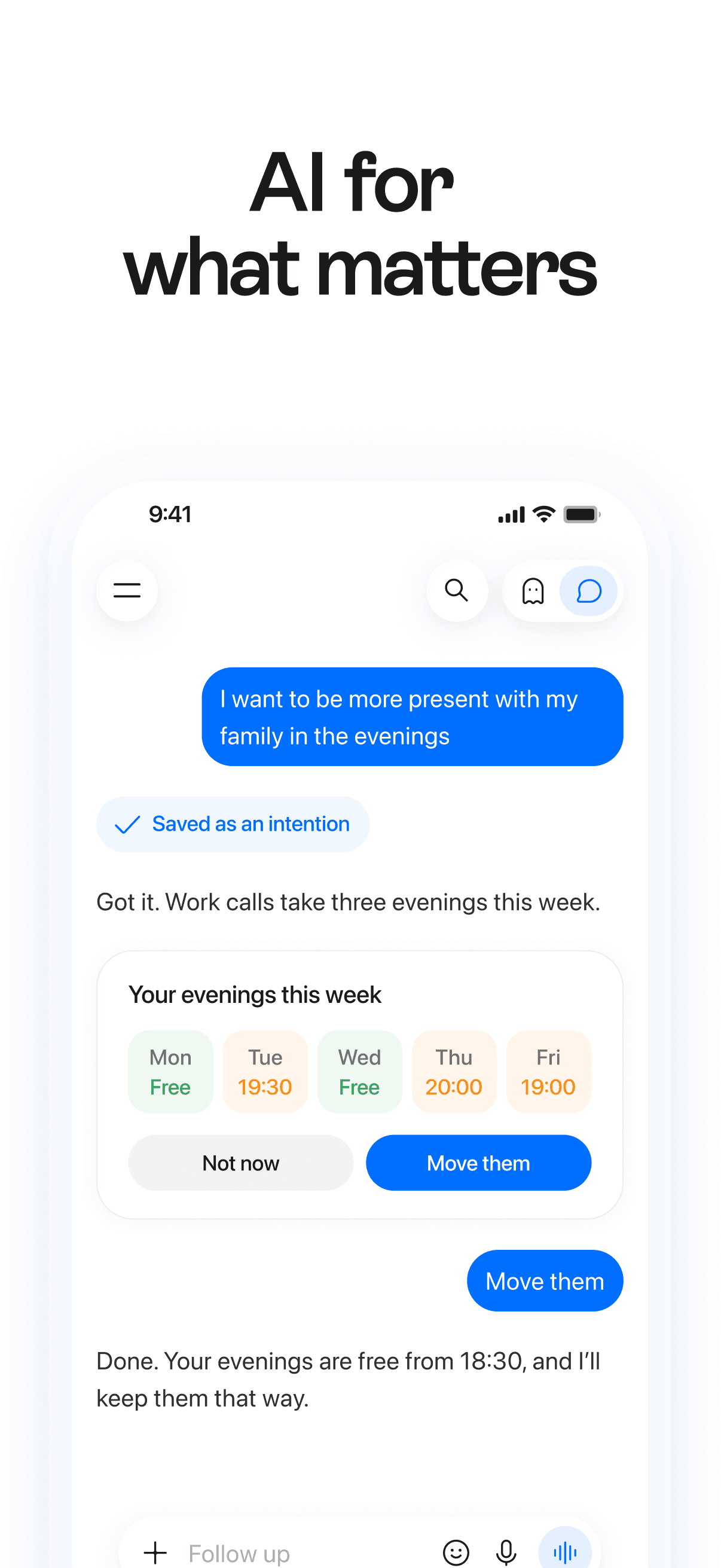
Lucie's official App Store screenshot: a saved intention leads to a calendar suggestion with an approval choice.
Lucie works across iPhone and Mac. Its feature documentation describes memory review, saved tasks, and pause and stop controls for computer work. Device pairing and account permissions determine which context it can use.
J.Doe: make the follow-up visible
J.Doe's public demo follows a call about expansion plans. It brings in a company profile, then proposes research, a report, and a briefing email.
The line that matters is “Ready. Nothing sent.” It tells you where the work stands without making you guess whether an email has already gone out.
The app is in beta. Its proposed O1 device is listed for early 2027, so treat the app and the announced hardware as separate buying decisions.
Ken: separate “Done” from “Needs you”
Ken offers a personal assistant with a cloud computer, memory, scheduled work, and Telegram access. In its public examples, a morning update splits into Done and Needs you. A drafted reply has a Review control; an account issue has a Fix control.
That distinction is easy to read. You can scan for the things that require a decision instead of treating every update as another task.
Ken says the included AI credits let you try it, but generally won't cover a month of daily use. You can connect a supported AI subscription or use its own offering. Its computer can sleep and wake for scheduled jobs. We reviewed the examples and documentation without provisioning one.
Instinct: an assistant you text or call
Instinct describes an assistant you text or call that can use a phone and computer. Its public site was sparse when we checked it.
A September 15 walkthrough by Greg Isenberg shows a restaurant-booking exchange and a separate card for securely adding payment details. It gives a useful view of the idea, but we couldn't verify that flow in a current account.
Keep Instinct on your list if you want help with personal errands. Access, pricing, and the current app version remain open questions for this review.
Atlas and Jett: compare trips before booking
Atlas's founder launch video shows place cards with Shortlist, Details, and Ask Atlas controls. You can keep an option while asking more about it. The site still leads to an invitation request.
Jett's November 17 video starts with a meeting in the calendar. It asks whether the trip should extend beyond that meeting, then offers separate flight and hotel cards. Its site also explains the factors behind example flight scores.
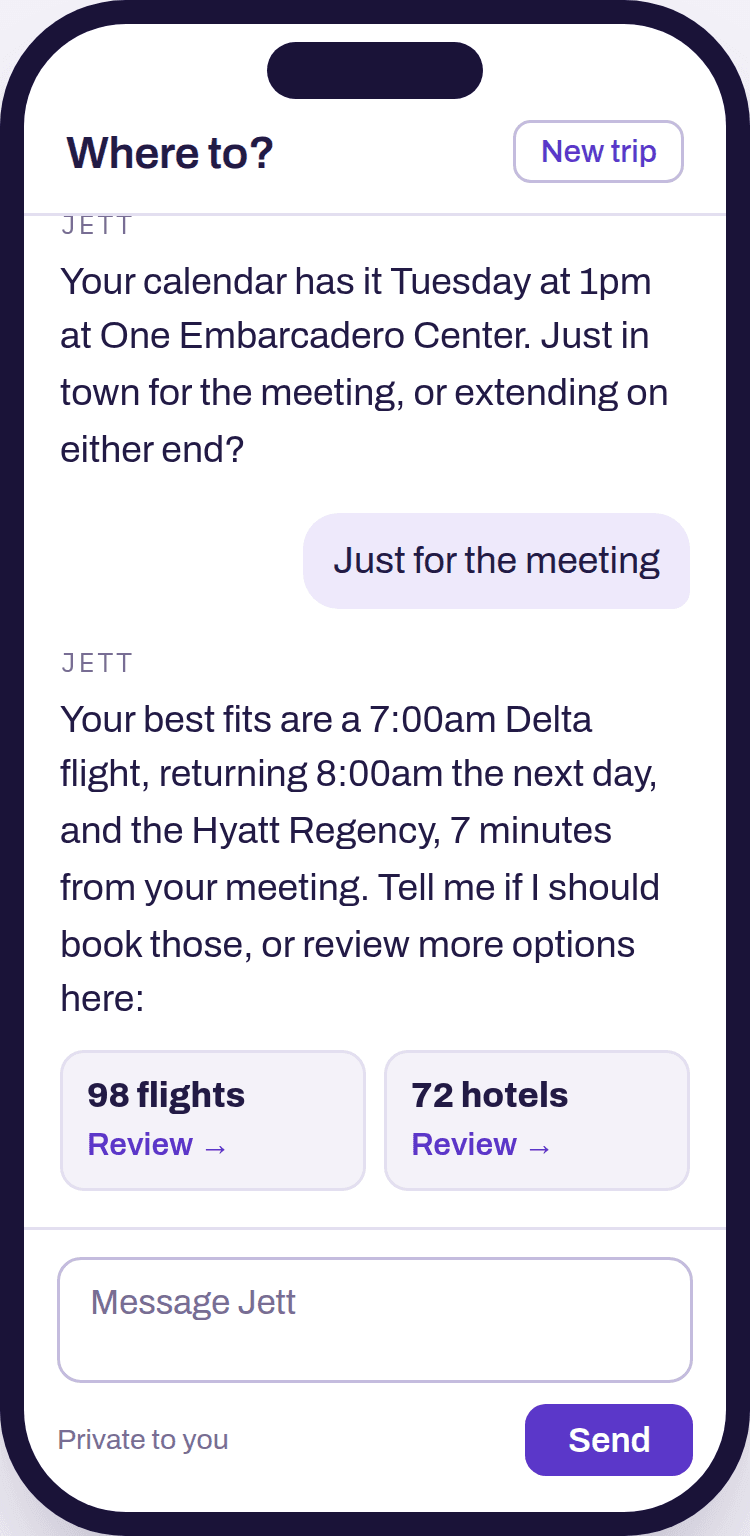
Jett's official interactive demo, captured November 19. Flights and hotels have separate review cards; the counts shown are demo data.
When you're planning a trip, a shortlist lets you compare options before committing. These interfaces make room for that comparison, though we didn't test booking in either product.
More AI teammates to consider
The directory below keeps the smaller and more specialized products in view. Descriptions come from their public pages, demos, or app listings. It isn't an exhaustive list of every launch.
Messaging and everyday admin
| Product | What to know |
|---|---|
| Pally | A personal assistant reached by text. Its site showed a heavy-volume notice when we checked. |
| Fo by Wajo | Calls, bookings, and purchases, with human help when needed. Find out when a person joins and how purchases get approved. |
| Lucas | Reservations, appointments, and refunds over text. The public film shows a check-in card; the app-build date isn't supplied. |
| Rene | Morning updates, focus, and coordination through messages. Available context depends on connected accounts and shared conversations. |
| Iris | Briefings, email, reminders, and plans in a phone thread. We saw phone onboarding and vendor demos. |
| Caddy | Reminders, calendar context, and follow-ups in Messages. Check beta access and where finished work appears. |
| Brea | iMessage requests and a browser-task demo. Our review covers the public examples. |
| Tab | Examples for restaurant bookings, calls, and flights. Sign-up uses a phone number. |
| Orchid | A personal-assistant message thread and connected services. The homepage directs new users toward Keiki, so confirm which offering you're getting. |
| Sundae | A personal assistant with its own computer and messaging entry points. The site labels it beta. |
| tinyNature | A WhatsApp-style assistant with email and delegated tasks. Public examples show the idea; we haven't tested its agents. |
| szn | Demos follow a request through calls and follow-ups to a result. Pricing and account access weren't established. |
| Zapia | App, web, and WhatsApp entry points, plus scheduled tasks. Language and region support affect availability. |
| WeClaw | Choose a personality or build your own, with a team behind the agent. |
| Chottu | India-focused requests by message, photo, or voice. The site describes UPI payments; location and merchant support matter. |
Money, calls, travel, and shared plans
| Product | What to know |
|---|---|
| Boski | Subscription cancellations, bill negotiation, and refunds. Savings claims weren't independently verified. |
| Asmi | Its website demo shows repeated call attempts and follow-ups for a cancellation. |
| Mitra | Phone coordination with incoming and outgoing call examples. We didn't test calls. |
| asaply | An interactive coffee-order demo ends at a payment-confirmation card. |
| Atlas by Voyage Labs | Trip planning and monitoring. Its November 17 founder video shows shortlists and Ask Atlas controls; beta access wasn't tested. |
| Jett | Flight and hotel cards with reasons behind the recommendations. Booking reliability remains untested. |
| Tomo | Personal conversation, goals, reminders, and group coordination. Its site showed a heavy-load notice during review. |
| HireAlpha | Friend, Coworker, and Cofounder personas in separate threads. Compare the price of the persona you actually need. |
| Folk | Social characters with reminders, shopping, and everyday help. More socially focused than a dedicated business assistant. |
| Boba | One-to-one and group planning, with booking after agreement. Check who in the group can approve an action. |
| Wabi | Shared plans and tasks with people close to you. We reviewed App Store screenshots. |
| Ohai | Family calendars and household coordination. A focused option for shared home admin. |
Apps for your devices
| Product | What to know |
|---|---|
| Comma | Tasks, routines, and a cloud computer, with Mac context. Check which jobs need your local Mac. |
| Eney | Mac and iPhone assistance tied to personal context. Review the device requirements and where each task runs. |
| Halo | An iPhone briefing that connects personal sources and supports actions. AI-provider costs may be separate from the app price. |
| Underdog | An on-device personal AI with email, calendar, and dictation in its public UI. Invite-only beta; local-processing claims weren't audited. |
| OpenHuman | Desktop personal AI with memory, connections, and workflows. The software is free, but running its models can cost money. |
| Linger | A desktop project built around local models and memory. Expect more setup, and read the hardware requirements and license. |
| Skye | Personal briefings on your phone's home screen. Look into what it can do beyond presenting information. |
A few related names need separating out. SPIRITT emphasizes company work and a cloud workspace. Sensei by Kosuke focuses on coding-agent decisions across devices. Dola returned a regional restriction in our environment, so we couldn't assess its current UI.
How much does an AI teammate cost?
Check both the subscription and what's included. A low monthly price can come with limited credits, and a quoted monthly equivalent may require a full year upfront. Purchases an agent makes for you are a separate expense.
| Product | Price and billing notes, checked November 18 |
|---|---|
| Muse | Free allowance. Power is $20/month; Maximum is $100/month. Usage and regional limits apply. |
| Claude Duet | Included for eligible paid individual-plan access, with a waitlist. Background work counts toward Claude usage limits. |
| Tasks in Gemini | The new rollout was announced as free. Features and availability vary by region. |
| Okou | Pro starts at $20/month. Credits, packages, and concurrency affect usage. |
| Poke | Free, Pro at $19/month, and Ultra at $199/month. Check channel and plan limits. |
| Martin | Basic is $35/month and Pro is $49/month with monthly billing. Lower advertised equivalents require annual billing. |
| Lindy | From $29.99/user/month, with credits and active-user billing to consider. |
| Halo | $69.99 one-time US price after a seven-day trial. AI-provider costs may be separate. |
These are the displayed US-dollar prices from the reviewed sources. Confirm the checkout total and included usage before paying.
Which AI teammate is best for me?
Choose one recurring job and try two or three products that are available to you. For everyday admin, that might be Muse and a messaging assistant. For professional work, Duet, Okou, and Lindy are reasonable starting points.
Give them the same request. For example:
Prepare a brief for tomorrow's meeting from the documents I select. Link to the sources, list the missing information, and draft a follow-up email for me to review.
Then judge the work you get back. How much did you have to correct? Could you follow the progress? Was the output useful enough to keep? That will tell you more than counting the features on a pricing page.
If business work across your apps is the priority, try Okou with one task and a clear output in mind.
Can ChatGPT be used as a personal assistant?
Yes. It can help with planning, research, and writing, with further actions depending on your account and product mode. For ongoing context and proactive work, look at dots and its eligibility. Those features aren't available in every standard chat.
Can an AI teammate work when my laptop is closed?
Some run in the cloud and can continue while your laptop is off. Others need your device for certain tasks. A cloud assistant may still need your Mac to reach a local file, so ask about the job you want done rather than the product as a whole.
Can an AI teammate send messages or spend money?
Some can, with the right tools and permissions. Before granting access, find the controls for reviewing messages, confirming purchases, and setting spending limits. When an action matters, check the actual sent message or receipt as well as the assistant's reply.
How we reviewed these products
We reviewed public product pages, interactive demos, help documents, launch videos, and app listings on November 18, 2026. We also explored Okou with a staging test account and captured its main workspace on November 19. No real business accounts were connected to that workspace.
We compared how each interface shows work in progress, remembered context, finished outputs, and decisions that need you. We didn't run the same task across every product or measure completion speed and reliability. Vendor demos and screenshots illustrate the interface; their example results aren't our results. No messages, calls, bookings, or purchases were made for this review.
Captions identify the image sources. The embedded YouTube videos show the creators' own demonstrations, published on the dates given above; they are separate from our walkthroughs. Some assets have no confirmed app-build date, and the Instinct video is an older reference. Availability and prices can change after the review date. This article was prepared for Okou, which is included in the comparison.