
At Techweek, I gave so many demos of using Okou to automate finding people that I lost count. Here's the walkthrough so you can try it yourself.
I'll use a creator partnership campaign as the example: give Okou your campaign context, find relevant creators, and use one Google Sheet to keep track of outreach and follow-ups.
Step 1: Define who you need and what should happen next
Tell Okou who you need and why. For this campaign, I want creators who teach marketers how to use AI, so I can discuss a sponsored tutorial.
The same approach works across several scenarios:
| Scenario | Who you're looking for | Useful outcome |
|---|---|---|
| Sales prospecting | Buyers and decision-makers | A qualified conversation |
| Recruiting | Candidates, freelancers, and specialists | An introductory interview |
| Creator partnerships | Creators, newsletter writers, and podcast hosts | A collaboration discussion |
| Expert research | Practitioners with firsthand experience | A research interview |
| Events | Speakers, panelists, and workshop hosts | A confirmed invitation |
| Fundraising and advice | Investors, advisors, and mentors | A relevant introduction |
| Professional lookup | Someone known through a company, project, or publication | A verified profile |
Separate requirements from preferences. Recent relevant work might be essential; previous sponsorship experience can be a bonus.
I'm planning a creator partnership campaign for an AI product used by marketing teams. My goal is five introductory calls. Help me define a search brief for English-language creators who publish practical AI workflow tutorials. Require recent relevant work, treat previous brand partnerships as a preference, and flag unclear criteria.
Step 2: Create a source of truth for the campaign
Put your approved background documents behind one link, such as a Notion page or a Google Drive index. This gives Okou a reference for what to say and which terms to use.
| Document | What Okou should use it for |
|---|---|
| Brand guidelines | Positioning, audience, tone, approved claims, and assets |
| Pricing and plans | Product prices, billing terms, and discount rules |
| Partnership offer | Formats, compensation, deliverables, and usage rights |
| Campaign brief | Goals, selection criteria, budget, timing, and success measures |
| Approved templates | Outreach, follow-ups, briefs, proposals, and contracts |
Label each source with its owner, version, approval status, and effective date. Make clear which document governs each topic.
Use [hub link] as the source of truth for this campaign. Summarize the target profile, approved messaging, partnership terms, and missing information. Flag conflicting or unapproved terms. Keep internal budgets and contract text out of public search queries.
In the demo, I uploaded one context file with five reference sections. Product subscription prices come from the pricing section; creator compensation comes from the partnership offer. Missing usage rights remain an open question.
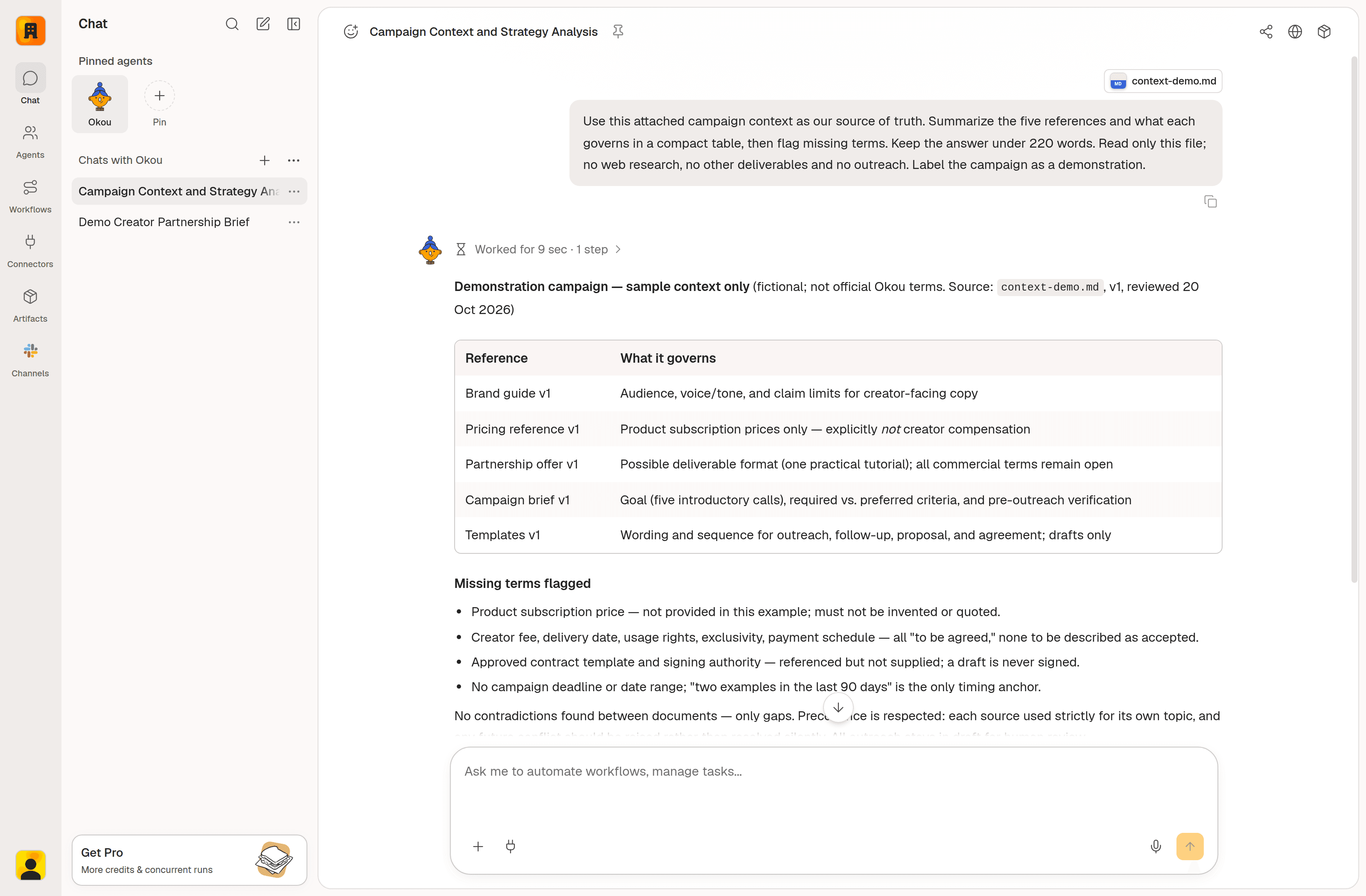
Okou staging: the uploaded context file identifies the source for each topic. These campaign documents are demonstration material.
Keep the hub link in your saved workflow instructions. Record the offer version shared with each person so later changes don't overwrite earlier commitments.
Step 3: Find people and verify why they fit
Start with a small group you can review carefully. Ask for evidence with every result.
Find up to 15 creators publishing English-language tutorials about practical AI workflows for marketers. Require two relevant examples from the last 90 days. Include each person's profile, content links and dates, reason for fit, and unresolved questions. Return fewer people if the evidence is insufficient.
Check the original work and publication dates. A relevant tutorial establishes topic fit; audience composition, original language, and availability may need separate checks.
Refine the search with specific feedback:
Prioritize independent creators who demonstrate complete workflows with their own examples. Lower the priority of AI news accounts. Explain the changes and find additional candidates if needed.
In the demo, the first search returned eight profiles, mostly course instructors. I then requested six independent creators with their own channels and original tutorials. That search returned three. Two discovery links were older guest appearances, so I traced those people to their own sites and current channels.
| Person | Evidence checked and remaining questions |
|---|---|
| Mark Kashef | His official website links to his channel. I checked an AI workspace organization guide from 17 October 2026 and a decision-tool comparison from 7 October. Marketing audience share, original language, and availability remain open. |
| Mike Russell | Creator Magic links to his AI channel. I checked a sponsor-research walkthrough from 16 October 2026 and a public-web research demonstration from 30 September. Audience composition and commercial fit need confirmation. |
| Vivek Mishra | I checked an AI and automation course from 19 October 2026 and an AI workflow masterclass from 16 October. English delivery and marketing-audience fit need confirmation. |
I reviewed six recent items per channel and selected transcripts. Translated captions didn't establish the original spoken language. The campaign terms and email examples are illustrative; nobody was contacted.
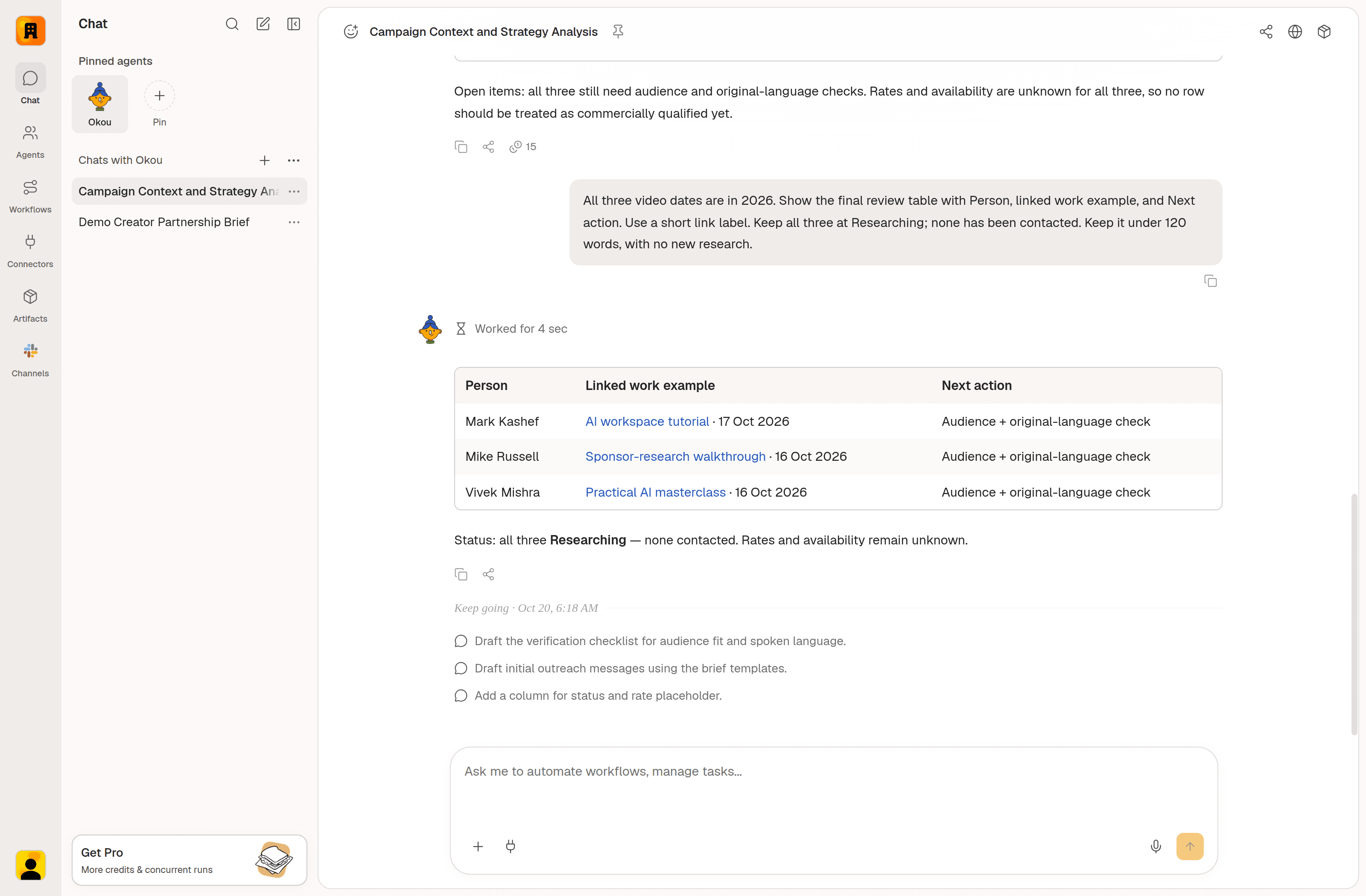
Okou staging: three sourced profiles and their open checks, all marked Researching.
Review the evidence before deciding who belongs on the shortlist.
Step 4: Design one Google Sheets tracker
Create one spreadsheet with a single tab, Creator tracker, and one row per person. Each row should explain why the person fits and what happens next.
Copy these headers into row 1:
| Column | Header | What to put here |
|---|---|---|
| A | Name | The person's professional name. |
| B | Profile | Their official website, professional profile, or owned channel URL. |
| C | Fit and evidence | Why they fit, a relevant work link, and open questions. |
| D | Contact route | A verified business email or public contact page; otherwise leave blank. |
| E | Status | Researching, Shortlisted, Draft ready, Contacted, Replied, Meeting booked, Paused, or Closed. |
| F | Last contact | The date of the latest confirmed sent message. |
| G | Next follow-up | The next review date; leave blank before the first send. |
| H | Next action | A task such as “Check media kit” or “Review initial draft.” |
| I | Owner | The teammate responsible for the conversation. |
| J | Context and conversation | Links to the context index, offer version, conversation, and any proposal or contract. |
Create a Google Sheet named “Creator partnership tracker” with one tab, “Creator tracker,” using the ten columns above. Add the three researched creators at Researching. Leave unverified contact routes and contact dates blank. Freeze the header, enable filters, wrap long text, and add a Status dropdown.
If you build it manually, paste the headers into row 1 and apply those same settings. Format the two date columns as yyyy-mm-dd. Add a Campaign column only when you need to manage several campaigns together.
For these three records, the next action is to confirm audience fit and original language. Draft ready means a draft exists; Contacted requires a confirmed send; Meeting booked requires confirmation.
Check profile URLs before adding duplicates, and update the existing row as the conversation develops.
Step 5: Use the same Sheet as your dashboard
Use filtered views of the tracker to see what needs attention:
| View | How to use it |
|---|---|
| Research to finish | Filter to Researching and read Next action. |
| Drafts to review | Filter to Draft ready and open the linked conversations. |
| Follow-ups due | Check active contacted records with a follow-up date of today or earlier; exclude blank dates. |
| Replies to handle | Filter to Replied and work through the next actions. |
| Meetings and outcomes | Filter by the confirmed outcome you want to review. |
Save filter views for teammates, or filter by owner for a personal queue.
Review this tracker. Group unfinished research, drafts to review, and follow-ups due by owner. Link to each row and use confirmed activity only.
The demo has three researched profiles and zero confirmed contacts, so contact dates stay blank. Update the Sheet before asking for a new summary.
If you add reply rate, use substantive replies divided by people actually contacted in the same campaign cohort and reporting period. Exclude drafts and automatic replies. With no contacts, reply rate is not applicable.
Step 6: Draft outreach using the person and the approved context
Combine a specific piece of the creator's work with your approved offer, then make one clear request.
Draft an initial email for each shortlisted creator. Reference one verified work example and connect it to our campaign. Use our approved offer and brand voice. Ask whether they'd like to review the brief, flag missing terms, and create Gmail drafts for my review.
A first message might look like this:
Hi [Name],
Your tutorial on [verified topic] caught my attention, especially [specific detail]. We're planning [approved collaboration format] for marketers working on [relevant task], and your approach looks relevant.
Would you be open to reviewing the brief? I'd also like to hear about your usual format and availability.
For Mike Russell, the example references his sponsor-research walkthrough as a reason to discuss a campaign involving research and a tracker. Fit and availability still need his confirmation.
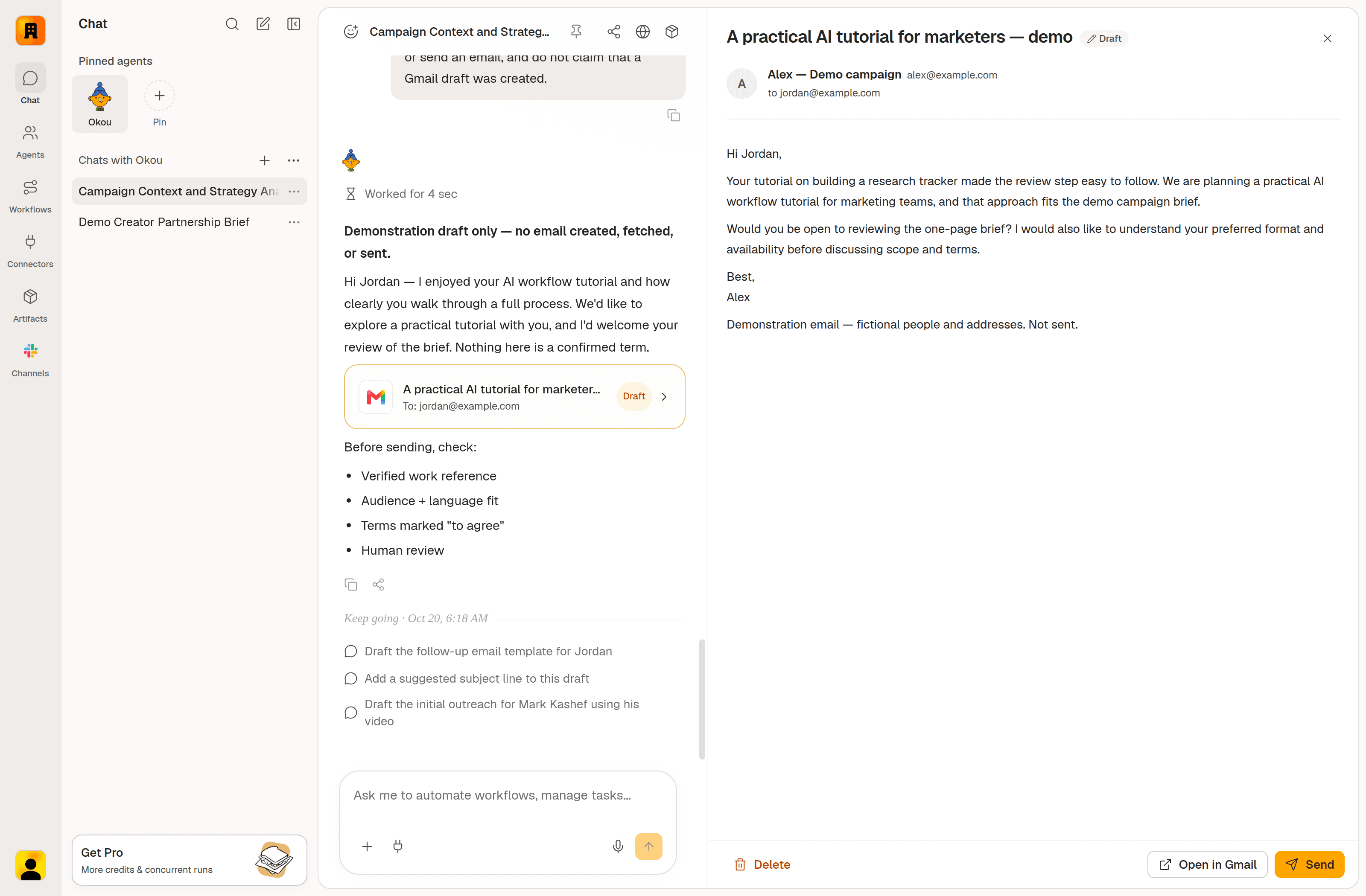
Okou staging: the conversation, draft card, and email panel. The panel uses fictional data for Jordan at example.com; no Gmail draft was created or sent in this UI demo.
Open the draft in Okou's email panel to check the recipient, subject, body, and attachments. Ask for changes in the conversation, keeping the same pending draft, then use Send when it's ready. Update the tracker and follow-up date only after the send is confirmed.
Use verified public business contact details or information you have permission to use. People search itself doesn't enrich email addresses or phone numbers.
Step 7: Follow up according to the conversation
For this example, follow up after four business days without a reply, then once more seven business days later. Stop after two follow-ups, and respect any timing the recipient requests.
Check the latest conversation before drafting:
| Situation | Next action |
|---|---|
| No reply and follow-up is due | Prepare a short follow-up with a useful detail or clearer request. |
| Interested | Share the brief or arrange a call. |
| Questions about rates, scope, or rights | Answer from approved sources and flag open terms. |
| Declines or opts out | Close the record and stop follow-ups. |
| Requests contact later | Record the date and pause until then. |
You don't need to know every detail yourself. When someone asks about a feature, pricing, or how the product fits their workflow, let Okou look it up and prepare the reply.
They asked: [question]. Find the answer in our product docs, approved campaign files, and conversation history. Research further if needed, then draft a reply with sources for my review. Ask me about anything you can't verify or that needs my decision.
For the rest of your follow-up queue:
Check the latest conversations for follow-ups due in this Sheet. Draft a short follow-up if there's no reply; otherwise summarize the reply and suggest the next action. Stop unanswered follow-ups after a reply, decline, or two confirmed follow-ups. Reuse pending drafts and update the Sheet from verified activity.
The follow-up can be brief:
Hi [Name], following up on the tutorial idea below. The proposed focus is [approved topic]. Would you like the one-page brief to see whether it fits your upcoming content?
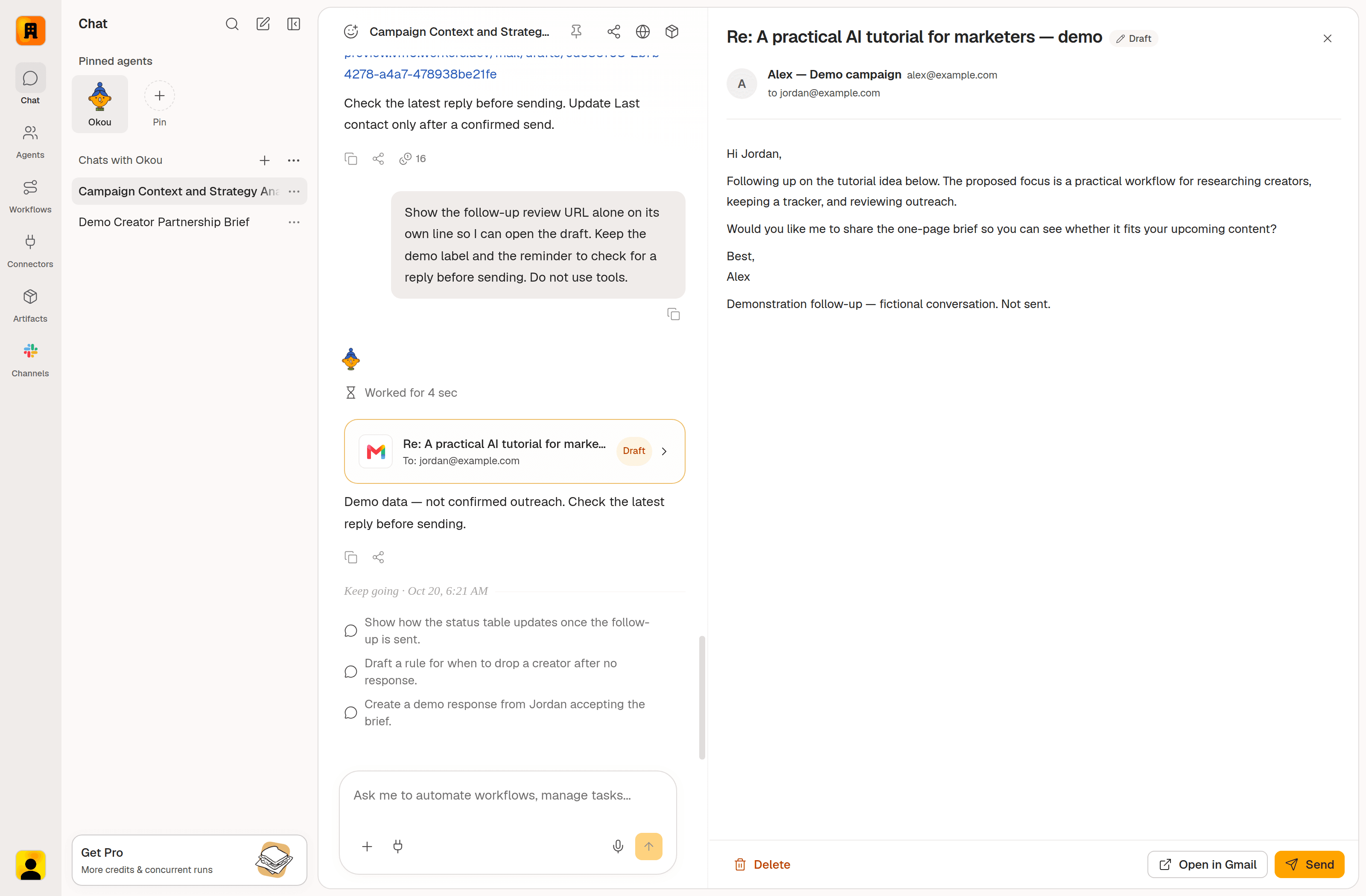
Okou staging: a fictional follow-up draft in the same email panel. This is a UI example, not a real send or reply.
Review and send through the email panel. After confirmation, update Last contact and Next follow-up. If someone declines, close the record and clear the follow-up date.
Once this review works, ask Okou to configure a weekday schedule with your time and timezone. Scheduled checks can summarize replies, prepare drafts, and update verified activity; you review and send. They begin after the schedule is configured.
Step 8: Prepare the brief, proposal, or contract from confirmed details
When someone is interested, turn the conversation into a specific proposal using your approved templates. Gather the agreed deliverables, channels, dates, compensation, payment terms, usage rights, and any exclusivity requirements.
Prepare a partnership proposal and contract draft from our approved templates and the confirmed conversation details. Preserve the template wording, fill agreed fields, and flag missing terms or requested changes. Link both drafts to the tracker and note the template versions.
In the practice example, a fictional creator is interested in one tutorial, but the fee, publication date, and usage rights are unresolved. Okou marks them To confirm. Add the draft link to column J and set the next action to “Confirm scope and commercial terms.”
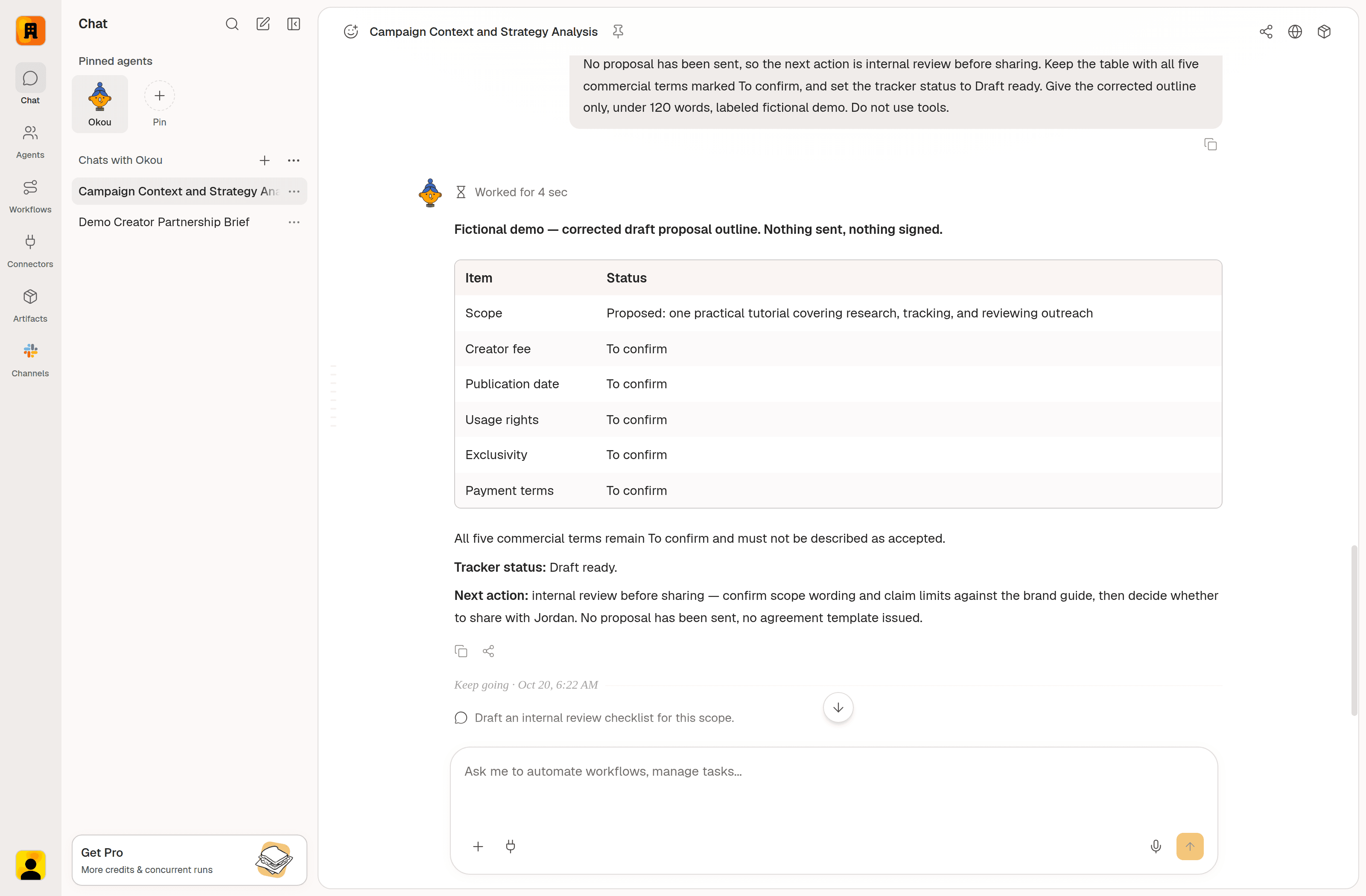
Okou staging: a proposal for a fictional creator, with open terms marked To confirm. The agreement is unsigned.
Review before sharing. Keep requested changes separate from approved terms until accepted, compare any revised offer with earlier commitments, and attach final documents and confirmed outcomes to the record.
Step 9: Use the outcomes to improve the next search
Review the campaign against its original goal: relevant introductory calls. Track proposal and agreement progress separately, and look for where conversations advanced or stalled.
Review the tracker and confirmed activity. Report unique people contacted, substantive replies, meetings booked, and outcomes. Compare creator topics and formats where evidence supports it. Separate documented reasons from possible explanations, and suggest changes to the next search brief.
Give groups comparable time to reply before comparing results. Distinguish silence from rejection, and use small samples to guide the next experiment. Have the owner approve changes to the brief or templates before updating the shared context.
Start with one brief and ten people. Check the evidence, put each person's next action in the Sheet, and prepare a small batch of messages. Add recurring review once the records are reliable.
Use [context hub] to find people for [goal]. Summarize the approved criteria and missing information, find up to ten relevant people with sources, save them to [tracker], and prepare outreach drafts for my review.
Frequently asked questions
How can I use AI to find the right people?
Give Okou a goal, a target profile, and clear selection criteria. Ask for a small shortlist with source links and recent work, then refine it after checking the evidence.
Does Okou's people search find email addresses?
People search returns professional profiles and supporting sources; it does not find email addresses or phone numbers. Use a verified public business contact page or contact details you already have permission to use.
How do I track outreach in Google Sheets?
Use one row per person with their profile, fit, status, latest confirmed contact, next follow-up, and next action. Link the conversation and campaign context so each row stays useful as the relationship develops.
Does Okou send outreach and follow-ups automatically?
In this workflow, Okou prepares drafts for you to review and send. Scheduled checks can summarize replies and prepare follow-ups; mark someone Contacted only after a confirmed send.
What if someone asks a question I can't answer?
Ask Okou to check your product docs, approved campaign files, and conversation history, then prepare a reply with sources. It should flag anything it cannot verify or that needs your decision.
Can I schedule this workflow?
Yes. Ask Okou to set up recurring research or follow-up reviews with a frequency, time, and timezone. Runs begin once the schedule is configured; this workflow keeps email sending with you.


